


TL;DR:Here are five AI image tools that help churches create high-quality, customizable graphics faster and more affordably.
|
As pastors and church leaders, we know the power of visuals in communicating our message.
Whether it’s sermon slides, video announcements, or social media posts, images can help bring clarity and impact to our communication.
However, finding quality images can be time-consuming and costly.
This is where AI-generated images come in.
Here are 3 reasons we love AI-generated images.
- They Are Cost-Effective
One of the most significant advantages of AI-generated images is their affordability. Traditional stock images can be expensive and can quickly eat up your budget. AI-generated images, on the other hand, are often free or come at a very low cost. This makes it easy for smaller churches with limited budgets to access high-quality images. - They Are Customizable
Another advantage of AI-generated images is their customizability. With AI, you can control the color, style, and subject matter of your images. This can be particularly useful when creating sermon series graphics or social media posts. You can adapt the AI-generated images to perfectly match the mood and tone of your message. - They Save Time
As pastors and church leaders, we are often pressed for time. Having access to quality images quickly can save us a lot of time. With AI-generated images, you can search for and access images in a matter of seconds. This means you can spend more time focusing on other aspects of your ministry.
As you can tell, I think AI image generators are a real game-changer for church creatives. One of the most common questions I get is, which AI tools should you try? Well there are plenty of AI tools listed in my AI Toolkit Report which has a curated list of 50+ different AI tools sorted by use cases that church staff encounter on a daily basis. You can download it here.
In the meantime, here are 5 tools I really enjoy working with to create AI-generated images:
- MidJourney
MidJourney is an AI image generator that stands out for its advanced capabilities in producing high-quality, artistic images. It’s particularly renowned for its effectiveness in creating detailed and stylistically varied visuals based on textual prompts. MidJourney is adept at interpreting complex prompts and turning them into visually stunning artworks. - DALL·E 3
DALL·E 3 is known for its ease of use and ability to generate high-quality images. It’s a popular choice for those seeking an intuitive AI image generator. DALL·E 3, developed by OpenAI, is especially adept at creating images from textual prompts, allowing for creative and unique outputs.
- Craiyon
Formerly known as DALL-E Mini, Craiyon is a free online tool capable of creating art, images, and drawings based on text descriptions. It offers users the ability to generate multiple variations from a text prompt and select their preferred option.
- Canva
Canva’s new AI image generator, powered by Stable Diffusion, allows you to find image variants based on your preferred look. In a free subscription plan, you can generate up to 50 images. Canva Pro users can generate up to 500 images per month.
- Jasper Art
Jasper Art is an AI text-to-image generator known for its built-in presets and ease of use. It allows users to generate images without the need to come up with detailed prompts or styles, making it convenient for those looking for quick and captivating visuals.
AI Image Generators Are Not Perfect At All
One caveat about AI image generation — it can be hard to get the prompt just right and then work within the system to get the text right. I generated a few images last year that wished viewers a “Merrry & Chrristmmas,” for instance.
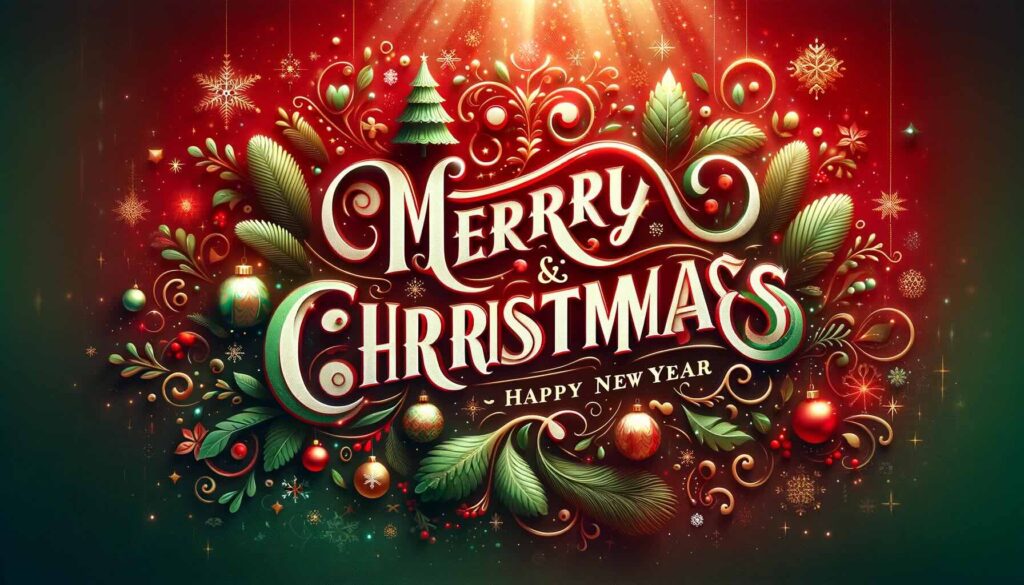
There’s a skill to getting the text just right on AI-generated images.
If you’re interested in how to fix jumbled and garbled text on AI images, we’re hosting a live workshop to teach you all about it: How To Get The Best Text Results With AI Image Generators.
In the AI for Church Leaders Monthly Workshop, you will walk through a step-by-step process for making incredible fixes to AI images. You’ll learn how to use Photoshop with AI to get the text looking crispy… So cool!
By the end, you’ll leave with an awesome image you can use right away to promote sermons, events – you name it!
Want to join the workshop? Check out the details for the AI monthly workshops.

