


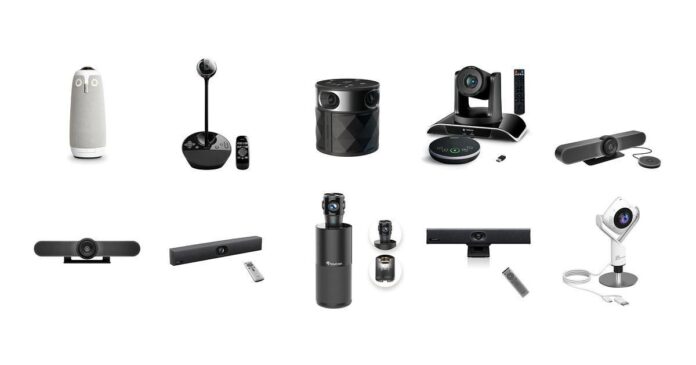
You know how important clear communication is in church offices, especially when coordinating meetings or streaming services. Choosing the right conference room video camera can make a substantial difference in keeping everyone connected and engaged, whether your team is gathered physically or joining remotely.
Investing in a camera designed for your specific needs ensures you get crisp video, reliable audio, and intuitive functionality that simplifies your meetings and enhances collaboration.
Top Picks
|
Category |
Product |
Price |
Score |
|---|---|---|---|
|
🏆 Best 360° Coverage |
$1,099.00 |
92/100 |
|
|
💰 Best Budget Desktop |
$159.00 |
85/100 |
|
|
🚀 Best Plug-and-Play Ease |
$199.99 |
88/100 |
|
|
🔰 Best Optical Zoom |
$299.99 |
87/100 |
|
|
🎯 Best Small Room System |
$737.16 |
90/100 |
|
|
⭐ Best All-in-One 4K |
$499.00 |
91/100 |
|
|
💼 Best AI Tracking |
$339.99 |
84/100 |
|
|
🎨 Best Wide Angle 4K |
$339.99 |
83/100 |
|
|
💼 Best Budget 360° Webcam |
$79.99 |
80/100 |
|
|
🎯 Best Hybrid Meeting Setup |
$299.95 |
86/100 |
Selection Criteria
You want video cameras that blend ease of use, clear high-definition video, and audio quality, making hybrid meetings seamless. We focused on devices with specific strengths such as wide-angle views, 360-degree coverage, optical zoom, and AI tracking to suit various room sizes and setups.
Ease of installation and compatibility with popular platforms like Microsoft Teams, Zoom, and Google Meet are critical to ensure your conference room video camera integrates effortlessly with your existing systems.
Owl Labs Owl

If you’re looking for a conference room video camera that covers every angle when your team gathers around the table, the Meeting Owl 3 is worth considering. Its 360-degree capture means no one gets left out of the frame, and the AI-driven speaker tracking keeps the camera focused on whoever’s speaking.
It’s ideal for church offices where hybrid meetings are a regular thing, helping everyone feel included whether they’re in the room or calling in remotely. Setup is straightforward, so you can get it up and running quickly without fuss.
It’s a solid choice when you want to create more engaging and connected meetings.
What People Say
People appreciate how this camera enhances hybrid meetings by keeping the speaker front and center while capturing the whole room clearly. Many enjoy the simple plug-and-play setup and the fact that it works well with popular apps like Zoom and Microsoft Teams.
The audio quality and mic pickup range also get frequent praise, making remote conversations feel more natural and inclusive.
Platform Compatibility
|
Platform |
Compatibility Level |
|---|---|
|
Microsoft Teams |
Certified |
|
Zoom |
Supported |
|
Google Meet |
Supported |
|
Slack |
Supported |
Why It Works
This camera fits perfectly in a church office or conference room setting where meetings often mix in-person and remote attendees. The 360-degree design means you don’t have to worry about repositioning it during discussions, and the automatic speaker focus keeps conversations easy to follow. You’ll also find it lightweight and compact enough to move between rooms if needed.
What You’ll Love
- 360-degree room capture so everyone is visible
- AI-driven speaker tracking highlights active speakers automatically
- Compatible with most video conferencing platforms for smooth integration
- Plug-and-play setup makes it simple to get started right away
Current Price: $1,099.00
Rating: 4.4 (total: 651+)
Logitech BCC950

If you need a reliable conference room video camera that’s perfect for small groups or individual use, the Logitech BCC950 is a solid pick. It offers crisp 1080p video and crystal-clear audio with its built-in speakerphone and advanced noise reduction.
Whether you’re leading a church committee meeting or catching up on one-on-one calls, this camera handles it all with ease. The ability to pan, tilt, and zoom via a wireless remote adds extra flexibility during your sessions.
It’s compact, easy to set up, and works across major platforms so you can focus on what matters without fuss.
What People Say
Most people mention how much better this is compared to built-in laptop cameras, especially appreciating the improved audio and wider coverage for small rooms. Customers like how easy it is to set up and use, with many highlighting the remote control feature for adjusting the camera angle during meetings. The audio quality and noise reduction get frequent positive notes, making for clearer conversations.
Platform Compatibility
|
Platform |
Compatibility Level |
|---|---|
|
Skype |
Supported |
|
WebEx |
Supported |
|
Zoom |
Supported |
|
PC/Mac |
Fully Compatible |
Practicality
This camera works great for small conference rooms or personal offices where you want high-quality video without a complicated setup. Its compact size and easy USB connection mean you can move it easily between rooms or desks. The pan, tilt, and zoom features help you frame your meetings perfectly, even if you’re not right in front of the camera.
Why You’ll Like It
- Crisp Full HD 1080p video quality for clear visuals
- Noise-reducing microphone and speakerphone for better sound
- Wireless remote control lets you pan, tilt, and zoom comfortably
- Compatible with popular platforms like Zoom and Skype
Current Price: $159.00
Rating: 4.3 (total: 1,443+)
PANOCORE360
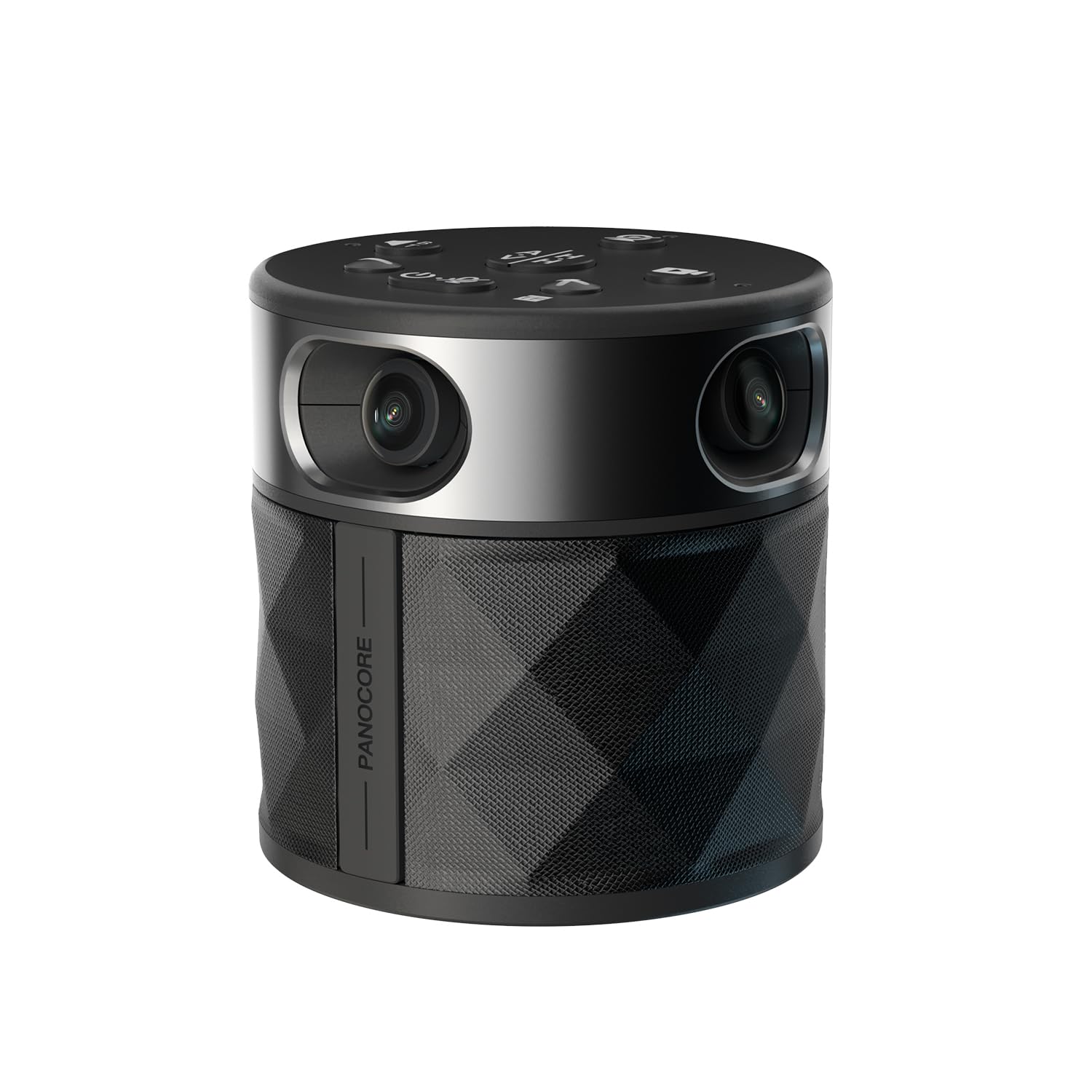
If you’re after a straightforward conference room video camera that covers every corner, the PANOCORE360 is an easy-to-use option. It’s compact but packs great features like 360-degree capture and AI voice isolation to cut through background noise. The plug-and-play setup means you won’t be fiddling with complicated installs, so you can get back to focusing on your meetings.
Whether you’re running small group sessions or larger gatherings, this camera helps bring remote and in-person attendees closer together with clear visuals and sound.
What People Say
Customers often highlight how easy it is to set up and use this camera, appreciating the clear video quality despite its compact size. The AI voice isolation feature receives positive mentions for improving audio clarity, especially in busy or noisy environments. A few users point out that it’s a budget-friendly option that still delivers solid performance for hybrid meetings.
Platform Compatibility
|
Platform |
Compatibility Level |
|---|---|
|
Zoom |
Supported |
|
Microsoft Teams |
Supported |
|
Webex |
Supported |
|
Google Meet |
Supported |
Practical Use
The PANOCORE360 is a great fit if you need flexibility without complicated gear. It’s lightweight and compact, making it easy to move between rooms or take on the go.
This conference room video camera works well for daily team check-ins or special hybrid events where you want everyone clearly seen and heard.
Why Choose It
- 360-degree camera design to capture everyone in the room
- AI-powered voice isolation for clearer audio
- Simple USB-C plug-and-play connection
- Local recording capability to save important meetings
Current Price: $199.99
Rating: 4.6 (total: 23+)
TONGVEO Camera
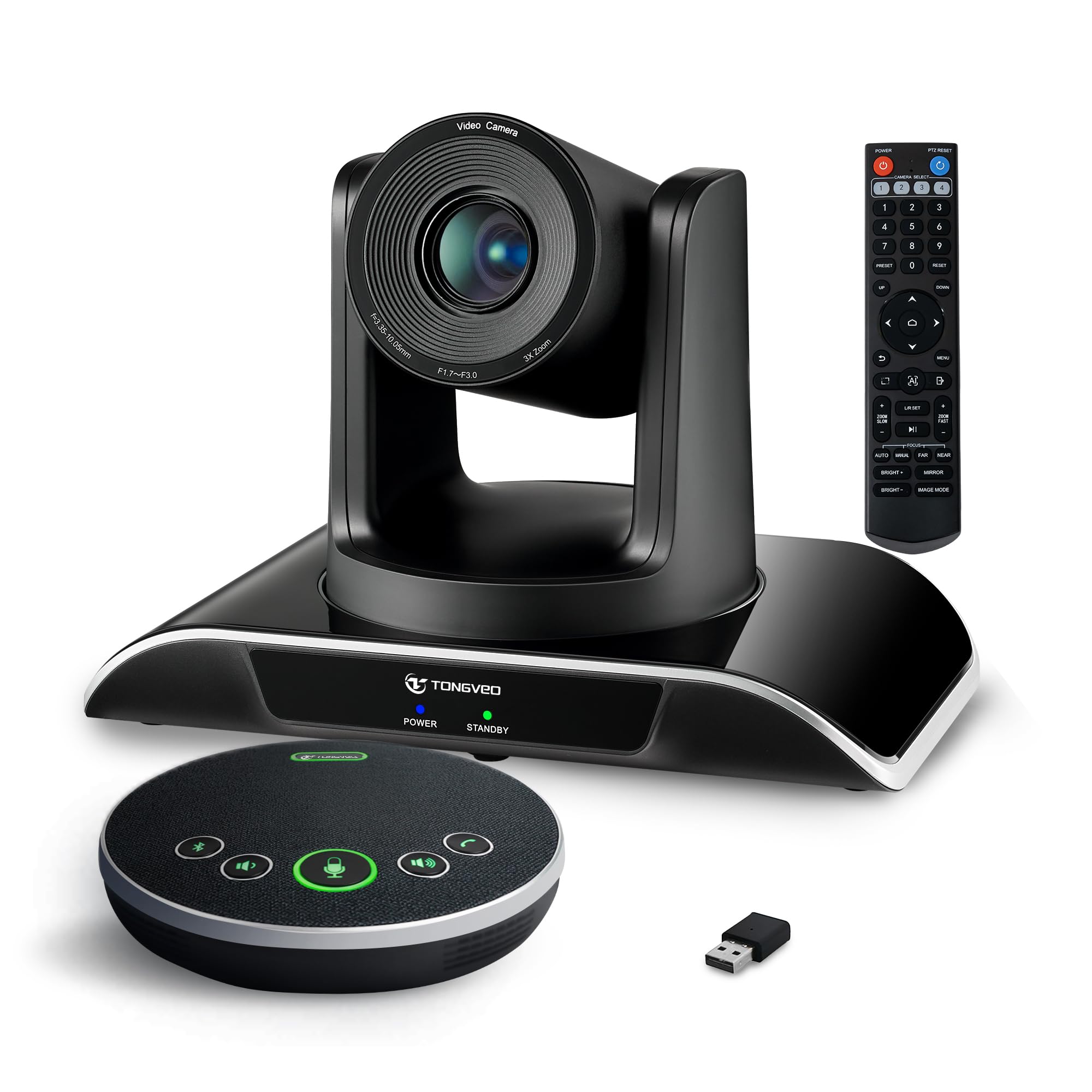
The TONGVEO camera combines solid video quality with an all-in-one speakerphone, making it a versatile conference room video camera for small to medium spaces. Its 1080p resolution at 60fps offers smooth, clear visuals, and the 3x optical zoom helps you get focused shots without losing detail. The pan and tilt range ensures everyone stays in frame, while the Bluetooth speakerphone makes audio crisp and easy to hear.
If you want a system that handles both video and sound without breaking the bank, this is a dependable choice for your church office meetings.
What People Say
Users often praise the clear video and ease of framing meetings using the remote zoom and pan features. The bundled speakerphone gets applause for boosting audio quality, especially in small to medium rooms.
Some mention setup requires a bit of tech know-how, but once configured, the system performs smoothly and consistently.
Platform Compatibility
|
Platform |
Compatibility Level |
|---|---|
|
Zoom |
Supported |
|
Microsoft Teams |
Supported |
|
Windows 10 |
Compatible |
|
USB Devices |
Compatible |
Practical Use
This camera is a great fit if you want an integrated solution for video and audio in your conference room without juggling multiple devices. It’s especially useful when you need smooth zooming and movement to keep up with discussions.
Its battery-powered speakerphone adds portability and convenience, so you can use it for both fixed setups and mobile meetings.
What Stands Out
- Smooth 1080p HD video at 60 frames per second
- Reliable 3X optical zoom with wide pan and tilt range
- Bluetooth speakerphone included for clear audio
- All-in-one design reduces extra gear and cables
Current Price: $299.99
Rating: 4.4 (total: 304+)
Logitech MeetUp + Mic

If your church office has a small to medium conference room, this conference room video camera is designed to capture the whole table and everyone around it. With a super-wide 120-degree field of view and motorized pan and tilt, you’ll get clean framing no matter where people sit.
The 4K Ultra HD video quality delivers sharp and professional visuals, while the built-in beamforming microphones ensure the audio is clear and natural. The included expansion mic is a thoughtful bonus, extending your audio pickup without cluttering the space.
It’s a solid pick for enhancing your video meetings during both routine check-ins and special gatherings.
What People Say
Customers frequently praise how easy this camera is to set up and use, with many commenting on the excellent video quality and wide angle that captures all participants clearly. The expansion mic gets lots of positive feedback for improving sound coverage, making it easier to hear everyone in the room.
Some users notice the mic picks up conversations beyond the room, so you might want to position it thoughtfully. Overall, it’s seen as a reliable and high-quality system for smaller conference spaces.
Compatibility
|
Platform |
Compatibility Level |
|---|---|
|
Zoom |
Supported |
|
Microsoft Teams |
Supported |
|
Google Meet |
Supported |
|
MacOS/Windows |
Compatible |
Why It Works
This setup shines in a small meeting room where you want to see and hear everyone without dealing with a bunch of extra devices. The compact design helps reduce clutter, and with USB plug-and-play, you avoid a lot of technical headaches.
Whether it’s a daily team meeting or a special church office discussion, this camera system helps everything flow smoother.
Standout Features
- Super-wide 120° field of view captures everyone at the table
- Ultra HD 4K video quality for crisp, clear footage
- Motorized pan/tilt helps keep the focus on speakers
- Expansion mic boosts audio pickup for larger rooms
Current Price: $737.16
Rating: 4.4 (total: 114+)
Logitech MeetUp

This conference room video camera is perfect if your meetings usually happen in smaller spaces where you need to see everyone clearly without complicated setup. The wide 120-degree lens captures the entire room, while the motorized pan and tilt take care of adjusting the view smoothly. The 4K video quality means visuals are sharp and professional, and the built-in beamforming mics plus custom speaker deliver excellent sound. It’s an ideal fit for daily check-ins or special meetings where you want everyone around the table to feel connected.
What People Say
Customers often mention how simple it is to set up this camera and how it quickly improves video meetings with its wide angle and high-quality footage. The sound system also gets praise for picking up voices clearly across the room. Some say the camera’s movement can seem a bit noticeable, but remote viewers especially appreciate the focused shots of whoever is speaking.
Compatibility
|
Platform |
Compatibility Level |
|---|---|
|
Zoom |
Supported |
|
Microsoft Teams |
Supported |
|
Google Meet |
Supported |
|
MacOS/Windows |
Compatible |
Practical Use
The MeetUp is a great option if your church office has a dedicated small or medium conference room. Its compact design reduces clutter, and with USB plug-and-play, you can get it running without hassle. Whether for quick weekly meetings or important group discussions, it offers a seamless way to make sure everyone can see and hear clearly.
Why It Works
- Super-wide 120° field of view to include the whole room
- Motorized pan/tilt for smooth and precise framing
- Ultra HD 4K video quality for sharp images
- Integrated beamforming microphones with clear audio
Current Price: $299.95
Rating: 4.3 (total: 368+)
Yealink UVC40 E2
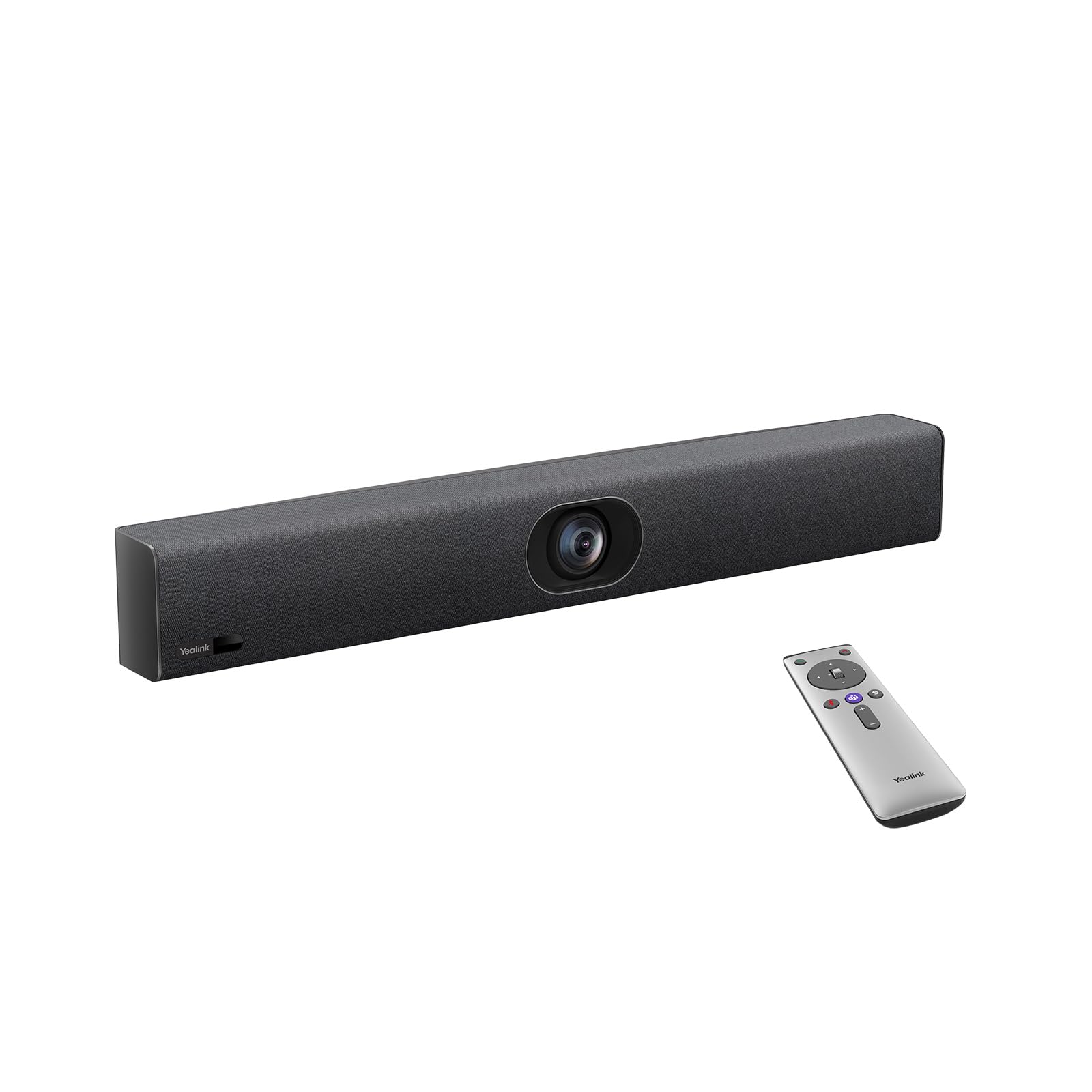
If you want a conference room video camera that brings high-end features into your church office, the Yealink UVC40 E2 fits the bill. It offers stunning 4K video quality and a super-wide 120-degree angle, so everyone in the room is captured clearly.
The built-in microphone array and speaker tracking help keep audio sharp and focused on whoever’s speaking, while smart exposure adjusts to different lighting for crisp images. This camera works well for daily meetings or larger boardroom sessions where picture and sound quality really matter.
What People Say
Reviewers emphasize how the UVC40 E2 feels like a big step up in both video clarity and sound quality, even if it’s a bit of an investment. People appreciate the smooth auto framing and how the microphone arrays pick up voices clearly from different spots around the room.
While setup can be a bit challenging initially, the camera performs seamlessly once running.
Compatibility
|
Platform |
Compatibility Level |
|---|---|
|
Zoom |
Supported |
|
Microsoft Teams |
Supported |
|
Webex |
Supported |
|
HDMI Devices |
Compatible |
Why It Fits
This camera is ideal if you want to combine premium image and sound quality with advanced features like auto framing in your church office meetings. It’s best suited for fixed setups where it can stay connected via HDMI, and the wide field of view ensures nobody gets left out during important discussions.
Top Benefits
- Crystal-clear 4K video with wide 120° lens
- 8 microphone arrays with smart speaker tracking
- Automatic framing and exposure for perfect visuals
- Compatible with a wide range of devices via HDMI
Current Price: $499.00
Rating: 4.7 (total: 3+)
TOUCAN SC360

If you want a conference room video camera that sits right in the center of the table and captures everyone without needing to move it, the TOUCAN SC360 is a smart pick. It offers a 360-degree wide angle so no one gets left out of the frame, and the AI tracking helps keep the camera focused as conversations flow naturally.
The 4 noise reduction mics and built-in Bluetooth speaker make audio clear, which is great for keeping your church meetings engaging whether people are in the room or remote. Setup is simple plug-and-play, so you can switch rooms or devices easily without hassle.
What People Say
Most users appreciate how well this camera handles group meetings with its full-room coverage and decent video clarity for the price. People often mention the easy setup and the convenience of a 360-degree camera in dynamic meeting environments.
While some note the speaker volume isn’t very loud, the overall audio and tracking features get positive feedback.
Platform Compatibility
|
Platform |
Compatibility Level |
|---|---|
|
Zoom |
Supported |
|
Microsoft Teams |
Supported |
|
Google Voice |
Supported |
|
PC/Mac/Tablet |
Compatible |
Practical Use
This video conference camera works well whether you’re running small daily check-ins or larger, more informal church gatherings. Its compact design and wireless features make it easy to carry and plug in wherever you need it. You can trust it to pick up everyone around the table without extra fiddling.
Key Features
- 360° wide-angle lens to capture the whole room
- AI tracking keeps the focus on active speakers
- Four noise reduction microphones for clear audio pickup
- Bluetooth speaker included for better sound quality
Current Price: $339.99
Rating: 4.2 (total: 123+)
Yealink UVC34

If you’re looking for a conference room video camera that combines excellent 4K clarity with a wide field of view, the Yealink UVC34 is a smart choice. It’s designed to capture everyone in the room with its 120-degree lens and features autofocus and digital zoom to keep things sharp and well-framed.
The integrated microphone and speaker deliver clear sound for effective communication. Whether it’s a daily team meeting or a special church event, this camera helps your video calls feel professional and natural without any complicated setup.
What People Say
People appreciate how the Yealink UVC34 offers high-quality video at a reasonable price, especially praising its sharp 4K visuals and wide-angle coverage. The auto framing feature gets positive notes for making meetings feel more dynamic and engaging.
Most find it easy to set up and use, although a few mention the need for a connected PC during meetings.
Compatibility
|
Platform |
Compatibility Level |
|---|---|
|
Microsoft Teams |
Supported |
|
Zoom |
Supported |
|
PC |
Compatible |
Practical Use
This camera fits perfectly in small to medium conference rooms where you want sharp visuals and smart framing without added hassle. It’s a great pick if your meetings mostly happen on PC-based platforms and you want to elevate your video quality with minimal setup.
Highlights
- Crisp 4K video resolution for sharp visuals
- Wide 120° viewing angle to capture the whole room
- Auto framing adjusts the shot to keep speakers in focus
- Built-in microphone and speaker for clear audio
Current Price: $339.99
Rating: 4.2 (total: 62+)
j5create JVCU360

If you’re searching for a budget-friendly conference room video camera that offers full 360-degree coverage, the j5create JVCU360 could be a great fit. It provides decent video quality with its 1080p resolution and a versatile set of viewing modes to keep your meetings engaging from every angle.
The fixed focus and ease of connection via USB-C make it a simple plug-and-play option that’s easy to move between rooms or devices. Whether you’re hosting daily team calls or virtual classes, this camera delivers solid performance without the higher price tag.
What People Say
Reviewers often highlight the value this camera offers at its price point, praising the 360-degree view for including everyone in meetings. The ease of setup and flexibility to use across devices stands out, though some find the video quality not quite as crisp as higher-end options.
The capability to adjust viewing modes is appreciated for adapting to different meeting styles.
Compatibility
|
Platform |
Compatibility Level |
|---|---|
|
Zoom |
Supported |
|
Microsoft Teams |
Supported |
|
Google Meet |
Supported |
|
USB-C Devices |
Compatible |
Practical Use
This camera suits church offices that need a portable, flexible conference room video camera for a variety of spaces and meeting styles. It’s especially handy if you want to capture everyone without moving the camera, and the USB-C connection works well with most modern computers and laptops.
What You’ll Like
- 360-degree coverage to capture everyone around the table
- 1080p HD video with multiple viewing modes
- High fidelity microphone for clear audio
- Simple plug-and-play USB-C setup
Current Price: $79.99
Rating: 4.3 (total: 664+)
FAQ
What should I look for when choosing a conference room video camera for my church office?
When picking a conference room video camera, focus on features that match your meeting style and space. A wide field of view or 360-degree capture ensures everyone around the table is visible, which is great for group discussions.
Look for good audio quality with noise reduction so remote participants can hear clearly. Easy setup and compatibility with your video conferencing platforms like Zoom or Microsoft Teams will save you time and prevent headaches.
How important is AI tracking and zoom for hybrid meetings in a church office?
AI tracking and zoom can make a big difference if your meetings involve multiple people speaking at different times. These features automatically focus on who’s talking, which helps remote attendees follow the conversation without distractions.
It also means you don’t have to manually adjust the camera during the meeting, letting you focus on your message instead. For hybrid church meetings, this keeps everyone engaged and feeling included even from afar.
Can I use a conference room video camera without special technical skills or IT support?
Yes, many modern conference room video cameras are designed to be plug-and-play, so you won’t need advanced technical skills to get started. Just connect via USB or Wi-Fi and you’re usually ready to join your video call.
If you choose a model with easy setup and intuitive controls, you can move it between rooms or devices without hassle. It’s helpful to familiarize yourself with your preferred conferencing software, but overall these cameras aim to be user-friendly for everyday use.
Wrapping Up
Choosing the right conference room video camera can elevate your church office meetings by ensuring everyone is seen and heard clearly. Whether you prioritize comprehensive 360-degree coverage, budget-friendly solutions, optical zoom capabilities, or AI-driven speaker tracking, the options here can meet your specific needs. These cameras help you foster better communication, reduce fatigue during remote collaborations, and make it easier to connect your entire community regardless of location.
| Product Name | Image | Rating | Video Resolution | Field of View | Audio Highlights | Price |
|---|---|---|---|---|---|---|
| Owl Labs Meeting Owl 3 |
|
4.4/5 (651 reviews) | 1080p | 360 degrees | 18-foot mic pickup, automatic speaker tracking | $1,099.00 |
| Logitech BCC950 |
|
4.3/5 (1,443 reviews) | 1080p, 720p | Not specified | Hi-definition webcam with noise-reducing mic | $159.00 |
| PANOCORE360 All-in-One Meeting Camera |
|
4.6/5 (23 reviews) | 1080p | 360 degrees | AI voice isolation, built-in mic array | $199.99 |
| TONGVEO Conference Room Video Camera |
|
4.4/5 (304 reviews) | 1080p | 80 degrees | Bluetooth conference speakerphone | $299.99 |
| Logitech MeetUp with Expansion Mic |
|
4.4/5 (114 reviews) | 4K, 1080p | 120 degrees | 3 beamforming mics, custom-tuned speaker | $737.16 |
| Yealink UVC40 E2 |
|
4.7/5 (3 reviews) | 4K | 120 degrees | 8 microphone arrays, auto framing | $499.00 |
Some links here help support our work if you make a purchase at no extra cost to you. Everything listed is something we’ve researched and would consider buying ourselves, and we might already own some.

