


|
TL;DR Stream decks and live stream controllers simplify church tech work by reducing clicks, saving time, and boosting focus during worship and admin tasks. 1. One-touch access to apps like Planning Center, ChMS, and Zoom. 2. Faster, stress-free live streaming with scene switching and media controls. 3. Cuts productivity loss from constant app switching and distractions. |
If you work with technology at your church, you know how much time you spend clicking through menus, searching for the right buttons, and switching between different programs. Stream decks and live stream controllers can change that experience by putting your most important functions right at your fingertips.

What Are Stream Decks and Live Stream Controllers?
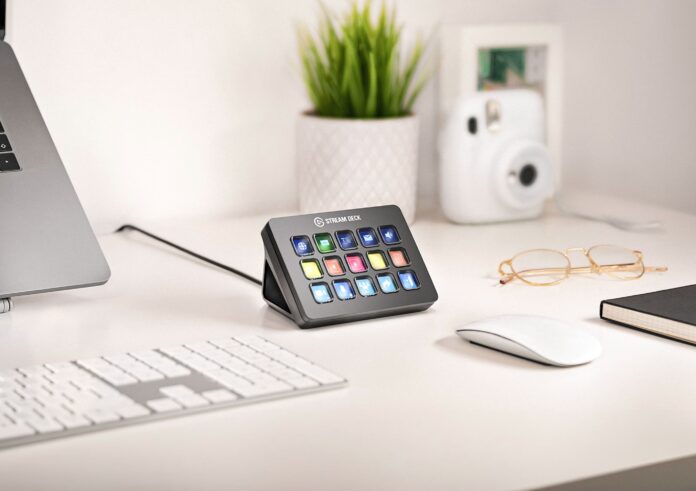
A stream deck is a physical device that sits on your desk and features multiple programmable buttons with small LCD screens. Each button can be customized with icons, text, or images to show exactly what it does. When you press a button, it can launch applications, trigger specific functions within programs, switch between different screens during live streams, or perform complex sequences of actions.
These devices connect to your computer via USB and work with both Windows and Mac systems. The buttons display custom icons that you choose, making it easy to see what each one does at a glance. You can create multiple pages of buttons and switch between them depending on what task you’re working on.
Popular brands include Elgato Stream Deck, which offers several models with different numbers of buttons, and various alternatives from companies like Logitech, Razer, and budget-friendly options that provide similar functionality at lower price points.
Key Benefits for Church Staff
Stream decks excel at reducing the number of clicks and mouse movements needed to complete common tasks. Instead of navigating through multiple menus or remembering keyboard shortcuts, you press one button and the action happens immediately.
The visual nature of these devices makes them particularly useful for people who work with multiple software programs throughout the day. Each button shows an icon or label, so you can quickly identify the function you need without memorizing complex key combinations.
These controllers also help during high-pressure situations like live streaming or video calls, where you need to make quick adjustments without disrupting the flow of your presentation or service.
The Hidden Cost of Application Switching
While switching between applications might seem like it only takes a few seconds, the productivity impact extends far beyond the immediate time spent clicking through menus. Research from the University of California, Irvine by Dr. Gloria Mark reveals that it takes an average of 23 minutes and 15 seconds to return to the original task after an interruption.
Workers toggle between applications roughly 1,200 times each day, which adds up to just under four hours each week reorienting themselves after switching programs. Task switching also overloads your brain and kills productivity by up to 80%, while significantly increasing stress, frustration, and mental effort.
Stream decks reduce and minimize many of these interruptions by providing instant access to your most important functions. While you can’t eliminate every distraction, significantly reducing the number of times you lose 23 minutes of focus makes a meaningful difference in your concentration and productivity throughout the day.
Streamlining Daily Church Operations
One-Touch Access to Essential Applications
Church staff typically use numerous software applications throughout their workday. Setting up dedicated buttons for your most-used programs can save significant time and reduce frustration.
Planning Center: Create a button that opens Planning Center directly to your dashboard, eliminating the need to open a browser, navigate to the site, and log in each time.
Church Management Software (ChMS): Whether you use Breeze, Church Community Builder, Fellowship One, or another system, a dedicated button provides instant access to member information, attendance tracking, and communication tools.
Financial Software: Set up quick access to your accounting program, expense reporting website, or donation management system. This is particularly helpful for administrative staff who need to switch between pastoral duties and financial tasks.
Video Conferencing: Create buttons for Zoom, Google Meet, or Microsoft Teams that not only launch the application but can also start your personal meeting room immediately. With additional buttons for all those functions you typically fumble with during calls, you can focus more on the people you’re meeting with rather than struggling with technology.
Communication Tools: Add buttons for Slack, email programs, or internal messaging systems your church uses for staff communication.
App-Specific Function Controls
Once you’re working within a specific application, stream decks can control functions within that program, making your workflow smoother and more professional.
Zoom Meeting Controls:
- Mute and unmute your microphone instantly when someone says “you’re on mute”
- Toggle your camera on and off without searching for the button
- Share your screen with one press
- Open the chat window to respond to questions
- Start recording important meetings or training sessions
- Switch between gallery view and speaker view
- Manage breakout rooms during small group sessions
Presentation Software Controls:
- Advance slides in PowerPoint or Keynote
- Jump to specific slide numbers during Q&A sessions
- Start and stop slide shows
- Switch between presentation and notes view
Church Management Software Functions:
- Quick search for member records
- Jump to attendance entry screens
- Access giving reports with one button
- Open communication tools for mass emails or text messages
Live Streaming Applications
Live streaming has become essential for many churches, and stream decks excel in this environment by providing immediate control over multiple aspects of your broadcast.
Basic Streaming Controls
Scene Switching: Set up buttons for different camera angles or graphic overlays. For example, create buttons for “Pastor Speaking,” “Worship Team,” “Scripture Slide,” and “Announcements.” During the service, the person running the stream can switch between these views instantly.
Audio Management: Create buttons to adjust microphone levels, switch between different audio sources, or mute specific inputs. This helps maintain consistent sound quality throughout the service.
Graphics and Text: Program buttons to display lower thirds with speaker names, Bible verses, announcement slides, or donation information. These can appear and disappear at the appropriate times during the service.
Advanced Streaming Features
Multi-Camera Productions: For churches with multiple cameras, set up buttons that switch between wide shots of the congregation, close-ups of the pastor, worship team angles, and overhead shots for communion or baptisms.
Interactive Elements: Create buttons that display social media feeds, prayer request information, or real-time giving updates during appropriate moments in the service.
Recording Functions: Set up automated recording that starts and stops at specific points, ensuring you capture the entire message without manual intervention.
Platform Management: If you stream to multiple platforms simultaneously (YouTube, Facebook, your website), create buttons that manage each platform’s specific requirements or start and stop streams on different services.
Getting Started with Stream Decks
Choosing the Right Device
The number of buttons you need depends on how many functions you want to control directly. Smaller devices with 6-8 buttons work well for basic application launching and simple streaming controls. Larger devices with 15-32 buttons accommodate more complex workflows and multiple pages of functions.
Important tip for first-time buyers: You’re not limited by the physical number of buttons on your device. Stream decks allow you to create “folders” where pressing one button opens an entirely new screen of button options. Think of it like folders on your computer desktop. For example, you could have one button labeled “Church Apps” that, when pressed, reveals a new screen with buttons for Planning Center, your ChMS, accounting software, and email. Another button might be labeled “Zoom Controls” and contain all your video conferencing functions. This folder system means even a 6-button device can actually control dozens of functions by organizing them into logical groups.
Consider your budget and technical comfort level. Entry-level devices cost around $60-90, while professional-grade controllers range from $150-220. All options provide the same basic functionality, with differences mainly in build quality, number of buttons, and additional features like dials or touch controls.
For detailed comparisons of specific models and their features, see our comprehensive guide to live stream controllers and Stream Deck alternatives for churches.
Setting Up Your First Buttons
Start with your most frequently used applications and functions. Begin by creating buttons for programs you open multiple times per day, then gradually add more complex functions as you become comfortable with the device.
Most stream deck software includes icon libraries and templates to help you get started quickly. You can also create custom icons using screenshots or simple graphics that match your church’s branding.
Learning and Expanding
Begin with simple one-button actions before moving to more complex multi-step sequences. As you become comfortable with basic functions, you can create buttons that perform multiple actions in sequence, such as opening an application, navigating to a specific section, and preparing commonly used templates.
Technical Considerations
Stream decks work with most modern computers and don’t require powerful hardware to function effectively. The device connects via USB and the software runs in the background, using minimal system resources.
Most popular church software applications are compatible with stream deck automation, including Planning Center, Zoom, OBS (for streaming), presentation software, and web-based applications accessed through browsers.
The learning curve is generally manageable for most church staff members. Basic functions can be set up and used within an hour, while more advanced features might take a few days of practice to master.
Investment and Value
Stream decks represent a productivity investment that pays dividends through time savings and reduced stress during important presentations or live streams. For church staff who regularly work with multiple software applications or manage live streaming, the time saved on daily tasks typically justifies the cost within a few months.
The devices are durable and designed for frequent use, making them a long-term addition to your church’s technology toolkit. Software updates and new integrations continue to expand functionality over time, adding value to your initial investment.
Professional Presentation Benefits
Using a stream deck during video calls, presentations, or live streams creates a more polished and professional appearance. Quick, smooth transitions between functions and immediate response to technical needs help maintain focus on your message rather than on technical difficulties.
This professional presentation can be particularly important during donor meetings, board presentations, or public live streams where technical competence reflects on your church’s overall organization and attention to detail.
For churches looking to enhance their technology workflow and streaming capabilities, live stream controllers like the Stream Deck offer extensive customization options and professional-grade features that can transform how your team manages daily operations and special events.
Whether you’re managing simple administrative tasks or complex live streaming setups for church services, these devices provide the control and efficiency that modern church operations demand. The investment in professional streaming equipment and controllers continues to pay dividends as churches expand their digital ministry reach and operational efficiency.

