If you’re involved in live streaming for your church, you know how important it is to have smooth, professional control over your broadcasts. Live stream controllers like the Stream Deck and its alternatives can transform your setup, making it easier for you to switch scenes, control audio, launch media, and engage your audience without fumbling through complicated software.
This means you can focus more on the message and less on the tech. Whether you’re new to streaming or looking to upgrade, understanding these tools can boost your productivity, enhance your live production quality, and simplify your workflow.
Top Picks
|
Category |
Product |
Price |
Score |
|---|---|---|---|
|
🏆 Best Overall |
$219.99 |
95/100 |
|
|
💰 Best Value |
$59.99 |
88/100 |
|
|
⚡ Best Performance |
$186.00 |
92/100 |
|
|
🎯 Best for Beginners |
$88.88 |
89/100 |
|
|
💡 Best Innovation |
$199.99 |
85/100 |
How We Chose These Live Stream Controllers
We focused on controllers that offer intuitive customization, reliable software integration, and versatile hardware features to suit church live streaming needs. Key factors included the number of programmable keys, ease of setup, compatibility with popular streaming platforms like OBS and Twitch, and additional controls such as dials or touch strips. We also considered user feedback on build quality, software stability, and value for money to ensure you get a device that enhances your live production without unnecessary complexity or cost.
Elgato Stream Deck XL
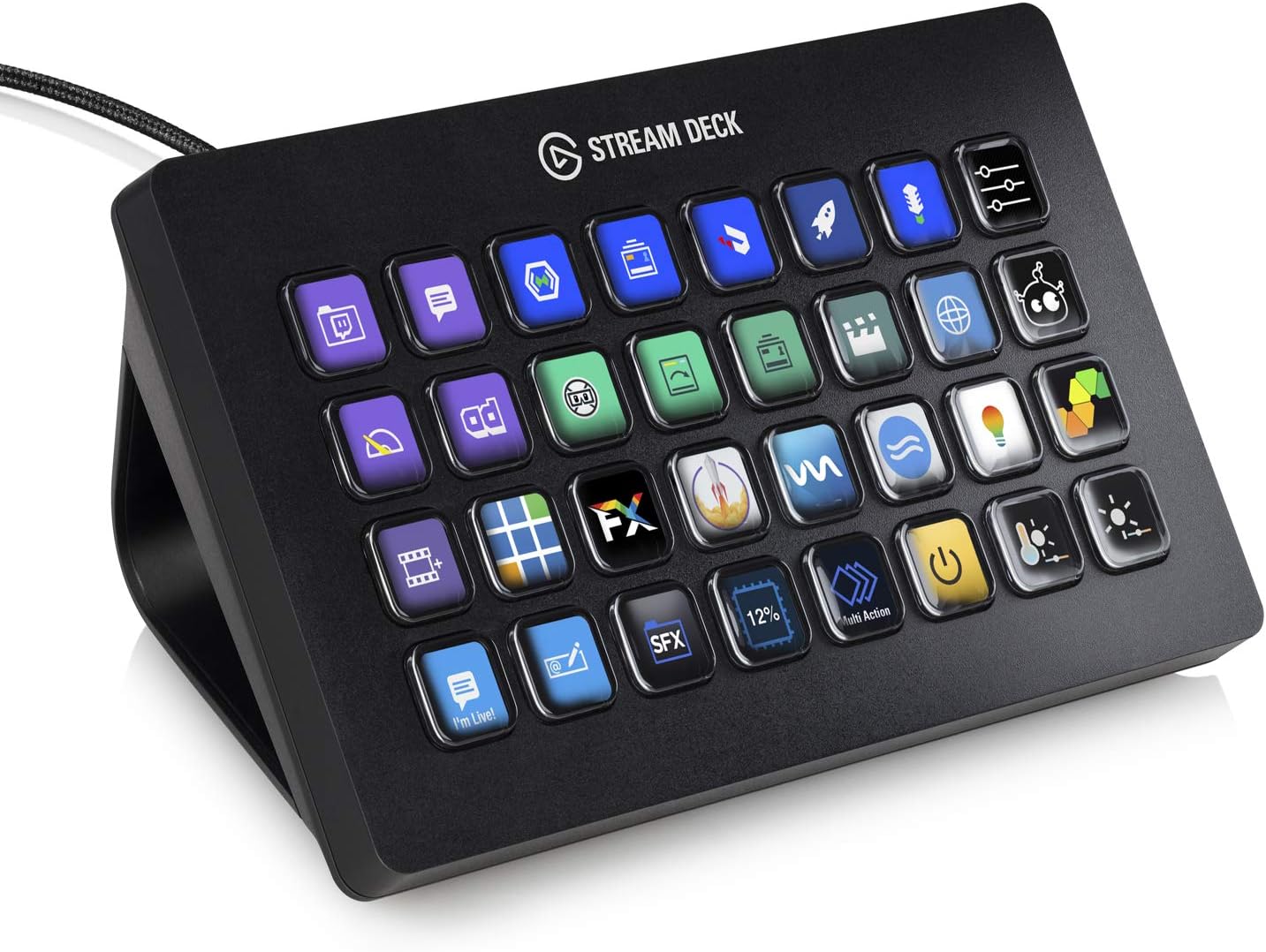
If you’re looking to take control of your live streams or presentations without juggling a million windows, the Elgato Stream Deck XL is a game changer. With 32 customizable LCD keys, you can set up shortcuts to switch scenes, launch media, adjust audio, and even post tweets—all with a simple tap. Whether you’re running a church service live stream, managing worship slides, or coordinating multiple cameras, this controller helps you keep everything smooth and professional.
It works seamlessly with popular platforms like OBS, Zoom, and YouTube, and even integrates with tools like Philips Hue for lighting control. Plus, the visual feedback on each key means you always know what’s going on.
It’s a bit of an investment, but if you want to streamline your workflow and keep your focus on the message, this could be exactly what you need.
What People Say
Users love how the Stream Deck XL transforms complex workflows into simple button presses. Many highlight its bright, clear keys and the ability to create multiple profiles for different tasks. While the software has a learning curve, the customization options and plugin support make it a powerful tool for streamers, editors, and professionals alike.
🗣️ K. Potts
I’m a cinematographer and editor, and this Stream Deck XL has seriously boosted my productivity. The 32 LCD buttons are bright and easy to see even under heavy studio lighting. You can customize each key with text or images, and there’s a huge plugin hub for different apps. I have multiple profiles for different tasks—from sound effects for Discord to editing shortcuts. The hardware feels solid and the braided USB-C cable is durable. The software took a bit to get used to, but once you get the hang of it, it’s fun and really speeds up your workflow.
🗣️ Aldo Patricio Guzman
This has been one of my best purchases. …it quickly became a productivity tool in my office. The customizable shortcuts save me tons of time, and the built-in clock helps remind me to take breaks. It’s versatile enough for both work and play, though the initial setup can take some time. the efficiency gains make it worth it if you plan to use it fully.
Ease of Use
|
Feature |
Ease Level |
|---|---|
|
Setup and Installation |
Moderate |
|
Customizing Keys |
Moderate |
|
Using Plugins |
Moderate |
|
Daily Operation |
Easy |
Versatility
This controller isn’t just for streaming. You can use it to control video editing software, manage office tasks, or even automate complex multi-step actions.
It’s flexible enough to handle everything from church live streams to gaming sessions or professional workflows.
Practicality
With its sturdy design and bright LCD keys, the Stream Deck XL is practical for any setup. The detachable stand lets you position it just right, and the durable braided cable means it can handle daily use.
It’s a solid tool that helps you stay organized and efficient.
Customization Options
|
Feature |
Customization Level |
|---|---|
|
Key Assignments |
Extensive |
|
Custom Icons and Images |
Extensive |
|
Multi-Action Macros |
Extensive |
|
Plugin Support |
Wide Range |
Why You’ll Like It
-
32 fully customizable LCD keys for unlimited shortcuts
-
Instant visual feedback to confirm your commands
-
Seamless integration with popular streaming and productivity apps
-
Sturdy build with a detachable stand for flexible setup
-
Great for both live streaming and everyday workflow boosts
Current Price: $219.99
Rating: 4.8 (total: 7,578+)
Elgato Stream Deck MK.2

If you want to simplify your live streaming or just make managing your computer a breeze, the Elgato Stream Deck MK.2 is a solid pick. It gives you 15 customizable LCD keys that you can program to do pretty much anything—from switching scenes in OBS, launching apps, controlling audio, to even managing your smart lights.
Whether you’re running a church service live stream, juggling worship slides, or just want quick access to your favorite tools, this little controller helps keep things smooth and professional. It works with both Mac and PC, and the software is pretty intuitive once you get the hang of it. Plus, the keys give you visual feedback, so you always know what’s going on without second-guessing.
It’s a bit of an investment at around $149.99, but if you’re looking to cut down on clicks and keep your focus on what matters, it’s worth considering.
What People Say
People appreciate how the Stream Deck MK.2 isn’t just for streamers—it’s a versatile tool that helps with productivity, meetings, live streams, and more. The customizable keys and smooth software integration get a lot of praise, even if the device can shift a bit on the desk when pressing keys hard. Overall, it’s seen as a reliable way to simplify complex workflows.
🗣️ Miguel Eduardo Vilar
It is a versatile and powerful tool that goes beyond streaming. It’s an excellent choice for non-streamers looking to enhance their productivity and creative workflows. I use it to monitor my CPU and GPU temps, mute my mic on Discord, share screens during Zoom meetings, and even launch games with a single tap. The customizable profiles make it easy to switch between tasks, and the soundboard feature is a nice bonus. Overall, it’s a fantastic tool for boosting productivity and streamlining workflows.
🗣️ Turkel
My new Stream Deck is a game-changer for streamers and content creators! The controls are intuitive, and the customizable buttons let me handle everything from starting streams to switching scenes and controlling audio without fumbling around. It integrates well with OBS, Twitch, and even chat apps, making content management way easier. Definitely an essential tool if you want to stay comfortable and productive during your streams.
Ease of Use
|
Feature |
Ease Level |
|---|---|
|
Setup and Installation |
Easy |
|
Customizing Keys |
Moderate |
|
Using Plugins |
Moderate |
|
Daily Operation |
Easy |
Versatility
This controller shines beyond just streaming. You can use it to control video editing software, manage meetings, launch games, automate multi-step tasks, and even control smart home devices. It’s flexible enough to fit into church live streams, office workflows, or personal projects.
Practicality
With its compact size and bright LCD keys, the Stream Deck MK.2 fits comfortably on your desk without taking up much space. The detachable stand lets you angle it just right, though it can move a bit if you press keys firmly.
The USB-C connection is reliable, making it a practical addition to your setup.
Customization Options
|
Feature |
Customization Level |
|---|---|
|
Key Assignments |
Extensive |
|
Custom Icons and Images |
Extensive |
|
Multi-Action Macros |
Extensive |
|
Plugin Support |
Wide Range |
Why You’ll Like It
-
15 customizable LCD keys for quick access to your favorite actions
-
Visual feedback on keys so you always know what’s active
-
Works seamlessly with popular streaming and productivity apps
-
Compact and portable design fits nicely on any desk
-
Great for both live streaming and everyday computer shortcuts
Current Price: $149.99
Rating: 4.8 (total: 10,124+)
Elgato Stream Deck +

If you’re looking to take your live streaming or church service production up a notch, the Elgato Stream Deck + is a seriously handy tool. It’s not just a deck of buttons—it combines customizable LCD keys, touch strip dials, and rotary knobs to give you precise control over audio, video, lighting, and more.
Whether you’re switching scenes in OBS, adjusting mic levels, or launching worship slides, this controller helps keep everything running smoothly without scrambling for your mouse or keyboard. It works with both Mac and PC, and the software lets you personalize each button with icons or even GIFs, so it feels like it was made just for you.
It’s a bit of an investment at around $186.00, but if you want a versatile, all-in-one console that can handle your streaming and production needs, it’s worth considering.
What People Say
Users love how the Stream Deck + combines tactile controls with visual feedback, making it easier to manage streams and production tasks without fumbling. The customization options and build quality get high marks, though some mention the software can occasionally glitch. Overall, it’s praised as a powerful and flexible tool that’s worth the investment.
🗣️ Mike
Right out of the box, the Stream Deck Plus felt solid and well-made. Setting it up was a breeze, and I customized it to fit my needs in no time. The 15 programmable LCD buttons let me set up hotkeys for quick access to essential functions, making managing my stream and other apps much simpler. The rotary knobs and touch screen add flexibility for adjusting audio and other settings. Now, I can easily tweak my mic volume or switch scenes in OBS without hassle. Being able to personalize each button with icons and even GIFs is awesome! My Stream Deck now looks just the way I want it. The software can be a bit glitchy sometimes, but overall it’s manageable. For a newbie streamer, the cost might seem steep, but considering its functionality and build quality, it’s a worthwhile investment.
🗣️ Bilise
The StreamDeck+ is one of the more impressive pieces of tech I’ve used. It’s very versatile and the customizability is fantastic. The software makes it easy to set up if you’re somewhat tech savvy. The build quality is impressive, with dials and switches that have nice texture and feedback. I’m running both my headphones and XLR microphone with the XLR backplate, and it’s improved my sound and mic quality. The only downside is that it’s still a relatively new product, so plugins and features are still growing. Definitely worth the cost if you enjoy techy stuff.
Ease of Use
|
Feature |
Ease Level |
|---|---|
|
Setup and Installation |
Easy |
|
Customizing Buttons and Dials |
Moderate |
|
Using Plugins |
Moderate |
|
Daily Operation |
Easy |
Versatility
This controller isn’t just for streaming. You can use it as an audio mixer, studio controller, or production console.
It works great for live church services, video editing, podcasting, or even automating everyday computer tasks. The ability to switch profiles and trigger multi-step actions makes it adaptable to whatever workflow you need.
Practicality
With its compact footprint and sturdy build, the Stream Deck + fits comfortably on your desk without getting in the way. The USB connection is reliable, and the combination of buttons, dials, and touch strip means you have physical controls for everything important. It’s practical for both quick adjustments during live events and detailed setup sessions.
Customization Options
|
Feature |
Customization Level |
|---|---|
|
Button Assignments |
Extensive |
|
Custom Icons and GIFs |
Extensive |
|
Multi-Action Macros |
Extensive |
|
Plugin Support |
Growing Library |
Why You’ll Like It
-
Customizable LCD keys, dials, and touch strip for versatile control
-
Easy setup with intuitive software for Mac and PC
-
Personalize buttons with icons, GIFs, and multi-action macros
-
Works seamlessly with streaming apps like OBS, Twitch, and more
-
Compact design that fits nicely on any desk
Current Price: $186.00
Rating: 4.6 (total: 3,332+)
Elgato Stream Deck Neo

If you want a smart way to speed up your live streaming or church service setup without a huge learning curve, the Elgato Stream Deck Neo is a solid pick. It’s got eight customizable LCD keys plus two touch points that let you switch between pages of shortcuts easily, so you’re not limited by just those eight buttons.
Whether you’re launching worship slides, controlling audio levels, or toggling between apps like Zoom or Spotify, this little device helps keep things smooth and stress-free. It’s compact and folds flat, which is great if you’re tight on desk space or need to travel with it.
Plus, it works with both Mac and PC right out of the box. At around $88.88, it’s a friendly entry point if you’re just starting out or want a streamlined, efficient controller without going overboard.
What People Say
People appreciate how the Stream Deck Neo makes complex workflows feel simple and accessible. It’s praised for being beginner-friendly yet powerful enough to handle multiple profiles and folders.
The fold-flat design is a hit for those who travel or have limited space. Users love the ability to automate everyday tasks and integrate with popular apps, making it a versatile tool beyond just streaming.
🗣️ bailarina94
I’d been thinking about getting a Stream Deck for a while and finally grabbed this model when it went on sale. It’s perfect for my needs, and the $20 discount made it even sweeter. I’m not super tech-savvy, but I set it up in an afternoon without buying any paid profiles. I started with some free ones, found good icon sets, and customized everything to fit my workflow. Over time, I added folders and different profiles to keep things organized. It’s great for automating any keyboard shortcut, macro, or file path you can think of. Plus, the app-specific plugins add even more power. The fact that it folds flat makes it perfect for travel, and it works well with both Mac and Windows. If you’re like me and mostly use office apps, this is a great starter device that won’t overwhelm you.
🗣️ J. Smith
This thing is amazing. You don’t realize how much you need it until you start using it. Setting it up was actually fun, and once you dig into all the keyboard shortcuts you use regularly, you can cut down on mouse clicks and speed up your work. I set up pages for music links, Chrome shortcuts, system functions, and media controls. Don’t let the 8 buttons fool you — you get multiple pages and folders, so it’s really like having way more buttons. It’s a powerful little device that’s also fun to use. Highly recommended if you want to work smarter, not harder.
Ease of Use
|
Feature |
Ease Level |
|---|---|
|
Setup and Installation |
Easy |
|
Customizing Buttons and Profiles |
Moderate |
|
Using Plugins |
Moderate |
|
Daily Operation |
Easy |
Versatility
This isn’t just a streaming gadget. You can use it to control worship presentation software, automate office tasks, manage media playback, or even run custom macros.
The ability to create folders and multiple profiles means you can tailor it to whatever you need, whether that’s a live church service, podcast, or just making your daily computer use smoother.
Practicality
The Neo’s compact size and fold-flat design make it super practical for small spaces or on-the-go setups. It connects via USB-C and feels sturdy enough to handle daily use.
Having dedicated page buttons means you don’t lose any keys to navigation, which keeps your shortcuts accessible and your workflow flowing.
Customization Options
|
Feature |
Customization Level |
|---|---|
|
Button Assignments |
Extensive |
|
Custom Icons and Labels |
Extensive |
|
Multi-Action Macros |
Extensive |
|
Plugin Support |
Growing Library |
Why You’ll Like It
-
Eight customizable LCD keys with two touch points for easy page navigation
-
Compact, fold-flat design perfect for small desks or travel
-
Works seamlessly with Mac and Windows without extra setup
-
Supports app integrations like Zoom, Teams, Spotify, and more
-
Free icon libraries and plugins to personalize your workflow
Current Price: $88.88
Rating: 4.6 (total: 542+)
Logitech MX Creative Console

If you’re looking to speed up your creative projects or just want a smarter way to handle your workflow, the Logitech MX Creative Console is worth checking out. It’s got 9 customizable LCD keys and a smooth control dial that lets you tweak settings precisely, whether you’re editing videos, photos, or even managing Zoom calls and Spotify.
What’s cool is how it integrates right out of the box with popular apps like Adobe Photoshop and Premiere Pro, but you’re not limited to those — you can create your own profiles for pretty much any software you use. The build feels solid with an aluminum dial and the keys show icons you can personalize, so it’s both functional and nice to look at.
It’s a bit of an investment at $199.99, but if you spend a lot of time in creative apps or want to streamline your multitasking, it’s a handy tool that really pays off.
What People Say
Users love how this console speeds up their creative work and multitasking. The customizable keys and dial make editing smoother, and the ability to create profiles for non-Adobe apps is a big plus. The build quality and design get high marks, though some wish the software setup was a bit easier and the app marketplace had more options.
🗣️ LivingCrazy4U
I recently got the Logitech MX Creative Console, and it’s been a game-changer for my editing workflow. This two-piece console features a customizable keypad and a dialpad, both easy to set up with the Logi Options+ app. It’s especially useful for Adobe Creative Cloud users, with dedicated integrations for Premiere Pro, Photoshop, and others, plus additional apps coming soon. I’m not a creative cloud user myself but still find it very useful. I’ve created my own profiles for Capcut, Davinci Resolve, Krita, and even an old Quake 1 map editor just for fun. The hardware is sturdy, with an aluminum dial and customizable LCD buttons. You can create your own graphics to fully customize all the buttons. The only downside is the limited selection of third-party apps in the marketplace right now, but I’m optimistic that will improve. Overall, it’s a fantastic addition to any creative setup and could even be useful for productivity apps like Excel or PowerPoint.
🗣️ Hyo Kim
I’ve been using the Logitech MX Creative Console, and it’s a total game changer! The 9 customizable LCD keys and the control dial make working on Adobe apps like Photoshop, Lightroom, and Premiere Pro so much faster and smoother. The device is super intuitive and easy to set up using the Logi Options+ software, and I love how I can tailor the keys specifically to different apps. The build quality is excellent, and the Graphite color looks sleek on my desk. It’s perfect for anyone into graphic design, video editing, or even multitasking with other tools like Zoom and Spotify. Highly recommend it to creatives and professionals looking to streamline their workflow!
Ease of Use
|
Feature |
Ease Level |
|---|---|
|
Setup and Installation |
Moderate |
|
Customizing Buttons and Profiles |
Moderate |
|
Using the Control Dial |
Easy |
|
Daily Operation |
Easy |
Versatility
This console isn’t just for Adobe fans. You can program it for all kinds of software, from video editors like Davinci Resolve to productivity tools like Excel.
The ability to switch profiles automatically based on the app you’re using means it adapts to your workflow seamlessly, whether you’re streaming, editing, or managing meetings.
Practicality
With a sturdy build and flexible connectivity options—Bluetooth for the dialpad and USB-C for the keypad—it fits well into both desktop and mobile setups. The included stand helps position it comfortably, though some users wish it was a bit heavier to avoid sliding around.
Battery life is solid, lasting up to 18 months with included AAA batteries.
Customization Options
|
Feature |
Customization Level |
|---|---|
|
Button Assignments |
Extensive |
|
Custom Icons and Labels |
Extensive |
|
Multiple Profiles and Pages |
Extensive |
|
Actions Ring On-Screen Overlay |
Available |
Why You’ll Like It
-
Nine customizable LCD keys for quick access to your favorite tools
-
Smooth, tactile control dial for precise adjustments
-
Native integration with Adobe apps and more, plus ability to create your own profiles
-
Custom icons and multiple keypad pages to fit your workflow
-
Bluetooth dialpad and USB-C keypad for flexible connectivity
Current Price: $199.99
Rating: 4.3 (total: 162+)
Razer Stream Controller
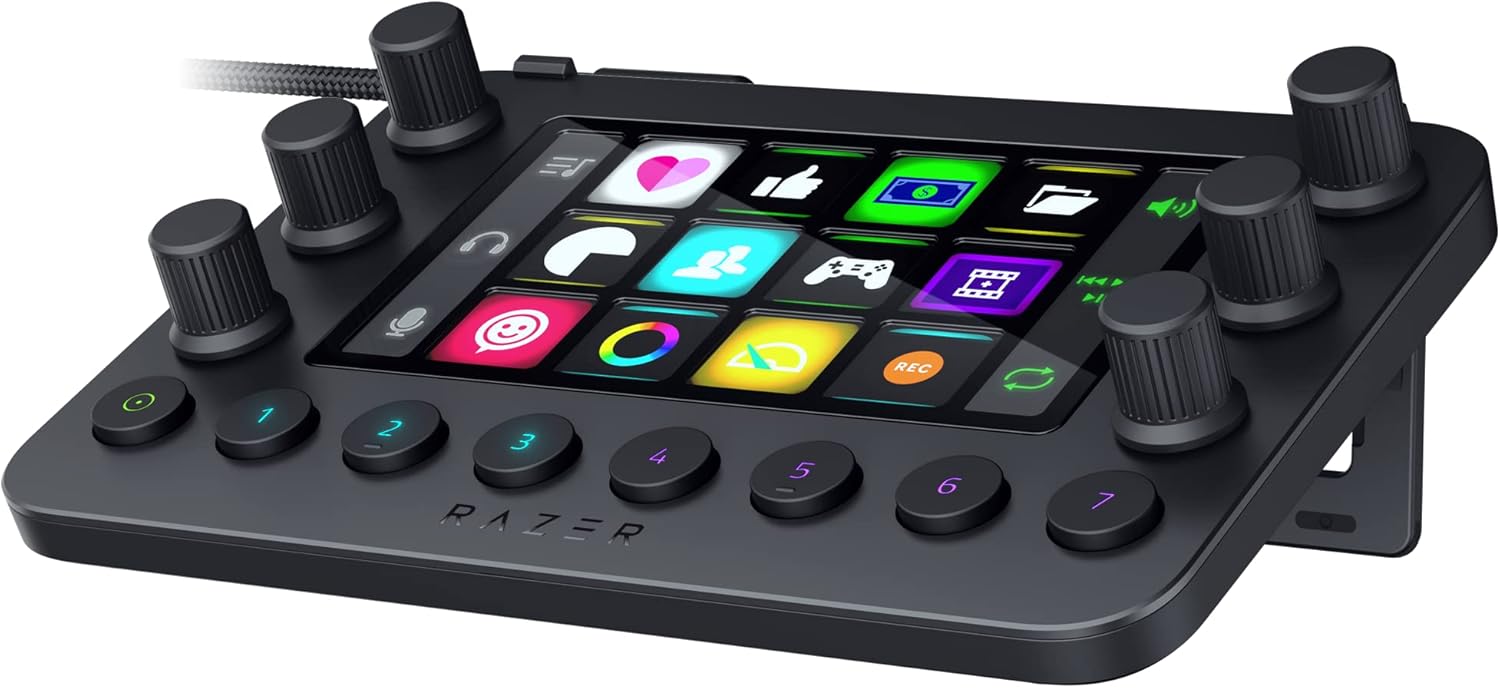
If you’re looking for a versatile controller that goes beyond just streaming, the Razer Stream Controller might be just what you need. It packs 12 haptic keys, 6 tactile analog dials, and 8 programmable buttons into a compact device that works with both PC and Mac. Whether you’re managing a church live stream, editing videos, or juggling multiple apps, this controller helps you keep everything at your fingertips.
The touchscreen lets you customize icons and layouts, so you can set it up exactly how you like. It’s a bit of a learning curve at first, especially with the software, but once you get it dialed in, it’s a solid tool for multitasking and streamlining your workflow.
What People Say
People appreciate how customizable and tactile the controller is, especially the haptic feedback on the keys and the responsive dials. While the software can be tricky at first, the ability to create custom shortcuts and macros makes it a powerful tool for streamers and content creators alike.
🗣️ Robert Dillon
This is a great visual/tactile macro pad that is marketed to streamers but can be used to control many applications through custom shortcuts and commands. It vibrates when you press the buttons, the dials are responsive and respond to presses. The screen is full color and shows custom images set up in the app. And it is highly customizable – see below. Couple of warnings: It doesn’t ship with all of the capabilities shown in the product image for this page, but you can customize it to add them after the fact. It’ll seem a bit sparse at first, but you can work to make it yours. As far as capabilities, you can download plugins for many programs like PowerTools or SoundController. But for situations not already covered by plugins, the customization piece really helps. You can add custom “Dial Adjustments” for things like switching desktops and browser tabs. You can add an entire panel to run custom “Keyboard Shortcuts” for your favorite text/art/code editor or game. The icons can come from their icon pack downloads or pick from images you have downloaded or taken from screenshots from your app. It can open whatever application you want, pull up a webpage, and even run macros. It’s great if you want to tinker with it, but expect to spend an afternoon or two getting it all set up. You’ll be rewarded for the effort.
🗣️ Gonteysetter
Great quality and is pretty compact in size, I’m not a streamer but it’s great for way more than just that, I use it for custom buttons for my art programs and even programmed it to do different things on PC games so it works for gaming too. The price at least for me was a little high but I got a refurbished one for a bit cheaper and it was well worth it, works and looks like it was never used before.
Ease of Use
|
Feature |
Ease Level |
|---|---|
|
Setup and Installation |
Moderate |
|
Customizing Buttons and Layouts |
Moderate |
|
Using the Touchscreen and Dials |
Easy |
|
Daily Operation |
Easy |
Versatility
This controller isn’t just for streaming. You can tailor it to control everything from video editing software to music apps and even games. Its ability to switch profiles automatically based on the app you’re using makes it a flexible tool for all kinds of workflows, including church live streams where you might need quick access to different controls.
Practicality
With a compact design and solid build, it fits nicely on your desk without taking up too much space. The included USB-C connection ensures reliable performance, though some users have noted occasional software hiccups, especially on Mac. Still, once set up, it’s a practical device that helps you manage multiple tasks smoothly.
Customization Options
|
Feature |
Customization Level |
|---|---|
|
Button Assignments |
Extensive |
|
Custom Icons and Images |
Extensive |
|
Multiple Profiles and Layouts |
Extensive |
|
Macros and Shortcuts |
Extensive |
Why You’ll Like It
-
12 haptic keys with customizable icons and tactile feedback
-
6 analog dials for precise control over audio and media levels
-
8 programmable buttons to switch layouts or trigger actions quickly
-
Dynamic touchscreen for easy navigation and multi-tasking
-
Compatible with PC and Mac, supporting popular streaming and creative apps
Current Price: $144.95
Rating: 4.0 (total: 323+)
VSDINSIDE Macro Keypad

If you want a budget-friendly Stream Deck alternative that still packs a punch, the VSDINSIDE Macro Keypad is worth checking out. It comes with 18 programmable keys, including 15 LCD keys that you can customize with your own icons or animations. Whether you’re running a church live stream, editing videos, or just trying to speed up your daily computer tasks, this keypad makes it easy to launch apps, switch scenes in OBS, or control media with a single tap.
The RGB light ring adds a nice touch to your desk setup, and it works smoothly on both Windows and Mac. The software is straightforward, though it needs to stay open while you use the device, which is a minor quirk. Overall, it’s a solid, versatile tool that won’t break the bank and can really streamline your workflow.
What People Say
Users love how easy it is to set up and customize the keys, especially the ability to add your own images and multi-step macros. The RGB lighting and sturdy feel make it a nice addition to any desk, and it’s praised for being a great value alternative to pricier Stream Decks.
🗣️ Amazon Customer
I’ve been pleasantly surprised by the VSDINSIDE macro keypad, which I mainly use to provide some shortcuts for many of the applications I use every day, and it’s been a great little tool so far. Setup was quick and easy—I just plugged it in, installed the software, and was customizing keys within minutes. The software is a bit basic-looking, but it gets the job done, and all my shortcuts and macros work exactly how I want. What I really like is how customizable the keys are. Each button can have its own icon, and you can assign just about anything—apps, hotkeys, media controls, folders, even multi-step macros. I use mine for launching Premiere Pro tools, muting my mic in Discord, and starting my OBS scenes. It works great. The RGB lighting around the edge is a nice touch too. It’s subtle but if you run an RGB theme for your desktop, it will fit nicely. Plus, the whole thing feels sturdy—not flimsy like I expected at this price point.
🗣️ WorldRaptor
I am very impressed with this Keypad! I just got it a couple of days ago, but the process of arranging it was so simple, with the help of a companion app. I have personalized my shortcuts in a jiffy and it is simply awesome. The visual LCD keys are fantastic, the fact that I can place my own pictures on the keys made me so familiar with the functions of each button. And the RGB lighting surrounding it is simply fantastic and gives my desk a cool aura. I stream, edit videos and generally perform daily activities, but this thing has surely simplified my work processes. It is so solid and well constructed and considering the price, it is a match to any other in the market. Whether you want to level up your productivity or streaming game without spending a lot of money, I would strongly suggest giving it a look!
Ease of Use
|
Feature |
Ease Level |
|---|---|
|
Setup and Installation |
Easy |
|
Customizing Keys and Icons |
Easy |
|
Running Macros and Shortcuts |
Moderate |
|
Daily Use During Streaming |
Easy |
Versatility
This keypad isn’t just for streamers. You can use it to speed up video editing, control media, launch apps, or even manage productivity tools.
Its compatibility with popular software like OBS, YouTube, Discord, and Photoshop makes it a versatile helper for many workflows, including church live streams where quick access to scenes and audio controls is key.
Practicality
With a compact footprint and solid construction, it fits nicely on your desk without getting in the way. The USB-C connection is reliable, and while the software needs to stay open, it runs smoothly once set up.
The RGB lighting adds a nice ambiance without being distracting, making it practical for both day-to-day use and special streaming events.
Customization Options
|
Feature |
Customization Level |
|---|---|
|
Key Assignments |
Extensive |
|
Custom Icons and Animations |
Extensive |
|
Multi-step Macros |
Moderate |
|
RGB Lighting Colors |
Basic |
Why You’ll Like It
-
18 fully programmable keys with customizable icons and animations
-
One-touch operation for launching apps, macros, and media controls
-
Surrounding RGB light ring adds subtle style to your desk
-
Compatible with both Windows and macOS via USB-C
-
Solid build quality at a very affordable price point
Current Price: $59.99
Rating: 4.7 (total: 37+)
SOOMFON Stream Controller

If you’re looking for a Stream Deck alternative that doesn’t skimp on features but won’t empty your wallet, the SOOMFON Stream Controller is worth a look. It packs 15 customizable LCD keys that let you trigger all kinds of actions in OBS, Twitch, YouTube, and more, right from your desk.
What’s cool is that you can personalize each key with your own images, so you always know exactly what you’re hitting. Whether you’re running a church live stream, editing videos, or juggling multiple apps, this controller helps keep things smooth and efficient.
Plus, it’s compatible with both PC and Mac, and the included software is pretty straightforward to get going. It’s a solid pick if you want to streamline your workflow without paying a premium.
What People Say
People appreciate how easy it is to set up and customize, especially the ability to add personal images to each key. The extra dashboard screen is a unique touch that helps keep an eye on system performance during streams. It’s praised for being a budget-friendly alternative that still feels solid and reliable.
🗣️ Orlin
I’ve been pleasantly surprised by how well this controller works for my streaming setup. Setting it up was a breeze, and the customizable LCD keys make it super easy to launch apps and control OBS scenes without fumbling around. The extra vertical screen on the side is a neat bonus that shows useful info like CPU and memory, which I didn’t expect but really appreciate. It feels solid and the software is stable, so it’s been a reliable addition to my desk.
🗣️ Bane Nichols
Works great and is compatible with voicemod, OBS, and plenty of other apps. Definitely worth the price and very easy to use. The only minor hiccup is that the voicemod button icons sometimes disappear when reloading the deck, but overall it’s a fantastic tool for anyone looking to up their streaming game without spending a fortune.
Ease of Use
|
Feature |
Ease Level |
|---|---|
|
Setup and Installation |
Easy |
|
Customizing Keys and Images |
Easy |
|
Using Macros and Shortcuts |
Moderate |
|
Daily Use During Streaming |
Easy |
Versatility
This controller isn’t just for streamers. You can use it to speed up video editing, control music, launch apps, or manage social media posts. Its compatibility with OBS, Twitch, YouTube, Discord, Spotify, and more makes it a versatile tool for church live streams and other creative workflows where quick access to controls is a must.
Practicality
With a compact design, removable stand, and rubber feet, it stays put on your desk and adapts to your setup. The USB-C connection is reliable, and the included software is straightforward, though some users note occasional quirks with certain app integrations.
Overall, it’s practical for both everyday use and special streaming events.
Customization Options
|
Feature |
Customization Level |
|---|---|
|
Key Assignments |
Extensive |
|
Custom Images on Keys |
Extensive |
|
Multi-step Macros |
Moderate |
|
Dashboard Info Display |
Basic |
Why You’ll Like It
-
15 fully customizable LCD keys with your own images
-
One-touch control for apps, audio, lighting, and more
-
Side dashboard shows real-time system info like CPU and memory
-
Compatible with PC and Mac, supporting popular streaming apps
-
Removable stand and rubber feet keep it stable and flexible on your desk
Current Price: $69.99
Rating: 4.0 (total: 223+)
COSTOM D15 Stream Controller

If you want a budget-friendly stream controller that still packs a punch, the COSTOM D15 is worth checking out. It comes with 15 customizable macro LCD keys that you can set up to trigger actions in OBS, Twitch, YouTube, and more. Plus, there’s a handy side info screen that shows things like CPU load, weather, and time — a nice touch to keep an eye on your system while streaming.
Whether you’re managing a church live stream or just want to simplify your video production workflow, this controller helps you stay organized without breaking the bank. It’s plug-and-play with Windows and macOS, though Mac users might need a bit of patience hunting down the right drivers. Overall, it’s a solid alternative if you want many of the features of a Stream Deck but at about half the price.
What People Say
Users appreciate the affordability and solid feature set, especially the customizable keys and the side info display. While the software and support could use some polish, the device itself is reliable and offers great value for the price.
Many mention it’s a great alternative to pricier stream decks without sacrificing essential functionality.
🗣️ Gregory A. Corson
This is a macro keypad similar to the Elgato Stream Deck but at half the price. It has 15 buttons and a status display on the side where you can put things like weather, the date, cpu load…etc. The buttons all have a color display behind them so you can customize them with things like the icons of favorite websites, apps or functions. This gives you a single click to open a favorite site. You can have multiple “pages” of buttons and scroll through them, so you get more than 15 buttons. The buttons can also be defined to activate functions inside of apps. The shortcuts can really be handy when live streaming or recording videos to trigger sound effects, change cameras and other such things. One thing this is missing is any sliders or knobs for adjusting things like volume or changing other analog parameters like brush size in a paint program. The long status display on the side isn’t touch sensitive and can’t be used as a button/slider. A few minor issues made me deduct a star. One was that I ordered a black unit and they sent me a white one. Another is the short (5 foot) USB cable provided. Considering that they advise you to plug this directly into the computer and not a hub, a longer cable would have been appreciated. Also the base on this unit has a fixed angle and can’t be adjusted. Also the “support” site could stand to be improved. I get the general impression that the Elgato Streamdeck software may have more options and app support than this one, but to be honest I don’t use the advanced features that much so either one works fine for me, and this one is HALF the price.
🗣️ Kenneth B Stanciel II
This is a good console. I wasn’t too sure about the software, but I still installed it. The only thing about this console is that they don’t have any real instructions. Basically, it is a 3-page layout with the location to install the software and how to change/add the keys. What I am now doing is looking online for a stream deck and finding what I can do. This console seems good because a stream deck needs a monthly/yearly subscription and this doesn’t. This is half the price of an Elgato stream deck.
Ease of Use
|
Feature |
Ease Level |
|---|---|
|
Setup and Installation |
Easy |
|
Customizing Keys |
Moderate |
|
Using Macros |
Moderate |
|
Daily Streaming Use |
Easy |
Versatility
This controller isn’t just for streaming. You can use it to launch apps, control audio, manage social media posts, or speed up video editing tasks.
Its compatibility with popular streaming and production software makes it a versatile tool for churches and anyone juggling multiple live or recorded media workflows.
Practicality
The D15’s compact size and plug-and-play design make it practical for both everyday use and special events. The included USB-C cable and detachable stand help keep your desk tidy, though some users wish for a longer cable and adjustable stand angle. It’s a straightforward device that gets the job done without fuss.
Customization Options
|
Feature |
Customization Level |
|---|---|
|
Key Assignments |
Extensive |
|
Custom Images on Keys |
Extensive |
|
Multi-step Macros |
Moderate |
|
Side Info Screen Display |
Basic |
Why You’ll Like It
-
15 customizable macro LCD keys for quick actions
-
Side info screen displays system stats, weather, and time
-
Compatible with OBS Studio, Streamlabs, Twitch, YouTube, and more
-
No subscription fees unlike some other stream decks
-
Compact design with a detachable stand and USB-C connection
Current Price: $55.00
Rating: 4.3 (total: 10+)
SOOMFON Stream Controller SE

If you’re looking for a budget-friendly stream deck alternative that still gives you plenty of control, the SOOMFON Stream Controller SE is a solid pick. It comes with 6 fully customizable LCD macro keys, plus 3 extra switch buttons and 3 knobs, so you can tailor it exactly how you want. Whether you’re running a church live stream, managing worship presentations, or just want to simplify your streaming setup, this controller makes it easy to trigger scenes, launch apps, or adjust volume with just a tap or a turn.
It works smoothly with OBS, live streams, YouTube, and more on both PC and Mac. The removable stand and adhesive base mean you can set it up just right on your desk.
It’s not as feature-packed as some pricier models, but for under $65, it’s a great way to get started without feeling overwhelmed.
What People Say
People appreciate how much control you get for the price, especially the customizable LCD buttons and extra knobs. The software is straightforward and lets you add plugins to expand functionality. Some mention the device feels surprisingly premium despite being budget-friendly, making it a great starter option for church streamers or content creators on a budget.
🗣️ Dave Daves Seaward
What really stands out is how customizable this device is. You can set each button to trigger all kinds of actions, and the LCD screens on the buttons let you add your own icons, which makes it super intuitive to use. It’s surprisingly high-end feeling for a product under $100. The knobs and switch buttons add extra control options that you don’t usually get at this price. The included software is easy to install and lets you download tons of free plugins to expand what you can do. It’s a great alternative if you want the look and feel of a Stream Deck without paying double the price.
🗣️ Random Viner
Setup was a breeze and the buttons are very responsive. The software didn’t trigger any security warnings like some others I’ve tried, which was a relief. While it only has 6 buttons, it’s enough for basic streaming needs, and the extra knobs are a nice touch for volume or brightness control. The price point is excellent for what you get, and it’s a good value if you don’t need a ton of buttons or advanced plugins right away.
Ease of Use
|
Feature |
Ease Level |
|---|---|
|
Setup and Installation |
Easy |
|
Customizing Buttons |
Moderate |
|
Using Plugins |
Moderate |
|
Daily Streaming Control |
Easy |
Versatility
This controller isn’t just for streaming. You can use it to launch apps, control media playback, manage social media, or even trigger MIDI commands if you’re into music production.
Its compatibility with popular platforms and software makes it a handy tool for churches, gamers, and content creators juggling multiple tasks during live events.
Practicality
With its compact size, removable stand, and adhesive base, the SOOMFON Stream Controller SE fits neatly on any desk setup. It’s practical for everyday use and special live events alike. The built-in USB cable with both USB-A and USB-C ends adds convenience, though some users wish for a longer cable.
Overall, it’s a straightforward device that helps keep your workflow smooth without extra fuss.
Customization Options
|
Feature |
Customization Level |
|---|---|
|
Button Assignments |
Extensive |
|
Custom LCD Button Icons |
Extensive |
|
Knob Functions |
Basic |
|
Plugin Support |
Moderate |
Why You’ll Like It
-
6 customizable LCD macro keys with vibrant displays
-
3 additional switch buttons and 3 knobs for extra control
-
Compatible with OBS Studio, Twitch, YouTube, Discord, Spotify, and more
-
Easy plug-and-play setup for PC and Mac users
-
Removable stand and adhesive base for flexible placement
Current Price: $64.99
Rating: 4.7 (total: 7+)
FAQ
How Do I Choose The Right Live Stream Controller For My Church’s Needs?
When selecting a live stream controller like the Stream Deck or its alternatives for your church, you want to consider how many actions you need to control simultaneously. If you manage multiple cameras, lighting, audio, and media cues, a model with more customizable keys like the Elgato Stream Deck XL with 32 keys might be ideal.
For simpler setups, the smaller Stream Deck MK.2 or budget options like the VSDINSIDE Macro Keypad can suffice. Also, think about your comfort with technology—some controllers have steeper learning curves due to advanced features and software customization. Compatibility with your streaming software (OBS, Streamlabs, etc.) and your computer’s operating system is crucial. Finally, budget plays a role; prices range from around $55.00 USD for entry-level decks to over $200.00 USD for premium models.
Balancing your church’s technical needs, ease of use, and budget will help you pick the best fit.
Is It Difficult To Set Up And Use A Stream Deck For Church Live Streaming?
You might find the initial setup a bit challenging if you’re new to stream controllers, but it’s definitely manageable. The software for devices like the Elgato Stream Deck is powerful but can feel overwhelming at first.
Fortunately, there are plenty of tutorials online, including official Elgato guides and YouTube videos that walk you through programming keys, creating macros, and integrating with popular streaming apps like OBS Studio and Twitch. Start simple by assigning basic functions like switching scenes or muting audio, then gradually explore multi-action macros and plugins as you get comfortable.
Also, keep in mind that the controller works only when your PC or Mac is on, so it’s tied to your computer’s power state. With a little patience, you’ll find it becomes an indispensable tool that streamlines your live production workflow.
Can I Use These Controllers For More Than Just Streaming At Church?
Absolutely! While these controllers are designed with streamers in mind, you can use them for a variety of tasks beyond live streaming. For example, you can program keys to control presentation software, launch worship media, adjust lighting presets, or even automate repetitive tasks on your computer like opening files or sending messages. Some users customize their Stream Decks for office productivity, video editing, or audio mixing.
The Logitech MX Creative Console, for instance, is great if you want tactile dials alongside programmable keys for creative workflows. Budget-friendly options like the SOOMFON or VSDINSIDE decks offer solid customization for general computer shortcuts.
So, investing in one of these devices can enhance your church’s entire media and administrative workflow, not just your live streams.
Wrapping Up
Choosing the right live stream controller can make a significant difference in how you manage your church’s broadcasts. Devices like the Elgato Stream Deck XL provide extensive customization and control, helping you streamline your workflow and engage your audience more effectively. If you’re just starting out or working with a tighter budget, options like the VSDINSIDE Macro Keypad or the Elgato Stream Deck Neo offer excellent functionality without overwhelming complexity.
Remember, the best controller is one that fits your specific needs and helps you focus on what matters most — delivering your message seamlessly. Investing in one of these tools can elevate your streaming experience and give you confidence behind the scenes.
|
Product |
Image |
Rating |
Highlights |
Pros |
Cons |
Price |
|---|---|---|---|---|---|---|
|
|
4.8/5 (7,578 reviews) |
32 customizable LCD keys, integrates with OBS, Twitch, YouTube. |
Highly customizable, great for productivity, sturdy build. |
Pricey, initial setup can be complex. |
$219.99 |
|
|
|
4.8/5 (10,124 reviews) |
15 customizable LCD keys, USB 2.0 interface. |
Compact design, easy to use, great for non-streamers. |
Limited keys compared to XL, can slide on desk. |
$149.99 |
|
|
|
4.6/5 (3,332 reviews) |
8 customizable LCD keys, 4 multifunction dials. |
Versatile for audio mixing and streaming, easy setup. |
Software can be glitchy, higher price point. |
$186.00 |
|
|
|
4.6/5 (542 reviews) |
8 customizable keys, 2 touch points. |
Compact and portable, great for office use. |
Limited buttons, may not suit heavy users. |
$88.88 |
|
|
|
4.3/5 (162 reviews) |
9 customizable LCD keys, control dial. |
Solid build quality, integrates well with Adobe apps. |
Setup can be complex, limited third-party app support. |
$199.99 |
|
|
|
4.0/5 (323 reviews) |
12 haptic keys, 6 tactile dials. |
Highly customizable, great for multitasking. |
Software issues reported, may not integrate well with all apps. |
$144.95 |
|
|
|
4.7/5 (37 reviews) |
18 programmable keys, customizable visual AI pad. |
Affordable, easy setup, solid build. |
Software needs improvement, requires open app to function. |
$59.99 |
|
|
|
4.0/5 (223 reviews) |
15 customizable LCD macro keys. |
Good value, easy to use. |
Limited software support, smaller buttons. |
$69.99 |
|
|
|
4.7/5 (7 reviews) |
6 customizable LCD macro keys. |
Compact and affordable, easy to set up. |
Limited functionality compared to larger models. |
$64.99 |
|
|
|
4.3/5 (10 reviews) |
15 custom macro LCD keys, side info screen. |
Affordable alternative to Elgato, customizable. |
Software issues, limited instructions. |
$55.00 |


Some links in this post and our site help support our work. They don’t affect your cost, and we only link to tools and gear we genuinely recommend.