



TL;DR: Turning sermon clips into short-form social media Reels helps churches extend Sunday’s message throughout the week and reach people who may never step inside the building.
|
In today’s fast-paced digital landscape, capturing and retaining the attention of your online audience is more challenging than ever. Enter the world of Reel videos – the short, engaging, and highly shareable video format that has taken social media platforms by storm. Reels, popularized by Instagram and Facebook, are typically 15 to 60 seconds long and offer a dynamic way to showcase your church’s message, culture, and community.
But why are Reels so strategic for churches? The answer lies in their ability to quickly capture the attention of scrolling users and deliver a powerful message in a concise format. By repurposing your existing sermon content into bite-sized Reels, you can extend the reach of your message far beyond the walls of your church and engage with a wider audience on social media.
The benefits of repurposing content are numerous. Not only does it save time and resources by leveraging existing materials, but it also allows you to tailor your message to different platforms and audiences. By creating short-form content, you can build an online attention funnel that draws viewers in and encourages them to explore the entire ecosystem of content your church offers, from full-length sermons to blog posts and podcasts.
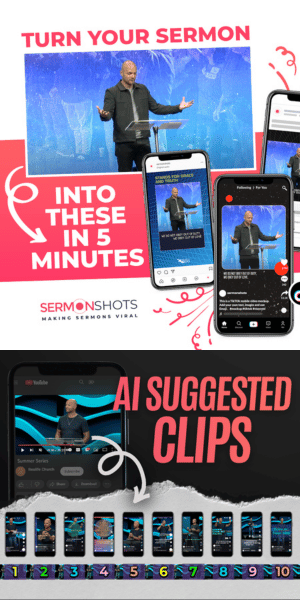
However, many churches face the challenge of not having a dedicated video editing team or volunteers with expertise in advanced video editing software like DaVinci Resolve, Apple iMovie, CapCut, or Adobe Premiere. This is where a tool like SermonShots.com comes in – a user-friendly, web-based platform designed specifically to help churches easily repurpose their sermon videos into engaging Reels.
In this article, we’ll walk you through the step-by-step process of using SermonShots.com to create compelling sermon Reels that will captivate your online audience and expand your church’s digital reach. By investing in short-form content and streamlining your video editing workflow, you’ll be well on your way to building a thriving online ministry that connects with people wherever they are.
Sermon Shots comes to the rescue! We help all skill levels create great quality sermon clips and recaps. The best part is that it only takes minutes because we utilize powerful technologies in a unique way. You are going to be amazed. Here is a quick explanation, step by step, of how it works.
Prefer to watch a video tutorial?
Step-By-Step Directions For Creating Social Media Reels From Sermon Videos
1. Upload Your Sermon
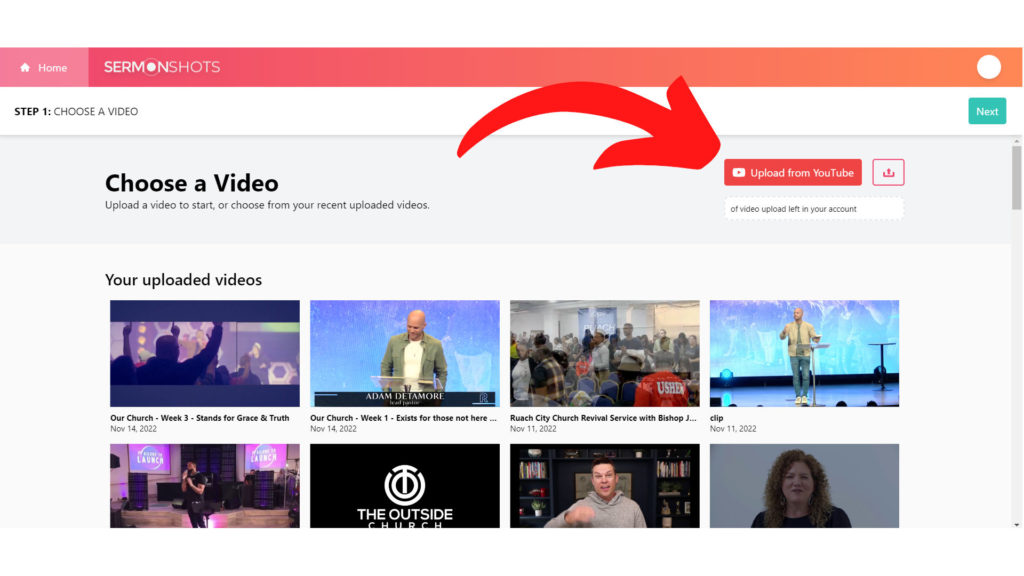
We’re going to use SermonShots.com, so the first step is to go create a free trial account. You can upload a full length sermon video from your computer or device directly.
My preferred method is to upload from YouTube if you have your sermon archive already up on a YouTube channel (if you don’t, we need to talk!).
1. Click the “Upload from YouTube” button on the top right.
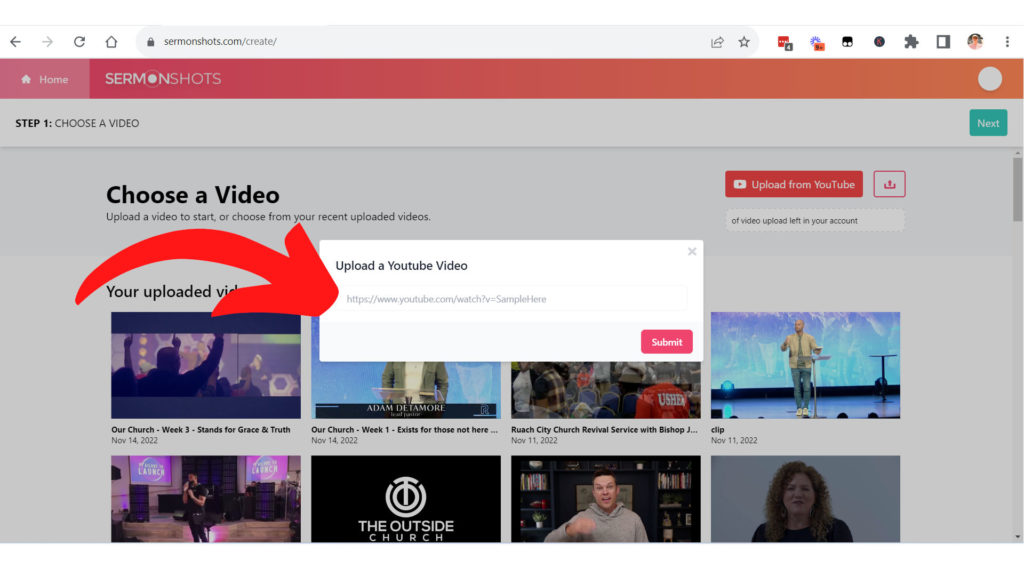
2. Then copy/paste your the YouTube URL.
3. Click “Submit.”
2. Select One Of The 400+ Templates/Designs
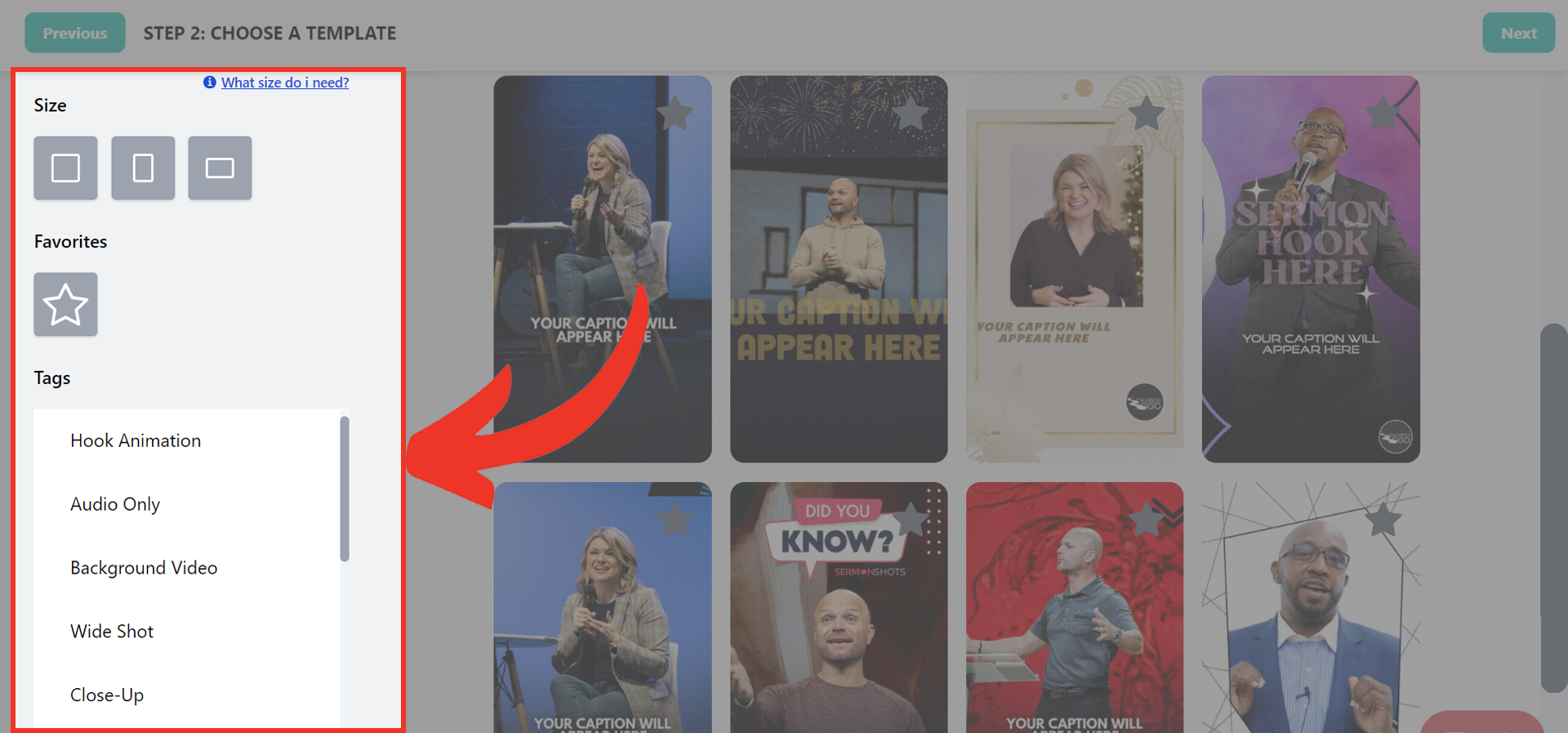
Choose the design template that you want to use for your social media sermon reel.
What I love is that you can filter by keyword for design elements like “Close Up”.
You can also filter the template library by posting format:
• square
• vertical
• or horizontal
After you select your template, click “Next” in the top right corner.
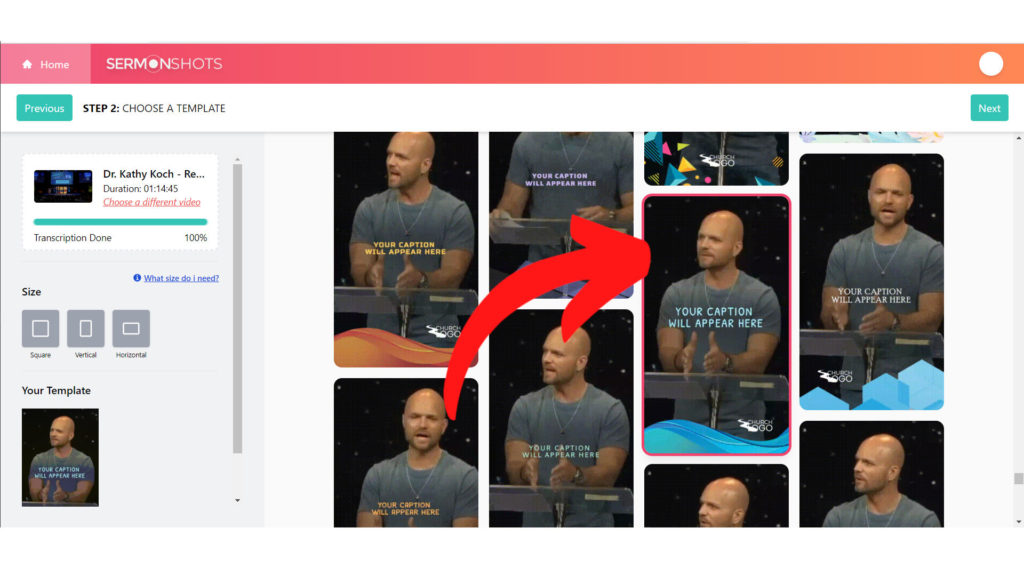
Social Media Best Practice: Use vertical format videos for Instagram & Facebook Reels, YouTube Shorts, and TikTok. Use square for Instagram and Facebook posts. Horizontal should be limited to longer YouTube videos. It *can* be used as a Facebook post, but square is better.
3. Find The Sweet Spot Moments With AI Suggested Clips Or Select Them Yourself
This step is what makes Sermon Shots so quick and easy to use!
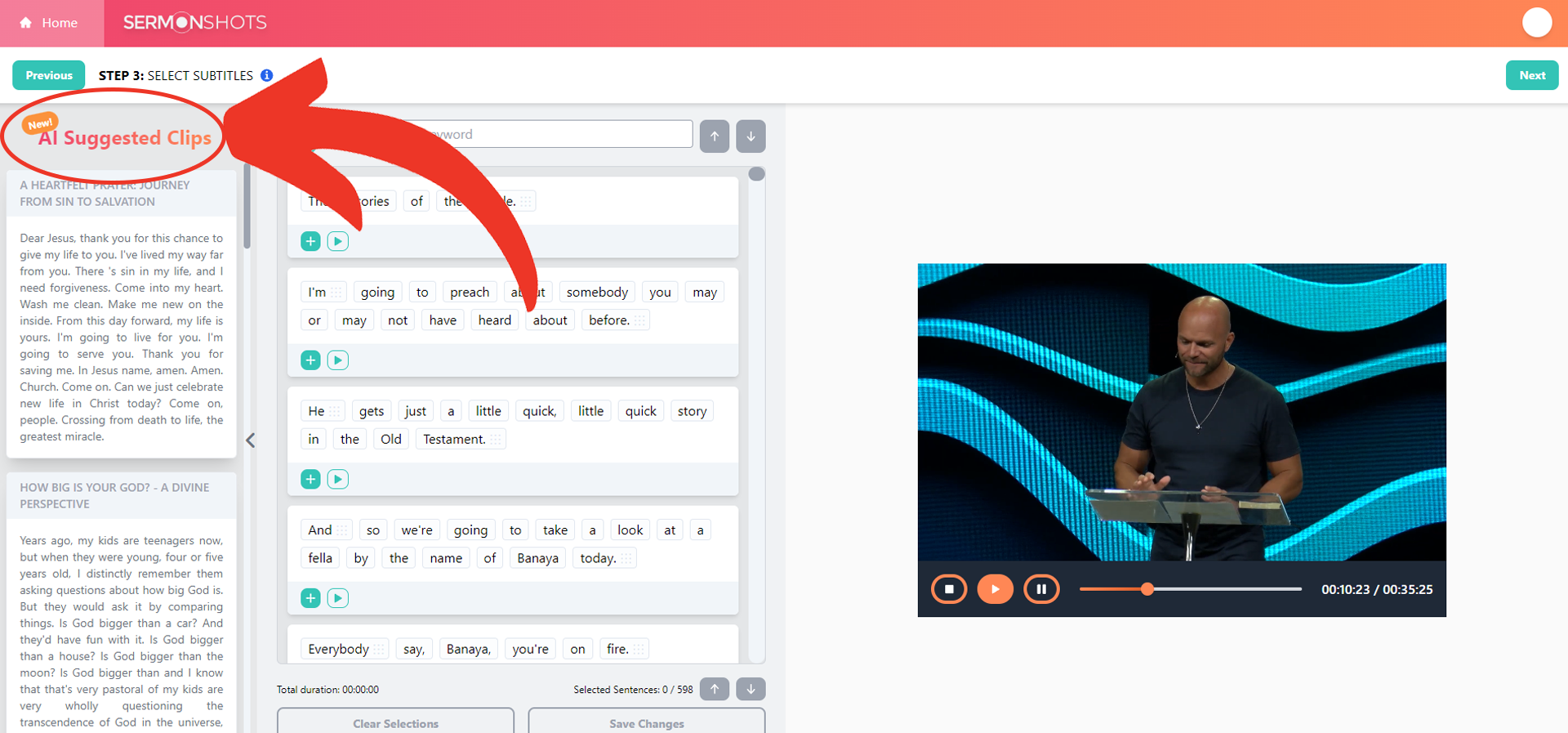
Option 1: AI Suggested Clips
On the left side of Step 3 in the editor view, you’ll see several suggestions to clip.
You can click on each suggestion and the text will automatically be presented from the transcript in the middle panel.
You can still add or delete sections with the [+] plus button on the text bar.
You can even listen through to make sure you have exactly what you want by hitting the play button on the video.
Check out the “time duration” at the bottom of the tool to track how long your clip will be. Remember most platforms limit Stories & Reels formats to 60 seconds or less. While TikTok is pushing long format videos beyond 1 minute currently.
When you’re finished with your transcript section of the video, click “next” again.
Option 2: Find Clips Yourself
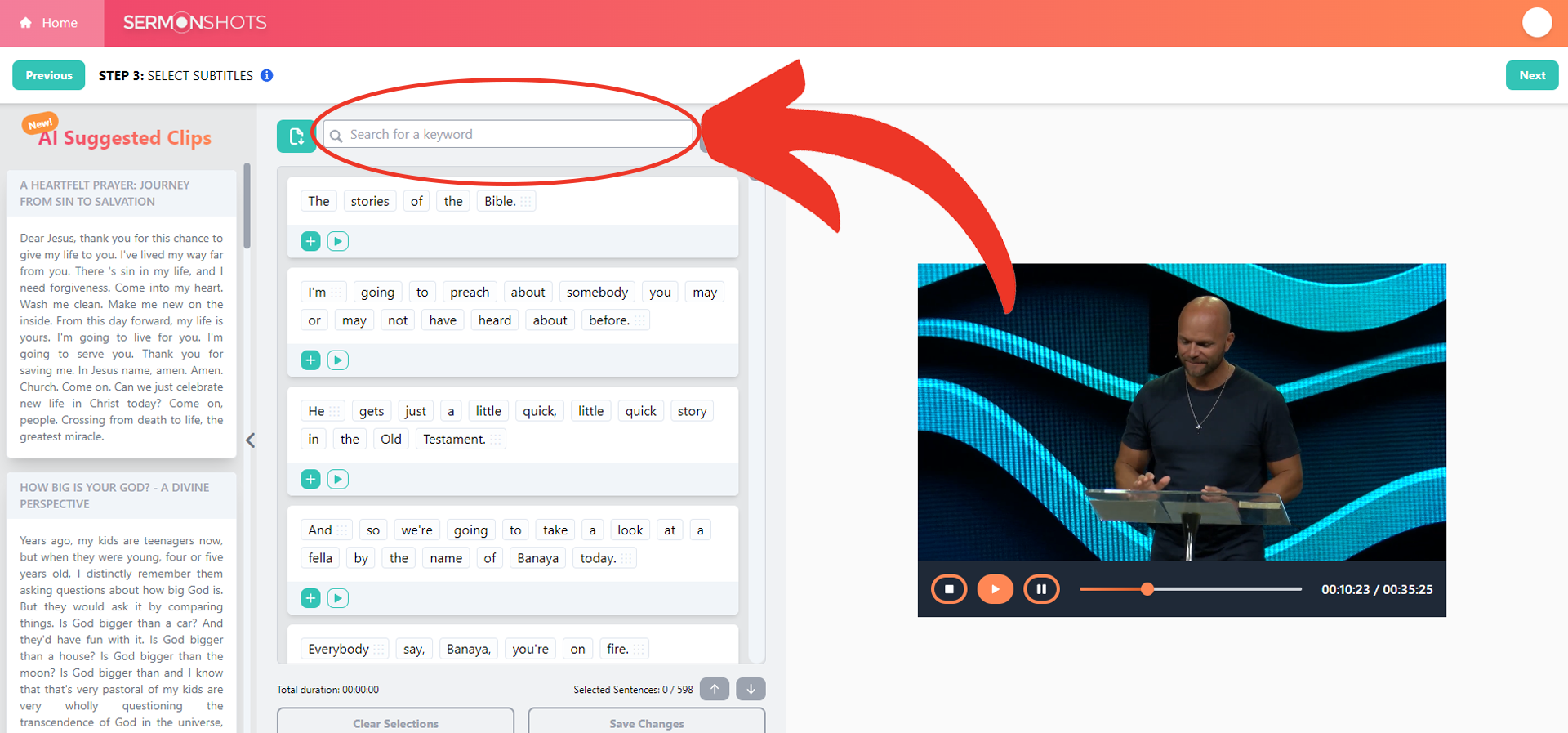
One of the best parts of Sermon Shots is that your entire sermon is automatically transcribed. (You can download it too). This makes your sermon searchable like a Microsoft Word or Google Docs document.
Use the search bar above the displayed transcript to enter a keyword or phrase from the sermon. Sermon Shots will tell you how many times that word or phrase was found and take you right to the first result in both the transcript and the video.
Use the down arrow to advance to the next result that includes your search phrase.
Select the text you want to be included in the clip by hitting the [+]plus button on each text box. You can even listen through to make sure that’s exactly what you want by hitting play.
You can pick one continuous portion or select from different sections of the message to combine more than one point into the clip. You’ll notice that the transcript is broken up into different pieces. This means that you do not need to include full continuous portions of the video. If there was a tangent, or interruption, or something that just doesn’t add to the clarity of the message you’re clipping out, you don’t need to include it! You can cherry-pick phrases and portions of the talk, and later Sermon Shots will auto-cut/edit the video for you. No need to understand how to use fancy video editing software for this.
Remember, be aware of the the total “time duration” for your current video clip, shown at the bottom of the tool to track how long your clip will be.
When you’re finished selecting the text, click “next” again.
Best Practice Tip: The shorter the better and more likely to hold the viewers attention. 30-60 seconds is the goal.
4. Make Final Edits
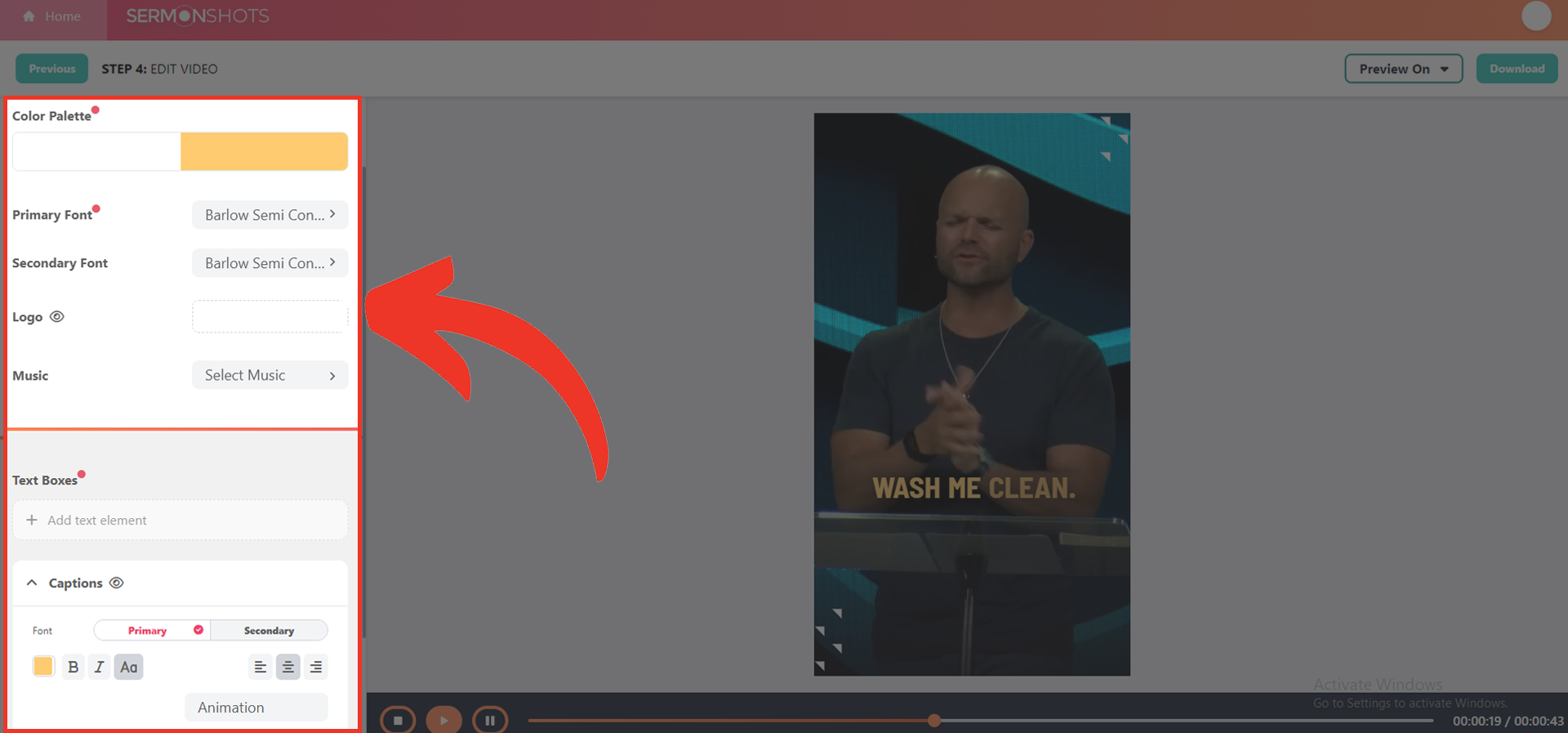
When you are done identifying all the pieces of the video you want included, you can preview the full video by clicking “play”.
Additional edits and improvements are available here now.
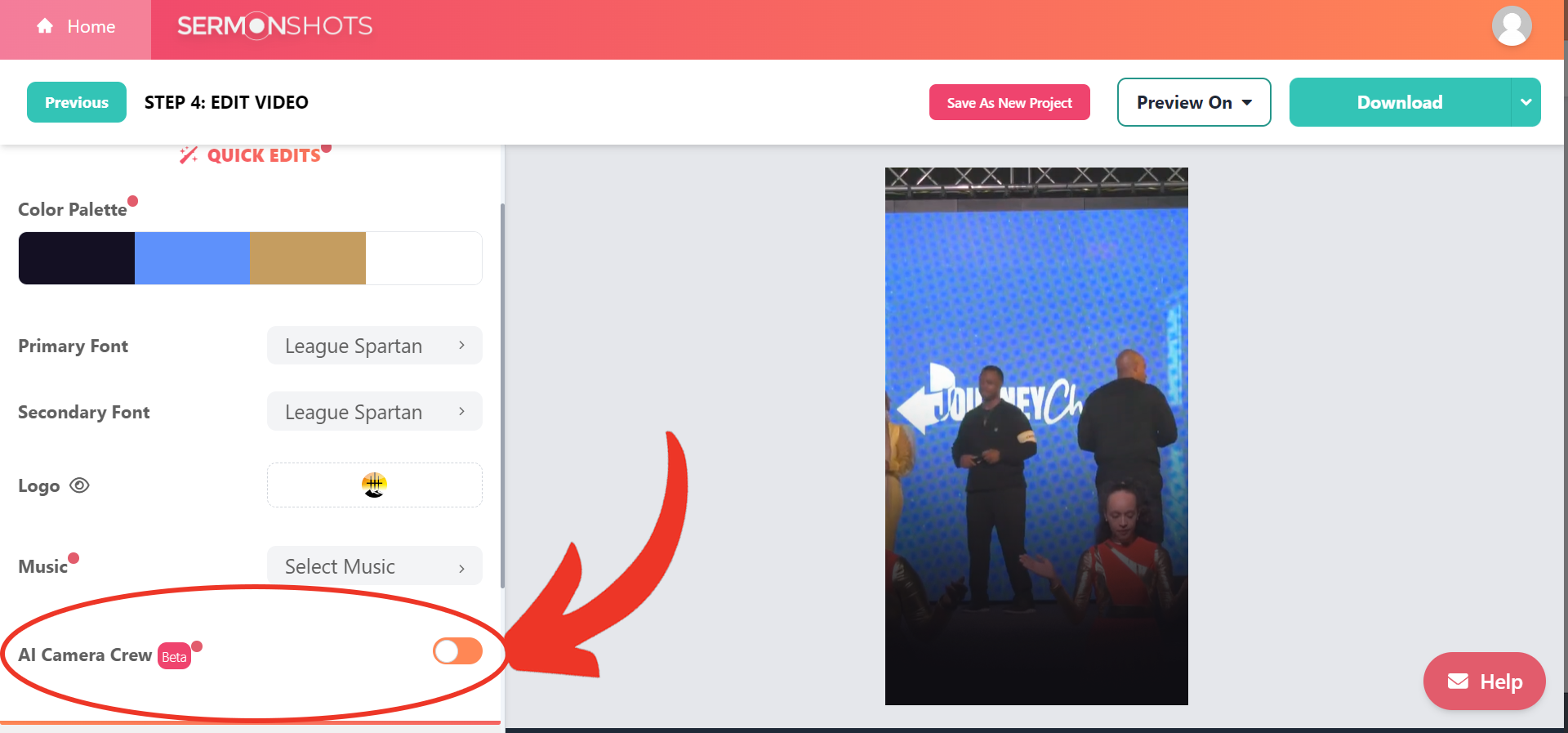
You can change colors, fonts, add your logo, add a title, adjust your caption size, and more.
You can also add background music to give the video some extra emotion.
You can use music tracks already available on the tool or upload your own from your computer.
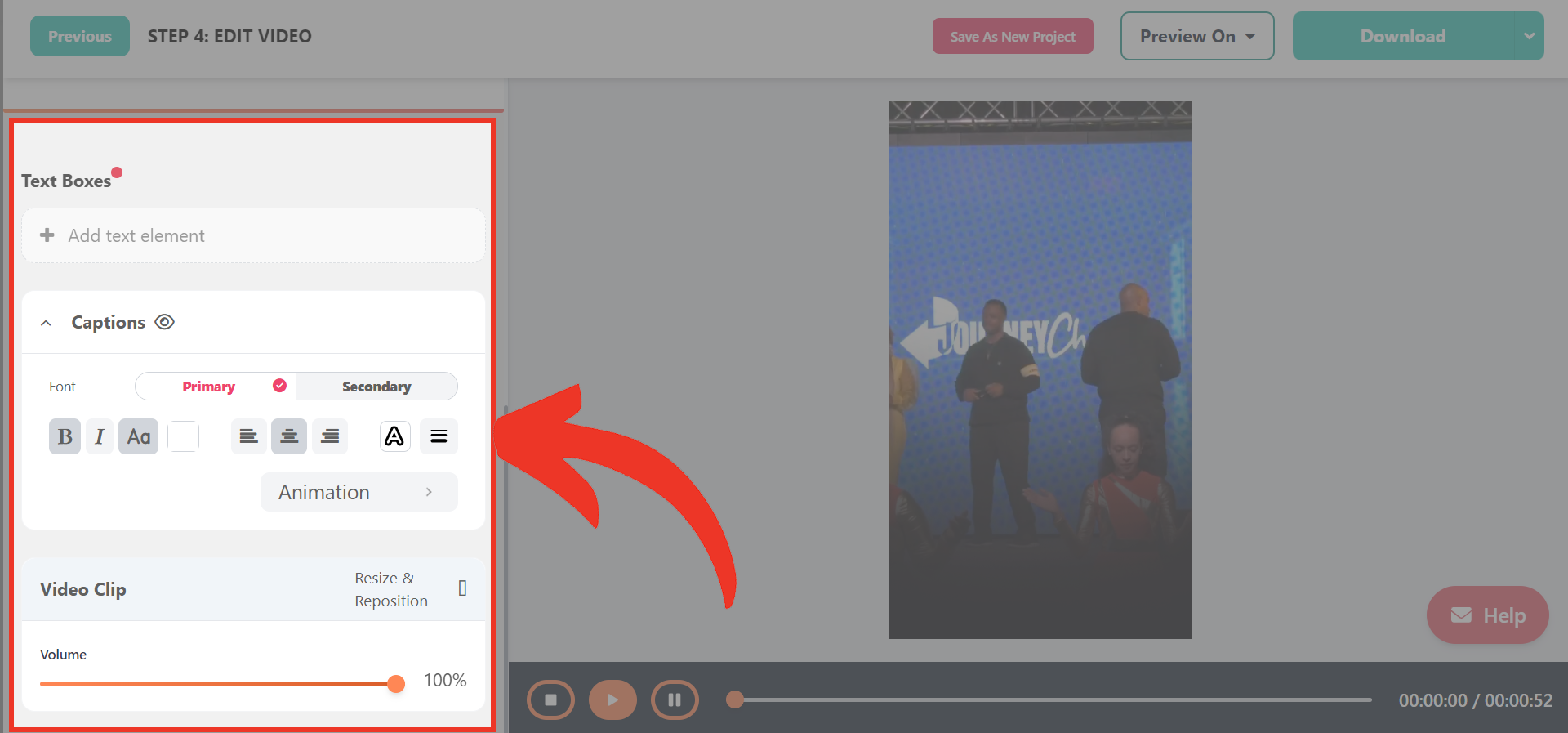
Here’s a powerful feature you should know about: One of the biggest issues with repurposing full wide-format videos into vertical clips is that the central focus, like the pastor on a stage, actually will move around during the recording. And editing the video to follow the subject around left and right can be tedious and maybe beyond your own skillset knowledge with video editing software. There is a solution: You can turn on AI Camera Crew for your video. This is a facial tracking or auto-reframe option that will keep your speaker in view at all times in the vertical video window. Try it, you’ll like it!
Best Practice Tip: The most engaging clips are those that are short, to the point, and inspirational (we call them “amen moments”).
5. Social Site Previews
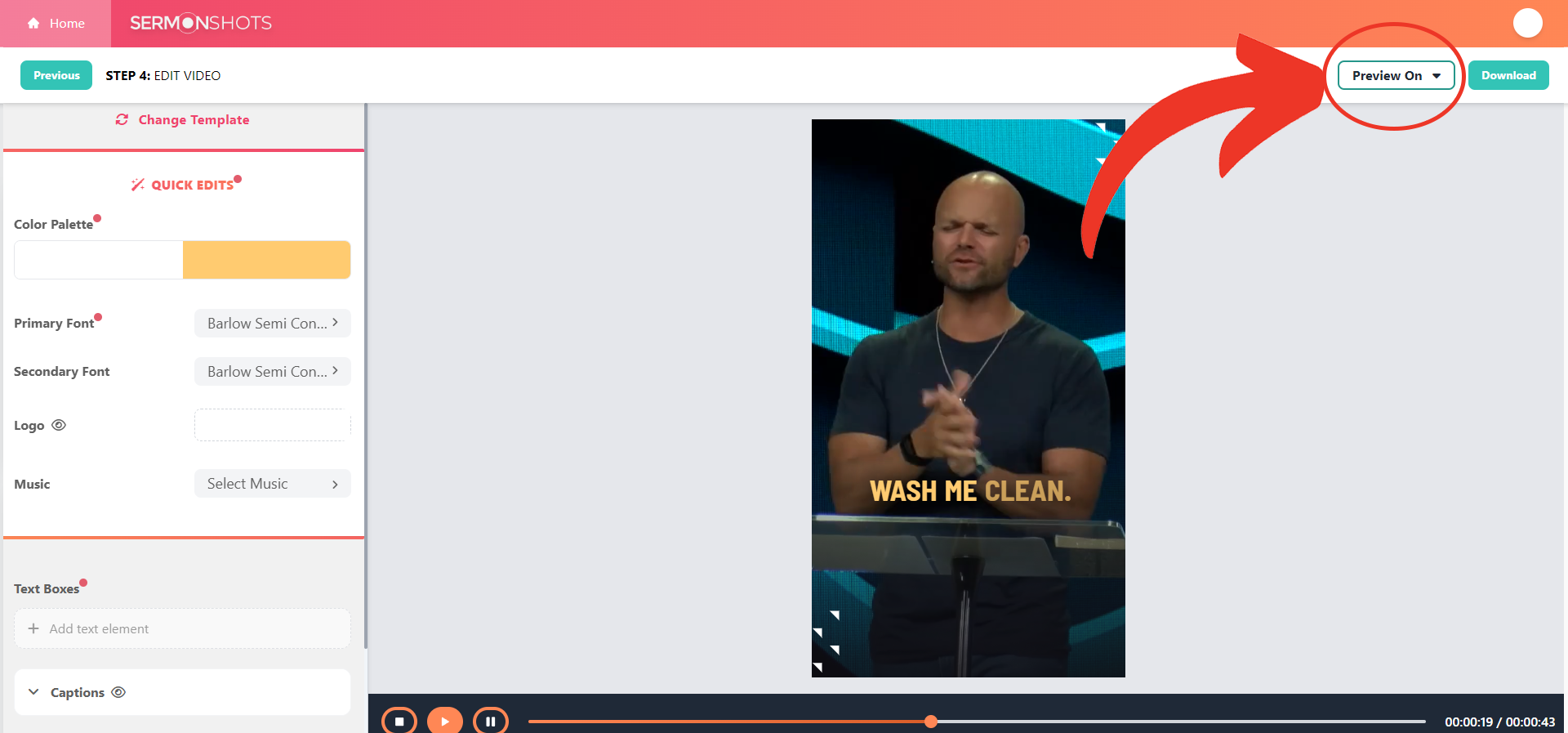
You’re almost done. Click on the “Preview On” Button to see exactly how your clip will look on the different social media platforms.
6. Download And Share On Social Media
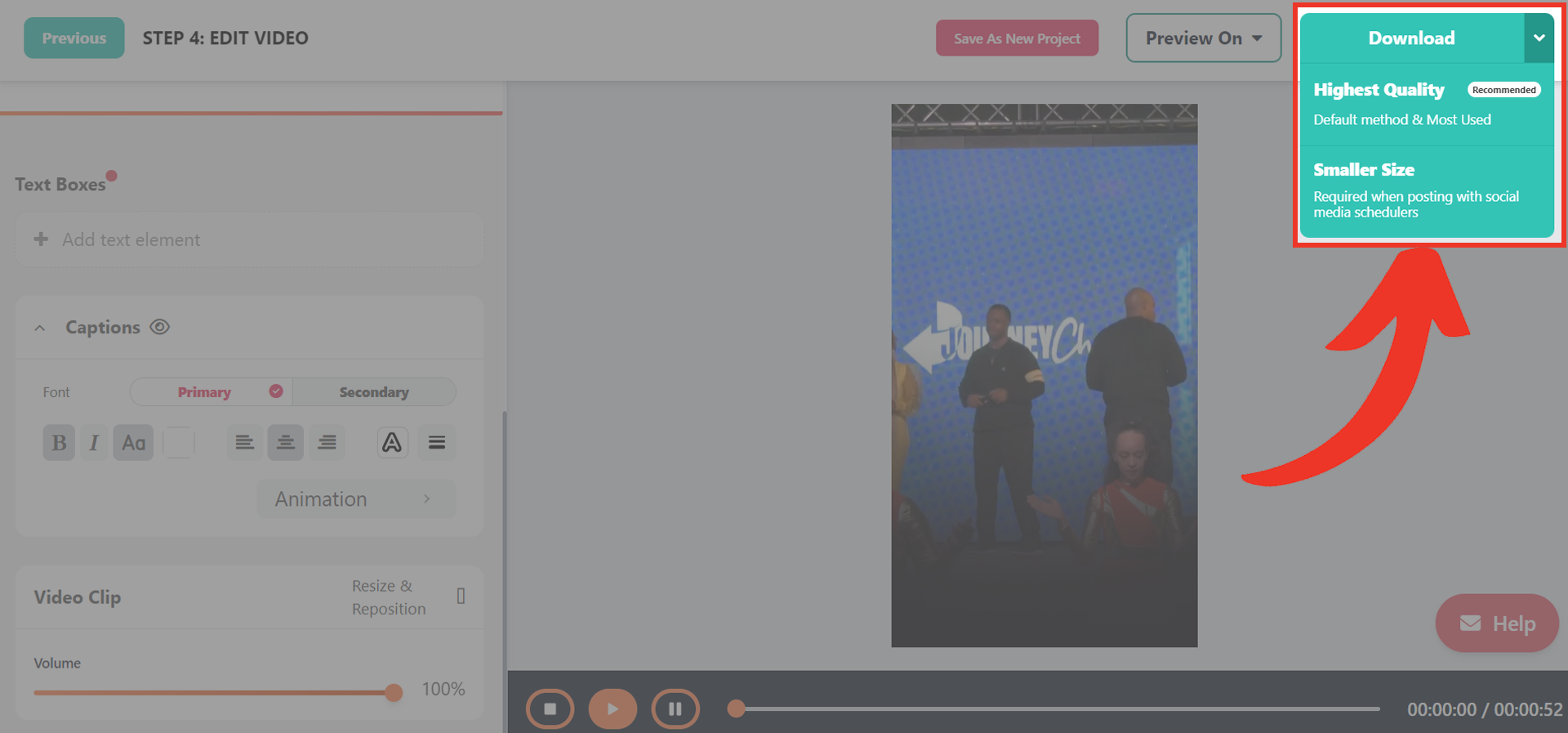
You have two file options when you download: high quality and smaller size.
High Quality is for manually posting your content, meaning you’re going to post directly to the platform of choice.
The Smaller Size download option is for those utilizing a social scheduler.
Many of these services require a slightly smaller MP4 to schedule out the content calendar. After downloading, the video is yours to share anywhere you want!
Best Practice Tip: When posting to social media, add a short description of the video along with popular hashtags to reach more people and increase your chances of virality.
Frequently Asked Questions About Social Media Reels & Short-Form Video For Churches
1. Q: What is a short-form video, and how is it different from traditional video content?
A: Short-form videos are brief, engaging video clips that typically range from 15 to 60 seconds in length. Unlike traditional video content, which can be several minutes or even hours long, short-form videos are designed to capture the viewer’s attention quickly and deliver a concise message. These videos are optimized for social media platforms and are highly shareable, making them an effective tool for reaching a wider audience.
2. Q: Why should my church invest in creating short-form videos for social media?
A: Investing in short-form videos can help your church expand its reach, engage with younger audiences, and share your message in a format that aligns with modern content consumption habits. By creating compelling short-form content, you can attract new visitors, encourage sharing among your congregation, and build a stronger online presence. Additionally, short-form videos can serve as a gateway to your church’s full-length content, driving traffic to your website and other resources.
3. Q: What are the most popular platforms for sharing short-form videos, and how do they differ?
A: The most popular platforms for sharing short-form videos include Instagram Reels, TikTok, Facebook Reels, and YouTube Shorts. While all these platforms focus on short-form content, they have some differences:
- Instagram Reels: Integrated within the Instagram app, Reels are discoverable through hashtags and the Explore page.
- TikTok: A standalone app dedicated to short-form videos, TikTok is known for its viral trends and unique editing features.
- Facebook Reels: Similar to Instagram Reels, Facebook Reels are embedded within the Facebook app and can be shared on Facebook pages and profiles.
- YouTube Shorts: YouTube’s answer to short-form content, Shorts are featured on the YouTube homepage and can help drive traffic to your church’s YouTube channel.
4. Q: How long should a short-form video be for optimal engagement?
A: The ideal length for a short-form video depends on the platform and the type of content. Generally, 15 to 30 seconds is the sweet spot for most platforms, as it allows you to deliver a compelling message while keeping the viewer’s attention. However, some platforms like Instagram Reels and TikTok allow videos up to 60 seconds or even 3 minutes, giving you more flexibility to create longer-form content when necessary.
5. Q: What types of content work best for short-form videos in a church setting?
A: Some effective types of short-form video content for churches include:
- Sermon clips: Highlight powerful moments or key takeaways from your sermons.
- Inspirational quotes: Share inspiring quotes from your pastors or religious texts, paired with engaging visuals.
- Behind-the-scenes glimpses: Give viewers a peek into the life of your church and its community.
- Event promotions: Create short, exciting videos to promote upcoming events or initiatives.
- Testimonials: Share brief testimonials from congregation members about their experiences with your church.
- Worship music clips: Showcase your church’s worship team or share short clips of uplifting music.
6. Q: How can I repurpose my existing sermon content into short-form videos?
A: To repurpose your existing sermon content, follow these steps:
- Identify key moments, stories, or quotes from your sermons that can stand alone as powerful short-form content.
- Use video editing tools like SermonShots.com to easily trim and extract these segments from your full-length sermon videos.
- Add engaging visuals, text overlays, or background music to enhance the impact of your short-form clips.
- Optimize your videos for each social media platform by adjusting the aspect ratio, length, and format as needed.
- Share your repurposed sermon clips on your church’s social media profiles, using relevant hashtags and captions to encourage engagement.
7. Q: What are some best practices for creating engaging short-form videos?
A: To create engaging short-form videos, consider the following best practices:
- Hook your viewers within the first few seconds with a compelling visual or statement.
- Use eye-catching graphics, text overlays, and transitions to keep viewers engaged.
- Ensure your video’s message is clear and concise, focusing on a single key point or theme.
- Optimize your videos for silent viewing by using captions or subtitles.
- Include a strong call-to-action at the end of your video, encouraging viewers to like, share, or visit your church’s website.
- Use relevant hashtags and post at optimal times to maximize your videos’ discoverability.
- Engage with your audience by responding to comments and encouraging shares.
8. Q: Do I need expensive equipment or software to create high-quality short-form videos?
A: No, you don’t necessarily need expensive equipment or software to create high-quality short-form videos. Many modern smartphones have powerful cameras and built-in editing tools that can be used to create engaging content. Additionally, user-friendly web-based tools like SermonShots.com are designed to help churches easily repurpose their sermon content without requiring advanced video editing skills or expensive software.
9. Q: How often should my church post short-form videos on social media?
A: The frequency of posting short-form videos depends on your church’s resources and social media strategy. Aim to post consistently, whether that’s once a day, a few times a week, or once a week. Maintain a regular posting schedule to keep your audience engaged and anticipating your content. However, prioritize quality over quantity – it’s better to post less frequently but maintain a high standard of content.
10. Q: How can I measure the success and impact of my church’s short-form video content?
A: To measure the success and impact of your short-form videos, track the following metrics:
- Views: The number of times your video has been watched.
- Engagement: Likes, comments, and shares your video receives.
- Reach: The number of unique users who have seen your video.
- Click-through rate: If you include a link in your video or caption, track how many viewers click on it.
- Follower growth: Monitor how your short-form videos contribute to increasing your social media following.
- Website traffic: Use analytics tools to see if your videos drive traffic to your church’s website.
By regularly reviewing these metrics, you can gain insights into what content resonates with your audience and adjust your strategy accordingly.
11. Q: What are some common mistakes to avoid when creating short-form videos for social media?
A: Some common mistakes to avoid when creating short-form videos include:
- Trying to cram too much information into a single video, making it feel rushed or overwhelming.
- Neglecting to optimize your videos for silent viewing by adding captions or subtitles.
- Using low-quality visuals, shaky footage, or poor audio that detracts from your message.
- Failing to include a clear call-to-action or not encouraging viewer engagement.
- Posting inconsistently or neglecting to engage with your audience in the comments section.
- Not tailoring your content to the specific platform you’re using or your target audience.
By being aware of these common pitfalls, you can create more effective and engaging short-form videos for your church’s social media presence.
12. Q: Can short-form videos help attract new visitors to my church?
A: Yes, short-form videos can be a powerful tool for attracting new visitors to your church. By creating engaging content that showcases your church’s culture, values, and community, you can pique the interest of potential visitors who may not have otherwise considered attending your church. Short-form videos can also help build trust and familiarity with your church before someone decides to visit in person. Be sure to include clear calls-to-action in your videos, inviting viewers to attend a service or event, or to visit your church’s website for more information.
13. Q: How can I optimize my short-form videos for different social media platforms?
A: To optimize your short-form videos for different social media platforms, consider the following:
- Aspect ratio: Each platform has its preferred aspect ratio. For example, Instagram Reels and TikTok favor vertical videos (9:16), while YouTube Shorts can accommodate both vertical and horizontal videos (16:9).
- Video length: Adhere to the recommended video lengths for each platform. Keep your videos concise and engaging, with the most important information presented early on.
- Caption placement: Ensure that your captions and text overlays are placed within the “safe zones” of each platform’s interface to avoid being cut off or obscured.
- Platform-specific features: Utilize features unique to each platform, such as Instagram’s AR filters, TikTok’s duet function, or YouTube’s end screens, to enhance your videos and encourage engagement.
- Hashtags and descriptions: Use relevant, platform-specific hashtags and write compelling descriptions to increase your videos’ discoverability and provide context for viewers.
By tailoring your short-form videos to each platform, you can maximize their impact and reach the right audience.
14. Q: How can I train my staff or volunteers to create short-form videos efficiently?
A: To train your staff or volunteers to create short-form videos efficiently, consider the following steps:
- Develop a clear workflow and guidelines for creating short-form content, including best practices for filming, editing, and posting.
- Invest in user-friendly tools like SermonShots.com that simplify the process of repurposing sermon content into short-form videos.
- Provide training sessions or workshops to teach your team the basics of video editing, storytelling, and social media optimization.
- Create a content calendar to plan and organize your short-form video creation and distribution.
- Encourage collaboration and idea-sharing among your team members to foster creativity and innovation.
- Regularly review and analyze your short-form video performance to identify areas for improvement and adjust your strategy as needed.
By equipping your staff and volunteers with the necessary tools, training, and resources, you can create a sustainable and efficient short-form video creation process.
15. Q: What role do captions and subtitles play in making short-form videos more accessible?
A: Captions and subtitles play a crucial role in making short-form videos more accessible and engaging for viewers. By adding captions or subtitles to your videos, you can:
- Make your content accessible to deaf or hard-of-hearing individuals.
- Enable viewers to watch your videos in sound-sensitive environments, such as the workplace or public transportation.
- Increase comprehension for non-native speakers or viewers who prefer to read along with the video.
- Boost overall engagement and watch time, as captions can help keep viewers focused on your content.
- Improve SEO by providing search engines with text-based content to index, making your videos more discoverable.
To add captions or subtitles to your short-form videos, you can use built-in tools within social media platforms, third-party captioning services, or create them manually using video editing software.
16. Q: What are some ways to incorporate calls-to-action in short-form videos to encourage viewer engagement?
A: To incorporate effective calls-to-action (CTAs) in your short-form videos and encourage viewer engagement, try the following:
- Use clear and concise language to communicate the desired action, such as “Like and share this video,” “Comment below with your thoughts,” or “Visit our website to learn more.”
- Place your CTAs strategically within the video, typically towards the end or in the caption, to give viewers context before asking them to take action.
- Use Link Stickers within your videos.
- Create a sense of urgency or exclusivity by using phrases like “Limited time offer” or “Be one of the first to know.”
- Offer incentives for engagement, such as exclusive content, resources, or entry into a giveaway.
- Use visual cues, such as arrows or text overlays, to draw attention to your CTAs and make them more noticeable.
- Vary your CTAs across different videos to avoid repetition and maintain viewer interest.
- Align your CTAs with the overall goal of your video and your church’s mission to ensure they are relevant and meaningful to your audience.
By incorporating compelling calls-to-action in your short-form videos, you can encourage your viewers to engage with your content and take the next steps in their faith journey.
17. Q: What are some examples of churches that are successfully using short-form videos in their digital strategy? A: Some churches that are successfully using short-form videos in their digital strategy include:
- Elevation Church: They create engaging Reels and TikTok videos featuring sermon clips, worship music, and behind-the-scenes content.
- Life.Church: They use Instagram Reels and YouTube Shorts to share inspirational messages, sermon snippets, and community stories.
- Transformation Church: They leverage TikTok and Instagram Reels to share powerful sermon moments, worship clips, and inspirational content. These churches demonstrate how short-form videos can be used to engage audiences, share the gospel message, and build a strong online presence.
18. Q: How do I get started with Sermonshots?
A: Use our partner link: www.churchtechtoday.com/sermonshots to set-up a free trial account. Use promo code: churchtechtoday2024 and you’ll get an exclusive offer too.





Solid guide — a lot of church teams say the biggest friction point isn’t the editing itself but the clip identification step: sitting through a 45-60 minute sermon to find the 3-4 moments worth clipping.
Worth adding Sermon Clips (sermon-clips.com) to the toolkit for teams dealing with that. It auto-identifies the strongest shareable moments from the full recording, adds captions, and exports formatted for Reels, Shorts, and TikTok in one step. Free tier available, no credit card. Good complement to the workflow you’ve outlined here — especially for smaller teams without a dedicated video editor.