


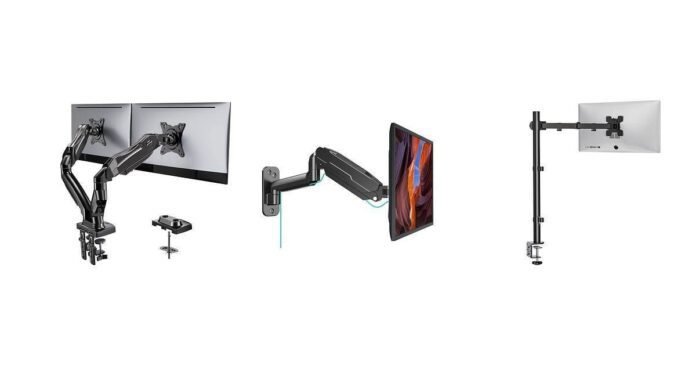
When you’re managing IT in a church setting, creating an efficient, organized, and ergonomic workspace is crucial. Monitor mount arms can transform your setup by freeing desk space, improving screen positioning, and reducing strain during long hours of tech management. Knowing the right mounts to choose will help enhance productivity, maintain a clean environment, and accommodate the variety of screens you oversee. This guide introduces ten standout options that combine quality, flexibility, and value—designed to help you confidently upgrade your IT command center.
How We Picked These Monitor Mount Arms
We focused on mounts compatible with a wide range of monitor sizes (typically 13 to 32 inches, with some up to 49 inches), sturdy build quality, and adjustability features like tilt, swivel, rotation, and height adjustment. Ease of installation and trusted user feedback were also important, as you want solutions that hold up to daily use and fit seamlessly into different desk setups. Affordable pricing balanced with durability was a key factor, ensuring you get lasting value without overspending.
HUANUO Dual Monitor Stand

If you’re looking to upgrade your workspace, this dual monitor stand could be just what you need. It’s designed to fit most 13 to 32-inch monitors and can hold screens weighing between 4.4 and 19.8 pounds.
Whether you’re dealing with two identical monitors or different sizes, this stand’s flexibility has got you covered. The gas spring arms make moving your screens smooth and easy, which means less hassle when adjusting angles or height throughout your busy day.
Plus, it frees up your desk space nicely and helps keep everything neat with its built-in cable management. Whether it’s for regular office hours or those marathon IT setup days at church, this monitor arm makes multitasking feel a lot less cluttered and a lot more comfortable.
What People Say
Most folks appreciate how sturdy and easy to adjust this stand is once you get the tension dialed in right. People with different monitor sizes love how it handles uneven VESA placements and frees up their desk space. Just keep in mind, it works best with wooden desks that are 0.59″ to 3.54″ thick and without any interfering cross beams underneath.
🗣️ Adrian
Very very good for the price. Used it with a 75mm VESA mount and dual 27-inch monitors. Makes it so easy to adjust. Very sturdy with no wobble on my desk. Installation took about 45 minutes and was easy to understand. The adjustable tightness on the joints lets you find the perfect balance depending on your monitor’s weight.
🗣️ Elizabeth M
Great product. Once you adjust the tension, they’re super easy to use and move around smoothly, just like in the videos. I had to drill a hole for mounting since the clamp didn’t quite fit on my desk, but that was no big deal and it’s impossible to tell now. Also, the option to add USB outlets is handy, but you’ll need to order those parts separately to install before mounting.
Ease of Use
| Feature | Ease Level |
|---|---|
| Installation | Moderate – takes about 45 minutes with clear instructions |
| Adjustment | Easy – gas spring arms offer smooth tilt, swivel, and rotation |
| Tension Control | Moderate – you can tighten or loosen joints to match monitor weight |
| Mounting Options | Easy – choose between clamp or grommet mount based on your desk |
Versatility
This mount handles a wide range of monitor sizes and weights, and it’s great whether your desk setup includes two identical screens or different sizes. Its ability to adjust angles and height independently on each arm gives you a lot of freedom to create a comfortable, ergonomic workstation.
Plus, switching between the clamp or grommet mounting means it can fit various desk styles.
Why You’ll Like It
- Fits monitors from 13 to 32 inches and supports up to 19.8 lbs each
- Gas spring arms make adjusting easy and smooth
- Two mounting options: C-clamp or grommet for flexibility
- Helps improve posture by raising screens to eye-level
- Built-in cable management keeps your setup tidy
Current Price: $59.99
Rating: 4.6 (total: 29,823+)
HUANUO Single Monitor Mount

If you’re looking to clear up your workspace and get that perfect screen position, this HUANUO single monitor mount is a solid pick. It fits a wide range of monitors from 13 to 32 inches and supports weights up to 19.8 pounds, which covers most setups you’ll have in church IT or your home office.
The gas spring arm means you can position your screen with just one hand, making it a breeze to get comfortable angles whether you’re making quick adjustments or settling in for long hours. Plus, it offers two mounting options so you can pick the best fit for your desk, and it even hides cables neatly to keep things tidy. It’s a budget-friendly upgrade that feels way sturdier than you’d expect.
What People Say
Folks often mention how stable and flexible this mount is once you get the tension right. It handles heavier or larger screens surprisingly well and frees up desk space, which makes it perfect for busy workstations. Just be mindful of your desk thickness and setup for the best fit.
🗣️ sg
I’ve used this mount for over three years, starting with a 27” monitor and recently trying a 34” ultrawide. It easily handles the bigger size and stays rock steady. The gas spring is strong and smooth, though it can take some effort to loosen at first. This has definitely improved both my work and gaming setups.
🗣️ Connor Holzinger
Bought this to save space in a tight work area without drilling holes. It holds up well and is surprisingly sturdy, freeing up workspace and letting me place my monitor just where I need it. Assembly is straightforward if you follow instructions closely.
Ease of Use
| Feature | Ease Level |
|---|---|
| Installation | Moderate – straightforward with included hardware, expect about 15 minutes |
| Adjustment | Easy – gas arm lets you tilt, swivel, and rotate smoothly |
| Tension Setup | Moderate – may require some twisting to get perfect tension |
| Mounting Options | Easy – choose clamp or grommet to match your desk |
Versatility
This mount’s an all-rounder that works well on a range of desk setups. Whether you want a clamp mount for quick setup or a grommet for extra stability, it adapts nicely.
It fits many monitor sizes and weights, and lets you freely adjust positioning so you can create a comfy, ergonomic workspace, perfect for IT work or long streaming sessions.
Why You’ll Love It
- Fits monitors sized 13 to 32 inches and supports up to 19.8 lbs
- Gas spring arm allows smooth, one-handed adjustments
- Two mounting options: clamp or grommet to fit your desk style
- Integrated cable management keeps your desk neat
- Sturdy alloy steel build tested for long-lasting reliability
Current Price: $35.99
Rating: 4.6 (total: 14,253+)
WALI Single Monitor Mount

If you’re ready to reclaim your desk and tweak your monitor’s position with ease, the WALI Single Monitor Mount is worth a look. It’s built to handle most 17 to 34-inch monitors, even those heavier curved screens up to 19.8 lbs. The gas spring design means you can effortlessly adjust height and angle without fumbling around, making it practical for everything from daily tasks to longer work sessions.
Plus, with both clamp and grommet mounting options, you’ve got flexibility to match your desk setup. It’s sturdy, keeps cables tucked away, and won’t stretch your budget.
What People Say
People love how flexible and solid this mount is once it’s set up. It’s great for heavier or larger monitors, letting you position your screen comfortably while freeing up desk space. A few mention the initial stiffness in adjustment, but it loosens up quickly with use.
🗣️ Joe D.
This is the first monitor mount of this type I’ve used. Assembly was simple and the mount feels high quality in both build and design. It offers two mounting options with perfect hardware, plus a tool to tighten hex bolts when you want to lock the monitor’s position. It gives you a ton of freedom to adjust height, distance, and even orientation, and it handles a 34” monitor without issues. Surpassed my expectations at this price.
🗣️ Keyara
Got two of these to free up space in our office and they’ve been great. Assembly was easy, and I love being able to swivel and tilt the monitor just the way I want. The quality feels solid and durable, which matters a lot when you’re juggling tight setups. Definitely recommend it if you want a stable, adjustable mount without spending too much.
Ease of Use
| Feature | Ease Level |
|---|---|
| Installation | Moderate – straightforward with included hardware and clear instructions |
| Adjustment | Easy – smooth swivel, tilt, and rotation after initial tension setup |
| Tension Tuning | Moderate – may need some effort to get just right initially |
| Mount Type Options | Easy – pick clamp or grommet to suit your desk |
Versatility
This mount flexes nicely to fit a variety of desks and monitor styles. Whether you need quick clamping or a more permanent grommet mount, it adapts well.
You can swivel, tilt, and raise your screen for ergonomic comfort, which makes it an excellent choice for church IT directors juggling busy workspaces or anyone aiming to upgrade their setup.
Why You’ll Appreciate It
- Supports monitors from 17 to 34 inches, including curved ones up to 19.8 lbs
- Effortless height and angle adjustments with a gas spring arm
- Two mounting choices: clamp or grommet to fit your desk style
- Cable management system keeps your workspace tidy
- Durable metal construction built to last
Current Price: $24.99
Rating: 4.4 (total: 621+)
VIVO Single Ultrawide Arm

You’ll find the VIVO Single Ultrawide Arm a solid companion for freeing up your desk while keeping your monitor exactly where you want it. It handles screens between 13 and 32 inches easily, plus ultrawide displays up to 38 inches, so chances are it’ll fit your setup perfectly.
The arm swivels, tilts, and rotates, allowing you to position your screen in portrait or landscape mode without breaking a sweat. Setup is pretty straightforward thanks to the detachable VESA plate, and you get to tidy up all those cables with built-in clips.
If you’re looking to maximize workspace in your church IT area or just want a stable, adjustable arm that won’t drain your budget, this is a worthy pick.
What People Say
Users appreciate how sturdy and stable this mount is, especially with ultrawide screens. Many note that while height adjustments require loosening a bolt, the swivel and tilt functions are smooth and reliable. The included cable clips get shoutouts for helping maintain a clean desk space.
🗣️ Flesh Pistol
Great value for the money. I currently have a 32″ Ultrawide on this and it’s secure and doesn’t shake or wobble. Easy to assemble and mount to the desk. Height adjustment takes a bit more effort but nothing frustrating. The cable management clips help keep things neat.
🗣️ Jesus
I love that the stand gives you two options for mounting and is very sturdy and good-looking. Once you figure out the build, it’s smooth sailing. The size and positioning work perfectly for my needs, making my workspace more efficient.
Ease of Use
| Feature | Ease Level |
|---|---|
| Installation | Moderate – requires some assembly but all parts and instructions are included |
| Height Adjustment | Moderate – needs an allen key to loosen and tighten for changes |
| Swivel & Tilt | Easy – smooth and flexible movement once set up |
| Mounting Options | Easy – choose between C-clamp or grommet based on your desk |
Versatility
This arm adapts well to a wide range of monitors and setups. Whether you work with regular or ultrawide screens, the full swivel, tilt, and height adjustments provide ergonomic comfort throughout your workday. Plus, with two mounting styles, it works for nearly any desk you have in the church’s tech space.
What Makes It Stand Out
- Supports ultrawide monitors up to 38 inches and 22 lbs
- Full articulation with tilt, swivel, rotation, and 16″ height adjustment
- Dual mounting choices: clamp or grommet to fit various desks
- Built-in cable management keeps wires organized and out of sight
- Easy installation with detachable VESA plate and included hardware
Current Price: $34.99
Rating: 4.4 (total: 19,415+)
MOUNTUP Single Monitor Arm

If you’re looking to clear up your desk and give your monitor some real flexibility, the MOUNTUP Single Monitor Desk Mount is a great fit. It handles screens up to 32 inches and supports a good weight range, so it works with most setups you’ll find in a church IT room or home office.
What’s cool is how smoothly you can tilt, swivel, and rotate the screen, which means you can adjust it perfectly whether you’re sharing your screen or just need a better angle for those long work sessions. The installation is straightforward, and it cleverly hides your cables to keep your space looking neat and less cluttered.
If you want an affordable, sturdy arm that lets you customize your workspace without fuss, this one’s worth considering.
What People Say
People love how much desk space this mount frees up and how simple it is to adjust their monitor to just the right spot. The sturdy gas spring makes height adjustments smooth, and the cable management feature is a subtle but big help for keeping things tidy. Though some mention the motion range could be a bit wider, overall it’s seen as a dependable arm that holds your screen steady without fuss.
🗣️ Andrew
Easy to put together, works like a charm. My monitor stays put without wobbling, and I’d definitely recommend it to anyone who needs a reliable monitor mount. The setup took less than 15 minutes, and it really cleared up my desk space.
🗣️ dcwolt
Bought this for my 32″ TV used as a monitor, and it worked great. The instructions were easy to follow and the build quality is solid. It’s adjusted easily and feels sturdy during use.
Ease of Use
| Feature | Ease Level |
|---|---|
| Installation | Easy – clear manual and all hardware included, no drilling needed |
| Height Adjustment | Easy – smooth gas spring action with adjustable tension |
| Swivel & Tilt | Easy – moves smoothly and locks in place well |
| Mounting Style | Easy – choose between clamp or grommet to fit your desk |
Versatility
This monitor arm works well with a wide variety of flat and curved monitors, as long as they’re under 32 inches and roughly 17.6 lbs. Whether you’re setting up a streaming station, managing multiple displays at your church office, or just want a clean, ergonomic desk setup at home, it adapts nicely. Plus, with reliable construction and two mounting options, it fits most desks and use cases without any headaches.
Why You’ll Like It
- Supports monitors up to 32 inches and 17.6 lbs
- Fully adjustable with tilt, swivel, rotate, and height movement
- Two mounting options: clamp or grommet for different desks
- Built-in cable management keeps your setup clean and organized
- Quick, drill-free installation with clear instructions included
Current Price: $29.98
Rating: 4.4 (total: 13,491+)
ErGear Dual Monitor Stand

When you’re juggling multiple screens in your church IT setup, having a solid, adjustable mount makes all the difference. The ErGear Dual Monitor Stand holds two monitors up to 32 inches each, letting you tilt, swivel, rotate, and adjust height so you get just the right angle.
It’s surprisingly sturdy for the price, and the cable management clips really help keep those cords out of the way. Whether you’re streaming services, managing presentations, or just need that extra desk space, this mount cleans things up and keeps your monitors exactly where you want them without floppiness.
Setup is pretty straightforward too, so you won’t be stuck fumbling with it for long.
What People Say
Users appreciate how stable and durable this dual mount is, especially at its price point. Setup is usually quick, and the wide range of motion lets you find comfortable viewing angles without fuss.
The cable management hooks are a simple but effective feature that keeps things neat. A few mention the monitor plate could fit a bit tighter, but overall it’s praised as a reliable and affordable solution.
🗣️ Kyle Oates
I’ve had this stand for over three years and it’s still rock solid. Once I set it up, everything aligned perfectly and I never had to tighten a thing after that. It handles two monitors with ease and the cable management keeps my desk neat. Definitely a durable choice for the price.
🗣️ Danny TR
Installation was super easy, and the arms move smoothly to get the perfect position. It’s held my two 32-inch screens securely without any wobble. The built-in cable routing is a nice touch, keeping things tidy. Definitely recommend if you’re looking for a solid dual monitor mount that won’t break the bank.
Ease of Use
| Feature | Ease Level |
|---|---|
| Installation | Easy – clear instructions and included hardware make for straightforward setup |
| Height Adjustment | Moderate – smooth adjustment but may require some initial tightening |
| Swivel & Tilt | Easy – moves well with good locking stability |
| Cable Management | Easy – built-in clips make organizing cables simple |
| Mounting Options | Easy – choose clamp or grommet to suit your desk style |
Versatility
This stand is a great fit whether you’re setting up a focused workspace at the church or creating a dual screen setup at home. It works well with most monitors between 13 and 32 inches and handles heavier screens up to about 17.6 lbs per arm.
The adjustable arms allow different monitor positions and viewing angles, which is handy when you’re switching between streaming, editing, or general office work. Plus, with two mounting methods, it suits a variety of desks and setups.
Why You’ll Like It
- Supports dual monitors from 13″ up to 32″ and up to 17.6 lbs per arm
- Adjustable with tilt, swivel, rotation, and height for ergonomic comfort
- Flexible mounting options with clamp or grommet to fit your desk
- Built-in cable management keeps cords under control and your desk clean
- Sturdy alloy steel build that feels solid once set up
Current Price: $28.98
Rating: 4.4 (total: 20,742+)
Suptek Gas Spring Monitor Arm

If you’re looking to clear up your desk but still want ultimate flexibility with your monitor setup, this Suptek gas spring arm has your back. It fits most monitors between 17 and 32 inches, supporting up to 22 pounds without feeling flimsy.
The gas spring action lets you effortlessly adjust height and angle, whether you’re sitting or standing. Plus, it swivels and tilts smoothly so you can find the perfect position to keep your neck and back happy during those long service days.
Installation is pretty straightforward with clear instructions and comes with a clamp and grommet option depending on your desk type. It’s a practical choice when you want your workspace to feel open and comfortable without breaking the bank.
What People Say
Most users mention how this arm transforms their workspace by freeing up desk room and allowing easy, exact positioning of their monitor. People like how solid and sturdy it feels, even when holding bigger screens, and say the installation is hassle-free. A few wish for better cable management, but overall it’s praised for reliability at a great price.
🗣️ AV
Super easy to mount and adjust. Mounted my monitor, there’s so much space on my desk now. No more cables everywhere! Such a functional tool for my desk. Definitely sturdy.
🗣️ Ghost
I purchased this arm for my desk and it’s very strong metal and should last for years. It holds my monitor securely while freeing up valuable desk space. Easy to attach to desk edge or grommet hole. Highly recommended.
Ease of Use
| Feature | Ease Level |
|---|---|
| Installation | Easy – step-by-step manual and hardware included make it simple |
| Height Adjustment | Easy – gas spring mechanism is smooth and responsive |
| Swivel & Tilt | Easy – rotates 360° and tilts ±80° with good stability |
| Mounting Options | Easy – clamp or grommet fit desks up to 3.85″ thick |
| Cable Management | Moderate – basic cover included but could be roomier |
Versatility
This mount works well whether your church setup is a simple desk station or a more mobile workstation. It’s great for various monitors under 32″, and the smooth gas spring arm makes switching between sitting and standing positions effortless. With both clamp and grommet options, you can fit it to almost any desk, keeping your space open and ergonomic for all-day use.
Why You’ll Like It
- Flexible gas spring arm offers smooth height and angle adjustments
- Fits most monitors from 17″ to 32″ and supports up to 22 lbs
- 360° swivel and ±80° tilt lets you find your best ergonomic setup
- Two mounting options: clamp or grommet to save desk space
- Sturdy alloy steel construction ensures long-lasting durability
Current Price: $21.39
Rating: 4.4 (total: 3,357+)
MOUNT PRO Single Monitor Wall Mount

If you’re looking to free up your desk and gain maximum flexibility, this MOUNT PRO wall mount is worth considering. It works great with most monitors from 13 to 32 inches, and its gas spring arm makes adjustments smooth and effortless.
Whether you want to tilt, swivel, or rotate your screen, this mount has you covered. The integrated cable management helps keep things neat, and it comes with all the hardware you need to install it on wood studs or concrete walls pretty quickly.
It’s a solid choice when you want a sturdy wall mount that feels reliable without much fuss.
What People Say
Folks really appreciate how this mount frees up desk space and gives them smooth, stable monitor positioning. It’s praised for easy setup and solid build quality, though some mention the cable clips could hold cables a bit better. Overall, it’s seen as a reliable and versatile wall mount that lasts.
🗣️ Angelica E.
This unit is super easy to mount and adjusts smoothly. I love how much desk space it frees up. The cord guides could be sturdier, but with a little tape the cables stay put. Overall, a solid and reliable mount that I’ve bought several times.
🗣️ MrJoe
I’m using this to hold a monitor in my CNC shop and it’s been fantastic. Strong and stable with very smooth motion, it holds the monitor exactly where I put it. Installation was straightforward with clear hardware included. Great for tougher environments too.
Ease of Use
| Feature | Ease Level |
|---|---|
| Installation | Easy – clear instructions and hardware included make it quick |
| Height Adjustment | Easy – gas spring action is smooth and responsive |
| Swivel & Tilt | Easy – good range of motion and holds position well |
| Cable Management | Moderate – clips keep wires organized but could be firmer |
| Compatibility Setup | Easy – fits most VESA 75×75 & 100×100 monitors 13–32 inches |
Versatility
This mount fits a wide variety of monitors used in church IT setups, whether you’re working at a control station or running AV in the booth. It’s sturdy enough for heavier screens but still easy to adjust for quick viewing changes.
The wall mount design frees valuable workspace and adapts well to different wall types, making it a flexible choice for various environments.
What You’ll Like
- Smooth gas spring arm allows easy height and angle adjustments
- Supports monitors between 13″ and 32″ up to 17.6 lbs
- Full range motion: tilts ±90°, swivels 180°, rotates 360°
- Integrated cable management keeps your setup neat
- Easy installation on wood studs and concrete walls with included hardware
Current Price: $33.99
Rating: 4.5 (total: 1,523+)
WALI Extra Tall Monitor Arm

If you need a reliable mount that lifts your monitor up high and lets you tweak the angle just right, this WALI arm is a solid pick. It supports most flat panels up to 32 inches and can hold up to 22 pounds, so it’s great for larger screens in your church’s control room or office.
The cool part is that it uses a sturdy pole instead of springs or pistons, so once you’ve set the height, it stays put without drifting. Plus, you get options for mounting—it clamps right to your desk or goes through a grommet hole if you have one. Working comfortably for long hours becomes easier when your screen is at the perfect height and angle, and the extra space on your desk is a nice bonus too.
What People Say
Users appreciate how solid and stable this mount feels, especially compared to those spring-loaded arms that can wear out. The height adjustment using the pole is straightforward and reliable, so you don’t end up with monitors drifting down over time.
People who need multiple monitors love the flexibility of positioning them just right, and overall it’s a favorite for boosting workspace comfort and tidiness.
🗣️ JR
The mount was super straightforward to set up, with hardly any assembly required. I love how stable it is compared to spring-loaded arms. Adjusting the height is a breeze—just loosen, move, and tighten. Having two single arms lets me get the monitors perfectly edge-to-edge against the wall, which double arms just don’t allow. It really helped clear up my desk space and makes long sessions less painful on my neck.
🗣️ KB
I needed a mount that worked with a desk grommet and still allowed cables to pass through neatly. This one nailed it. The two-piece VESA mount was easy to handle and gave a secure fit. I was even able to zip tie a USB hub to the arm, cleaning up my workspace nicely. The arm swings around well and supports rotation, so I have plenty of flexibility without it feeling loose or wobbly.
Ease of Use
| Feature | Ease Level |
|---|---|
| Installation | Easy – minimal assembly with clear instructions |
| Height Adjustment | Easy – loosen, slide on the pole, then tighten |
| Tilt & Swivel | Moderate – wide range but tilt can feel a bit stiff |
| Rotation | Easy – full 360° rotation for landscape or portrait |
| Mounting Options | Easy – choose between clamp or grommet for desk setup |
Versatility
This monitor arm suits a ton of setups — whether you’re at a tight desk in the tech booth or organizing multiple stations in the church office. The adjustable height and solid arm make it ideal for heavier or larger monitors.
The two mounting choices help fit different desk styles, and since it doesn’t rely on springs, it handles less frequent height changes really well. If you want a dependable way to reclaim desk space and keep your screens flexible, this fits the bill nicely.
Why You’ll Like It
- Supports flat panel monitors up to 32” and 22 lbs
- Height adjustable 31.5” tall pole for ergonomic setups
- Tilt, swivel, and 360° rotation let you find your perfect angle
- Two-stage mounting options: C-clamp or grommet base
- Sturdy alloy steel build that stays solid without springs or pistons
Current Price: $29.99
Rating: 4.6 (total: 5,011+)
WALI Ultrawide Monitor Arm

If you’re juggling a big, heavy ultrawide or curved monitor, this WALI arm is a handy helper. It can easily support screens up to 49 inches and 33 pounds, which is perfect if you’re running a serious setup in the church IT or media booth.
The gas spring makes adjusting the angle smooth, letting you tilt, swivel, or flip your monitor into portrait mode without much effort. Plus, it clamps on your desk or goes through a grommet hole, so you’ve got options depending on your workspace.
It keeps your desk clear and your screen exactly where you want it, making long hours of screen time easier on your neck and eyes.
What People Say
People rave about how sturdy and reliable this arm feels, especially for ultrawide or heavy curved monitors. The gas spring mechanism makes positioning your screen a breeze once you dial in the tension.
Users also highlight the fairly easy installation, noting that even solo setups are manageable. Cable management and mounting flexibility pop up as nice extras that help keep things organized.
🗣️ Jeff
Upgraded my multi monitor setup with Samsung Odyssey G9 49” Ultra Wide. This mount is solid and high quality, with a heavy duty spring perfect for bigger monitors. Installation was quick and easy, no extra hands needed to hang my screen. Adjustments are smooth once you tweak the tension, and the whole setup feels stable and sleek—definitely a smart $100 investment compared to pricier alternatives.
🗣️ UndeadBrian
I use this mount with my 45″ LG OLED Ultragear and it’s been fantastic. The build feels sturdy and the gas spring holds the large monitor steady while allowing easy tilts and swivels to get that perfect angle. Installation was straightforward, and cable management helped keep my desk neat. Whether gaming or working, the flexibility this mount offers really makes a difference in comfort and productivity.
Ease of Use
| Feature | Ease Level |
|---|---|
| Installation | Easy – comes with all necessary tools and instructions |
| Monitor Mounting | Moderate – aligning and securing the monitor takes some care but is doable alone |
| Adjusting Tension | Moderate – requires a few turns to get the gas spring right for your monitor weight |
| Tilt & Swivel Movement | Easy – fluid and responsive once tension is set |
| Cable Management | Easy – integrated clips make keeping wires tidy simple |
Versatility
This monitor arm handles a wide range of setups and monitor sizes, from everyday office work to more intense video or media control rooms. Its weight capacity and smooth gas spring movement mean you’re covered whether you’re switching between portrait and landscape or need a heavy-duty mount for a flashy curved ultrawide.
Plus, with two mounting styles, it fits many desk types, making it a flexible choice for churches with diverse tech needs.
Why You’ll Like It
- Supports large ultrawide and curved monitors up to 49″ and 33 lbs
- Smooth gas spring adjustments for tilt, swivel, and 180° rotation
- Includes both C-clamp and grommet mounting options for various desks
- Durable metal construction tested for long-term stability
- Built-in cable management keeps your workspace tidy
Current Price: $56.99
Rating: 4.4 (total: 1,843+)
FAQ
What Should I Consider When Choosing a Monitor Mount Arm for My Church IT Setup?
When selecting a monitor mount arm, you want to prioritize compatibility and sturdiness. Make sure the arm supports the screen size and weight of your monitors; for example, many options handle screens from 13 to 32 inches and weights up to about 20 lbs per arm. Consider the mounting type your desk supports, such as C-clamp or grommet mount, so installation is secure and easy.
Pay attention to adjustability features like swivel, tilt, rotation, and height range—these allow you to customize positions for ergonomic comfort during long hours of work or services. Also, look for integrated cable management to keep your workspace tidy.
Remember, a solid, easy-to-adjust mount can enhance productivity and reduce neck or back strain while freeing up valuable desk space.
Will Installing Monitor Mount Arms Be Difficult on My Church’s Existing Desks?
Installation is usually straightforward, but it depends on your desk type and size. Most mounts come with all necessary hardware and clear instructions, and options like the HUANUO Dual Monitor Stand offer both C-clamp and grommet mounting methods.
If your desk is sturdy and has an edge thickness within the recommended range, clamp mounting should be simple with no drilling required. However, if your desk surface or space is tight, you might consider drilling a hole for a grommet mount, which offers extra stability for heavier or larger screens.
Take your time during installation, and use tools like an allen wrench included with the product to adjust tension so your monitors hold steady without wobbling or sagging. If your desk is less stable, it’s worth investing in mounts that prioritize robust clamping or wall mounts.
How Can I Make Sure My Monitors Stay Stable and Don’t Drop or Sag on These Arms?
To keep your monitors stable, you should adjust the tension on each joint properly using the provided allen wrench or adjustment screws. Many gas spring arms have adjustable friction points so you can set how tightly each arm holds your monitor’s weight.
If the arms feel too loose, your monitor may droop; if too tight, adjustments become difficult. Test moving your monitors after installation and fine-tune tension as needed to find the perfect balance. Also, ensure the arm you choose supports the actual weight of your monitors—like a single arm rated for up to 19.8 lbs or more. For dual-monitor arms, ensure the combined monitor weight doesn’t exceed the mount’s specifications.
Lastly, mounting the arms to sturdy desks and avoiding overextending the arms beyond recommended limits improves stability and longevity of your setup.
Wrapping Up
Choosing the right monitor mount arm can make a significant difference in how you manage your church’s IT workspace. These ten options each bring unique strengths—from heavy-duty support for larger or multiple monitors, to easy adjustability and cable management that keeps your desk clear and organized.
Whether you’re looking to upgrade a dual-monitor setup or need a single sturdy arm with full range of motion, this list equips you with smart choices that combine functionality, reliability, and affordability. Investing in one of these mounts means you’ll be working more comfortably and efficiently, which ultimately helps you keep your church’s technology running smoothly.
| Product | Image | Rating | Price | Maximum Monitor Size | Weight Capacity |
|---|---|---|---|---|---|
| HUANUO Dual Monitor Stand |
 |
4.6/5 (29,823 reviews) | $59.99 | 32 inches | 19.8 lbs per arm |
| HUANUO Single Monitor Mount |
 |
4.6/5 (14,253 reviews) | $35.99 | 32 inches | 19.8 lbs |
| WALI Single Monitor Mount |
 |
4.4/5 (N/A) | $24.99 | 34 inches | 26.4 lbs |
| VIVO Single Monitor Arm |
 |
4.4/5 (19,415 reviews) | $34.99 | 38 inches | 22 lbs |
| MOUNTUP Single Monitor Desk Mount |
|
4.4/5 (13,491 reviews) | $29.98 | 32 inches | 17.6 lbs |
Some links in this post help support our work at no extra cost to you, and we only recommend shirts and gear we believe offer real value to church staff.

