


|
TL;DR A 16 billion password leak has exposed nearly every major online service—making churches prime targets unless they adopt password managers now. 1. One stolen password can unlock donations, counseling records, and church communications. 2. Password managers generate strong logins, centralize access, and revoke permissions instantly. 3. Features like breach monitoring, 2FA, and audits make them essential for ministry security. 4. Start with high-risk accounts (finance, email, website) and train staff gradually. |
Cybersecurity researchers just discovered something terrifying in June 2025: 16 billion stolen passwords floating around the dark web. If you’re running a church with staff and volunteers, this should keep you up at night.
The breach affects major platforms your team uses every day.
Google, Apple, Facebook, and thousands of other services.
Your donor management system.
Your email.
Your online banking.
All potentially compromised.
Here’s what happened, why churches are sitting ducks, and how password managers can save your organization before it’s too late.
The Hack That Changed Everything
Cybernews researchers found 30 massive datasets packed with login credentials. We’re talking about usernames and passwords for virtually every major online service. The scale is unprecedented.
The technical details don’t matter.
What matters is this: criminals now have access to billions of real passwords.
Even if your church has never been directly hacked, your staff’s personal accounts probably have been.
And those same passwords? Your team is probably using them for work accounts too.
It’s happening right now as you read this. This is urgent.
Why Churches Are Perfect Targets
Your church handles incredibly sensitive data. Donor information worth millions. Personal details from pastoral counseling. Financial records. Member directories. Social media accounts that represent your entire community.
One compromised password opens the door to everything.
Think about what hackers could access with a single stolen password:
- Your donation processing systems and all financial records
- Complete member directories with addresses and phone numbers
- Email accounts containing private pastoral communications
- Online banking and accounting platforms
- Social media accounts representing thousands of followers
- Your website’s admin panel and all content controls
Unlike businesses, churches can’t just find new customers after a data breach. You lose trust, you lose everything. Relationships built over decades can crumble overnight.
Password Management Isn’t Optional Anymore
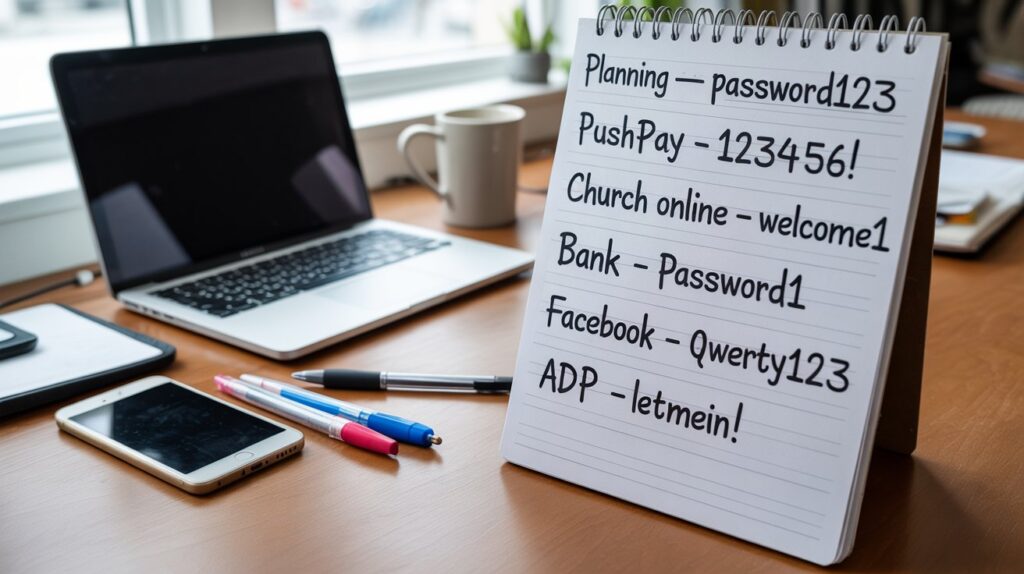
Traditional password security is dead. Asking staff to remember dozens of complex passwords doesn’t work. People create weak passwords, reuse them everywhere, and store them in unsafe places. It’s human nature.
The math is simple: good passwords are impossible to remember, and memorable passwords are easy to hack.
Password managers solve this by removing humans from the equation. They generate unbreakable passwords automatically and fill them in seamlessly. No more trade-offs between security and convenience.
How Password Managers Fix Your Biggest Headache
Managing a church means coordinating across staff, volunteers, and board members who work different schedules from different locations. Everyone needs access to shared accounts, but traditional password sharing is a nightmare.
Right now, your team probably emails passwords back and forth. Stores them in unsecured documents. Relies on informal systems that fall apart when key people are unavailable.
Business password managers eliminate this chaos through centralized management. You can give new staff access to the systems they need without sharing actual passwords. When someone leaves or changes roles, you revoke their access instantly without changing passwords everywhere.
The shared vault feature organizes everything by team or function. Youth ministry staff get access to social media and registration tools. Administrative staff manage vendor accounts and services. Everyone gets exactly what they need, nothing more.
This becomes crucial during emergencies, staff transitions, or busy ministry seasons when multiple people need coordinated access to the same systems.
Security Features That Actually Matter
Modern password managers go way beyond password storage. Two-factor authentication integration means even stolen passwords can’t break in. The system generates and manages those annoying authentication codes automatically.
Breach monitoring constantly scans the dark web for your organization’s compromised credentials. When a service you use gets hacked, your password manager identifies affected accounts immediately and prompts password changes. You fix problems before they become disasters.
Security audits analyze your organization’s password habits and flag specific problems. Weak passwords, reused credentials, accounts that haven’t been updated in months. You get concrete data about what needs fixing and where to focus first.
Enterprise features include detailed logging and compliance reporting. Perfect for churches processing credit cards, maintaining donor databases, or operating under specific data protection regulations.
The Right Way to Roll This Out
Don’t try to change everything at once. Start with your highest-risk systems: financial platforms, email, and website administration. Get leadership using password managers first. When directors and senior staff demonstrate commitment, everyone else follows.
Training takes 15-20 minutes per person for basic functionality. The hard part isn’t learning the technology. It’s building new organizational habits around secure practices.
Migrate gradually. Pick priority accounts first, then expand coverage as your team gets comfortable. Rushing creates operational disruptions that kill adoption.
What Password Managers Actually Cost
The price range varies dramatically based on features and team size. Here’s what you’re looking at:
Budget Options:
- Zoho Vault Standard: 90 cents per user per month
- Zoho Vault Professional: $4.50 per user per month (includes enhanced reporting)
Mid-Range Solutions:
- NordPass Teams: $1.99 per user per month for teams up to 10 users
- Dashlane Business: $8 per user per month (includes centralized administration and group sharing)
- Keeper: Around $5 per user per month for up to 10 users
Premium Options:
- 1Password: $6 per user per month (extensive integrations and advanced features)
- HeyLogin: ~$5 per user per month. No-password technology. Hardware-based encryption with enterprise features.
Free Options:
- Apple Passwords: Free for organizations already using Apple devices and iCloud (built into iOS, macOS, and iPadOS)
Many providers offer nonprofit pricing or free tiers, though free solutions typically include limitations on features, user counts, or support that may not work for organizational use.
You might be trying to factor in implementation time, training, and ongoing administration, but these costs pale compared to the financial and reputational damage from a single data breach.
Benefits You Didn’t Expect
Password managers become central platforms for managing your entire digital infrastructure. New staff onboarding becomes automatic instead of chaotic. Instead of manually creating accounts and sharing passwords through insecure channels, administrators provision appropriate access through structured workflows.
Automated password updates eliminate coordination nightmares. When services require password changes or security audits identify weak credentials, password managers generate and deploy new passwords across your organization without manual coordination between staff.
Centralized logging shows you exactly who accesses what systems and when. This visibility helps optimize workflows and spot potential security problems before they become breaches.
Single sign-on integration streamlines operations even further. Staff access multiple systems through unified authentication while administrators maintain granular control over permissions.
These efficiency gains often justify the investment even without considering direct security benefits. Time saved from eliminated password coordination, reduced system lockouts, and streamlined access management can offset subscription costs while improving overall effectiveness.
Your Next Steps
The 16 billion password leak isn’t going away. Church leadership can no longer treat password management as optional or delegate responsibility to individual staff members. The threat level demands systematic, organization-wide responses that match the sophistication of modern cybercriminal operations.
Start evaluating password managers today. The threat landscape only gets worse with time, and every day of delay increases your exposure to preventable security incidents.
Your specific choice of password manager matters less than organizational commitment to consistent implementation. Any reputable business password manager represents a massive security improvement over current practices at most churches.
Church leaders have a responsibility to protect sensitive information entrusted by congregants, donors, and community members. Password management provides practical, cost-effective tools for meeting this responsibility while supporting operational efficiency and ministry effectiveness.
The question isn’t whether you can afford to implement password management. It’s whether you can afford not to in 2025.

