


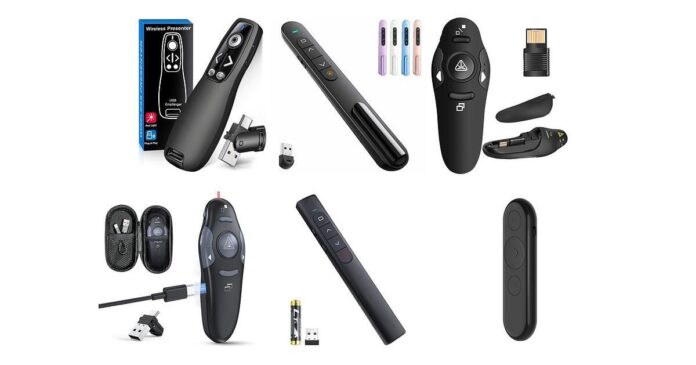
When you give presentations, having the right presentation clicker can make all the difference in your confidence and flow. You want a device that’s easy to use, reliable, and lets you move freely while controlling your slides seamlessly. Choosing the best wireless USB-A or USB-C presentation remote can simplify your setup and help you engage your audience more effectively.
Whether you present in classrooms, boardrooms, or large auditoriums, the right clicker saves you from constant laptop-hugging and lets you focus on delivering your message. This guide helps you find the perfect presentation clicker designed to match your needs and tech setup.
Top Picks
| Category | Product | Price | Score |
|---|---|---|---|
| 💰 Best Budget | DinoFire Classic | $9.99 | 88/100 |
| 🏆 Best Reliable Range | Logitech R400 | $29.99 | 92/100 |
| 🚀 Best Versatile Connectivity | ELISWEEN E600 | $15.99 | 88/100 |
| 🔰 Best Ergonomic Design | QUI BK600 | $9.99 | 87/100 |
| ⭐ Best Premium Features | Logitech R800 | $49.99 | 94/100 |
| 🎯 Best Classroom Favorite | DinoFire AAA+ | $12.99 | 89/100 |
| 💼 Best Rechargeable | CLIKBUTM WP08 | $24.99 | 95/100 |
| 🎨 Best Ultra Low Price | UBUYONE GX60 | $6.99 | 90/100 |
| 🔰 Best Lightweight Bluetooth | Lenovo Portable | $23.99 | 85/100 |
How We Chose The Best Presentation Clickers
We evaluated these wireless presentation clickers based on ease of use, compatibility with USB-A and USB-C ports, wireless range, battery life, portability, and special features like volume control and laser pointers. Reliability in real-world settings, ergonomic comfort, and overall value for the price were also key components of our assessment.
Our picks include great options for budget-conscious users, professionals seeking premium features, and those who prioritize rechargeable designs or specific tech compatibility.
💰 Best Budget

DinoFire Classic
If you’re looking for a simple, no-fuss presentation clicker that just works, this DinoFire Classic is a solid pick. You just plug in the USB receiver—stored right in the clicker so you don’t lose it—and you’re ready to go.
It covers all the basics like forwarding and going back through slides, volume control, and even hyperlinking, so you can keep your presentation smooth without fumbling around. Plus, the bright red laser pointer is easy to spot, making it easier to highlight things whether you’re in a small meeting or a bigger room. For everyday presentations or even bigger gigs where you need that bit of extra reach, it’s dependable and won’t break the bank.
What People Say
Most people appreciate how easy this presentation clicker is to use right out of the box, especially the straightforward USB plug-and-play setup. Reviewers often mention the good battery life thanks to the energy-saving features, and the handy magnetic USB storage prevents losing the receiver. The red laser pointer is bright enough for most backgrounds, which a lot of users find useful.
Some users do point out that the range might not be flawless in very large rooms or with obstacles, but for everyday use, it’s pretty reliable and packs great value for the price.
Travel Friendly
Compact and lightweight, this clicker slips easily into your bag or even your pocket. With the USB receiver safely tucked inside, you won’t have to worry about losing any parts when you’re on the move.
Why You’ll Like It
- Plug & play setup with USB receiver stored inside clicker
- Supports slide navigation, volume control, and hyperlink functions
- Bright, easy-to-see red laser pointer for highlighting
- Wireless range up to 100 feet lets you move freely
- Comfortable grip with soft rubber buttons and energy-saving design
Current Price: $9.99
Rating: 4.4 (total: 12,826+)
🏆 Best Reliable Range

Logitech R400
You know when you want a solid presentation clicker that just gets the job done without fuss? The Logitech R400 fits right in that spot.
With a reliable 50-foot wireless range, it lets you roam the room and actually connect with your audience instead of being stuck by your laptop. The intuitive buttons make moving through slides smooth, and the red laser pointer helps you spotlight key points just right.
It’s perfect for everything from quick office meetings to more formal presentations where you want freedom to move and keep it professional.
What People Say
Folks really value how easy it is to use this presentation clicker right away, especially appreciating the plug-and-play design. Lots mention the strong wireless range and how comfortable it feels in the hand, with buttons that are positioned just right.
Battery life gets high marks too, with many happy that it lasts for ages. While some note the red laser might not work well on certain monitors, overall it’s praised for reliability and simplicity, making it a favorite for classrooms and office settings alike.
Travel Friendly
Its lightweight design and built-in receiver storage mean you can toss this clicker in your bag without fuss. No loose parts to track, so it’s super easy to travel with and pull out whenever you need to present.
Why You’ll Like It
- No setup headaches — just plug the USB receiver in, and you’re ready
- 50-foot wireless range gives you room to roam freely
- Bright red laser pointer makes it easy to highlight important details
- Intuitive touch-keys for smooth slide navigation
- Receiver stores inside the remote so you don’t lose it
Current Price: $29.99
Rating: 4.6 (total: 12,195+)
🚀 Best Versatile Connectivity

ELISWEEN E600
If you’ve ever found yourself juggling different devices during presentations, this ELISWEEN E600 clicker is a handy companion. It comes with both USB-A and USB-C connectors, so you can easily switch between your Mac, laptop, or PC without fuss. The bright red laser pointer stands out well, and the controls — like volume adjustment and slide navigation — are straightforward and tactile.
It’s got a long enough wireless range that you can move comfortably in the room and engage your audience without being tied to your desk. Whether it’s for daily meetings or bigger presentations, this clicker just makes things smoother.
What People Say
Most people really like how versatile this presentation clicker is, especially because it works with both USB-A and USB-C ports, so you’re covered no matter what device you have. The long wireless range and bright laser get consistent praise, helping users feel confident moving around while presenting. Folks also find the buttons intuitive and easy to use, with volume controls as a nice bonus. Some mention the design feels comfortable in hand, making those longer presentations less tiring.
Great for On the Go
With its compact size and the handy feature of storing the USB receiver inside the clicker, it’s a great pick to toss in your bag without worrying about losing parts or extra bulk. You can take it along for work trips, classes, or anywhere your presentations take you.
Why You’ll Appreciate It
- Dual USB-A and USB-C ports fit a variety of devices without needing adapters
- Up to 100 feet wireless range means you’re free to roam and interact
- Bright red laser pointer helps highlight important details clearly
- Easy-to-find buttons let you control volume, slides, and screen modes
- Magnetic base keeps the USB dongle safe inside the remote when not in use
Current Price: $15.99
Rating: 4.4 (total: 3,056+)
🔰 Best Ergonomic Design
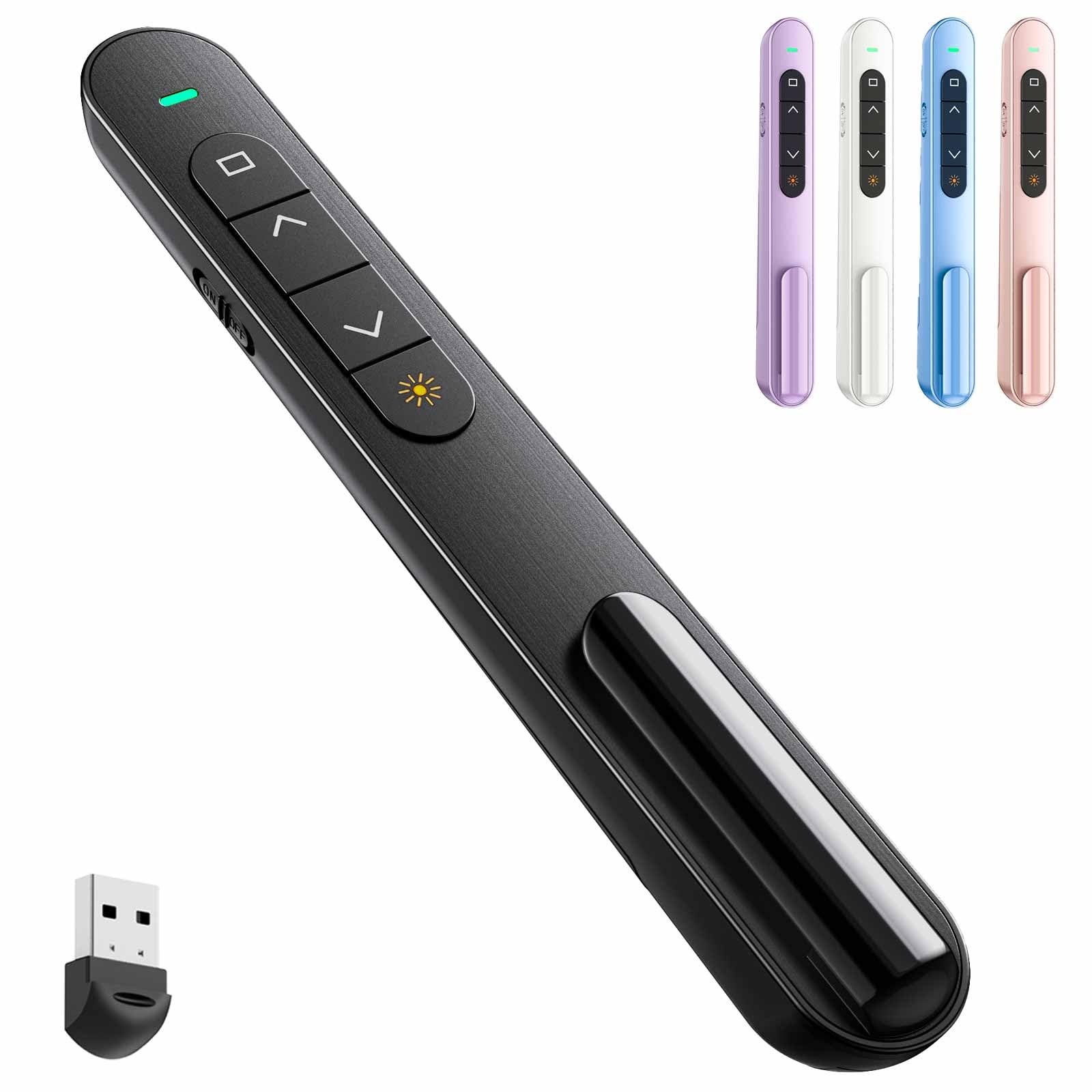
QUI BK600
When you need a presentation clicker that’s comfortable to hold and simple to use, the QUI BK600 fits the bill. It’s got just the right size and shape to feel natural in your hand during any talk, plus a solid wireless connection that lets you move freely around the room.
The laser pointer is bright and clear, making it easy to highlight key points in your slides whether you’re in a small meeting or a big auditorium. Since it’s plug-and-play, you won’t waste time installing software — just plug in the USB receiver and go.
This one’s a great everyday companion for anything from classroom lessons to business pitches.
What People Say
People often mention how easy this presentation clicker is to set up and use right away, which is perfect if you dislike fussing with new gadgets. The laser is bright enough to catch audience attention, and the wireless range lets you wander confidently during your talk.
Lots of users also appreciate the ergonomic feel, saying it’s comfy to hold even for longer sessions. Volume control gets a thumbs-up as a handy extra, though some note it’s not rechargeable, so keep spare batteries handy.
Easy To Take Along
Thanks to its lightweight, slim design and the handy USB receiver storage, you can slip this clicker in your bag or clip it to a pocket without adding bulk. It’s easy to carry around whether you’re traveling for work, moving between classrooms, or presenting at different venues.
Why You’ll Like It
- Ergonomic design feels good in your hand for longer presentations
- Bright red laser pointer highlights details clearly on all backgrounds
- Strong 2.4GHz wireless connection with up to 100 meters range
- Simple plug and play with no software needed, just a USB receiver
- Includes volume control so you can adjust sound without reaching for the remote
Current Price: $9.99
Rating: 4.4 (total: 1,896+)
⭐ Best Premium Features

Logitech R800
If you want a presentation clicker that goes beyond the basics, the Logitech R800 is a solid choice. It’s made for folks who value smooth slide control and clear visuals, thanks to its bright green laser that really stands out, even in well-lit rooms.
The handy LCD screen keeps you updated on your slide number and battery life, so you’re never caught off guard. Plus, with a 100-foot wireless range, you can freely pace around without worrying about losing connection.
It’s perfect for everything from small meetings to larger presentations, and storing the tiny USB receiver inside the remote means you won’t have to keep track of any loose pieces.
What People Say
Most users love how reliable this presentation clicker is, especially praising the clear and bright green laser pointer that makes highlighting super easy. The LCD screen is a favorite feature that helps keep track without extra effort, and the strong wireless connection gives you the freedom to move without stress.
People also comment on how comfortable it feels in hand and appreciate that the USB receiver stores neatly inside the remote, avoiding the annoyance of losing it. Battery life gets good marks too, with many saying it lasts ages.
Great On the Go
With its sleek, lightweight design and the smart USB receiver storage, this clicker slips right into your bag or pocket without fuss. It’s great for taking along to work, conferences, or anywhere you need to impress, making travel and quick setup a breeze.
What You’ll Enjoy
- Bright green laser pointer easily visible on most backgrounds
- Built-in LCD screen shows slide number and battery status
- Up to 100-foot wireless range lets you move around confidently
- Compact design with receiver that docks inside the clicker for safekeeping
- Plug-and-play setup means no software hassle — just plug it in and start
Current Price: $49.99
Rating: 4.6 (total: 12,195+)
🎯 Best Classroom Favorite

DinoFire AAA+
If you’re doing presentations regularly, especially in a classroom or casual setting, this DinoFire presentation clicker is an easy pick. It’s simple to use, with plug-and-play functionality that means you won’t have to fiddle with software.
The bright red laser pointer helps you highlight important points clearly, and the ergonomic design makes it comfortable to hold for long stretches. It’s compact enough to fit in your pocket, and that handy USB receiver stows away under the battery cover so you don’t lose it. Perfect for those lectures, meetings, or anytime you want to keep control without being stuck by your laptop.
What People Say
Folks often remark on how straightforward and reliable this presentation clicker is. The bright red laser pointer gets a lot of positive nods for making it easy to highlight content, and many find the range more than enough for typical classroom or meeting spaces.
People appreciate how comfy it feels in the hand and like that the USB receiver tucks away safely without getting lost. Some mention it’s perfect for the price and just works without a hassle.
Simple To Carry
Thanks to its small size and the hidden USB receiver, this clicker slides effortlessly into your bag or pocket. It’s a solid travel buddy if you’re hopping between classrooms or meeting rooms and don’t want bulky gear slowing you down.
Why You’ll Like It
- Bright red laser pointer that’s easy to spot on most backgrounds
- Easy plug-and-play setup with no software fuss
- Ergonomic and compact design fits comfortably in your hand or pocket
- USB receiver stores neatly under the battery cover to keep it safe
- Wireless range up to 49 feet lets you move freely while presenting
Current Price: $12.99
Rating: 4.4 (total: 4,433+)
💼 Best Rechargeable
CLIKBUTM WP08
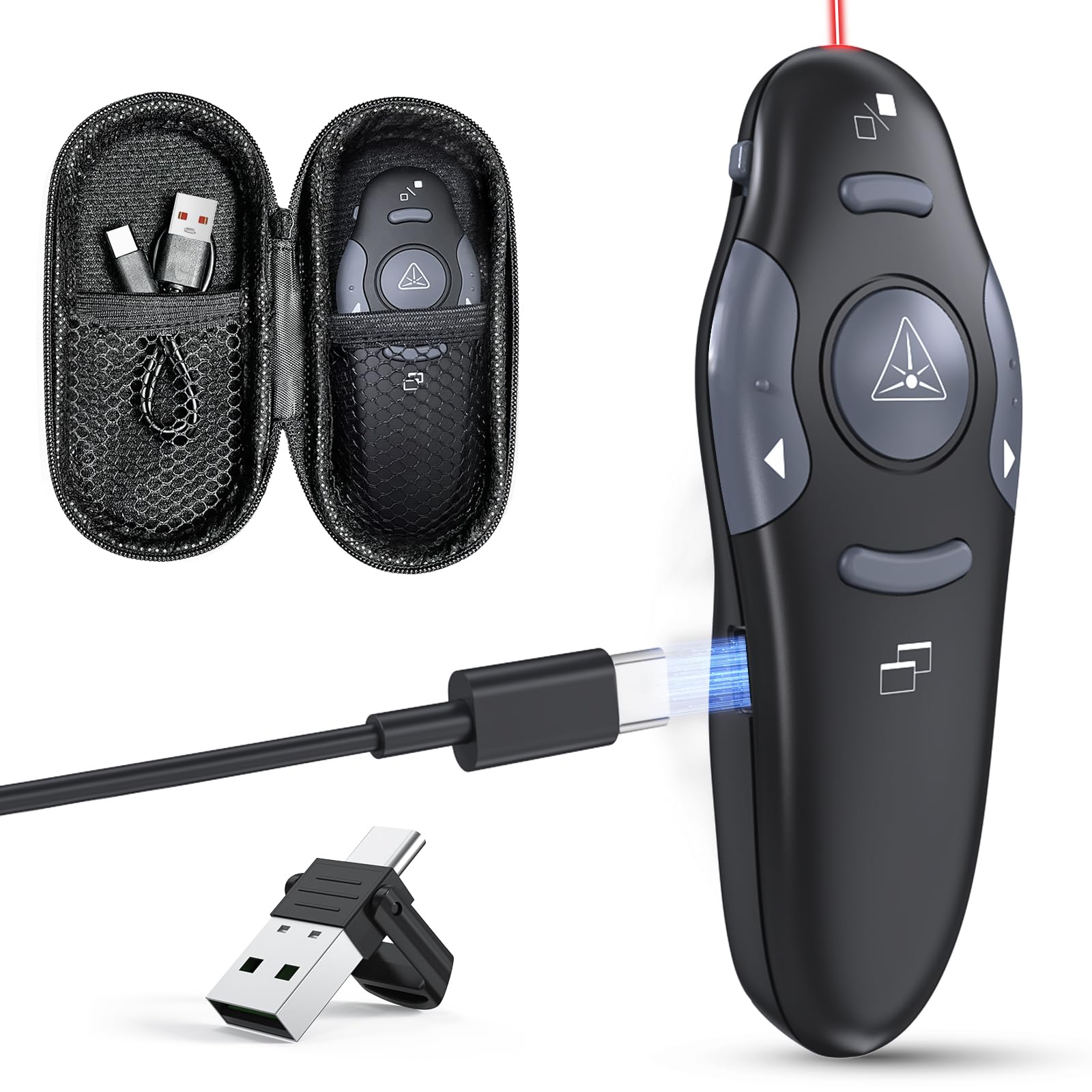
If you like to keep things simple but efficient during presentations, this CLIKBUTM presentation clicker might be exactly what you need. It’s rechargeable via USB-C, so no hunting for batteries, and it even comes with both USB-A and USB-C receivers, which is super handy if you switch devices often. The red laser pointer is bright enough to catch attention without being overpowering, and the clicker’s grip feels natural in your hand. Plus, the included case keeps everything neat—great for when you’re on the move between meetings or conferences.
What People Say
People frequently mention how convenient it is that this clicker charges quickly and saves them the hassle of buying batteries. The dual USB receivers get a lot of praise for making connectivity flexible, and the red laser pointer shows up well in most lighting. Many also like the firm but comfortable grip and the smart storage case that keeps everything organized.
Overall, it’s seen as a well-built, easy-to-use tool that just makes presentations less stressful.
Easy to Take Anywhere
Thanks to the compact design and included storage case, this clicker is a breeze to carry around. The case keeps receivers safe, so you’re not fishing through your bag when it’s time to present.
Whether you’re heading to a client meeting or a conference, it fits nicely alongside your laptop and charger.
Why You’ll Appreciate It
- Rechargeable USB-C port lets you skip disposable batteries
- Dual USB-A and USB-C receivers cover most laptops and computers
- Bright red laser pointer with long range for clear highlighting
- Ergonomic design means the clicker won’t slip when you’re presenting
- Comes with a handy storage case to keep clicker and dongles together
Current Price: $24.99
Rating: 4.9 (total: 80+)
🎨 Best Ultra Low Price

UBUYONE GX60
This UBUYONE presentation clicker is a solid pick if you want something budget-friendly without sacrificing key features. It’s super easy to use — just plug the USB receiver into your laptop, and you’re good to go. The bright red laser pointer makes highlighting important bits simple, and the long control range lets you roam the room while keeping control. Whether you’re presenting at work, school, or a casual meetup, this clicker has you covered without emptying your wallet.
What People Say
Lots of folks appreciate how straightforward this clicker is to use, praising the plug-and-play setup and nice battery life. The bright laser pointer and long range come up a lot as helpful features, especially for teachers and frequent presenters who want some freedom to move.
A few mention occasional connection hiccups, but overall it’s seen as a dependable, no-nonsense presentation clicker that delivers good value for the price.
Compact and Portable
Its lightweight and slim profile means you can easily slip this clicker into your bag or even a pocket. Since it uses a small USB receiver and AAA battery, you won’t have to worry about bulky chargers or tangled cables while traveling between presentations.
What Makes It Great
- Plug & play setup, no software needed for most systems
- Bright red laser pointer that’s easy to spot on most backgrounds
- Long wireless range of up to 100 ft to keep you moving freely
- Compatible with Windows, Mac, Linux, and Android systems
- Supports handy functions like hyperlink, page navigation, and screen black out
Current Price: $6.99
Rating: 4.6 (total: 2,502+)
🔰 Best Lightweight Bluetooth
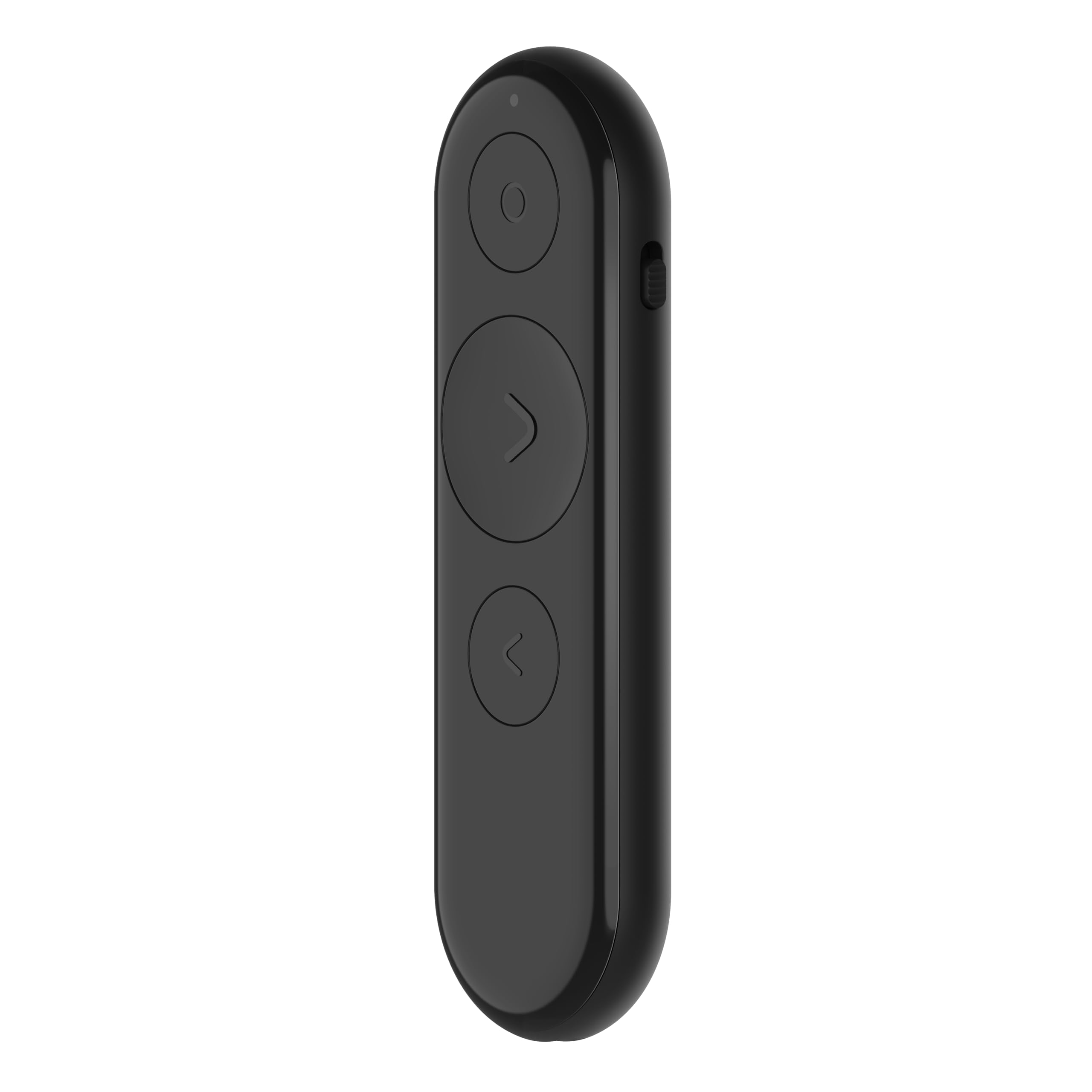
Lenovo Portable
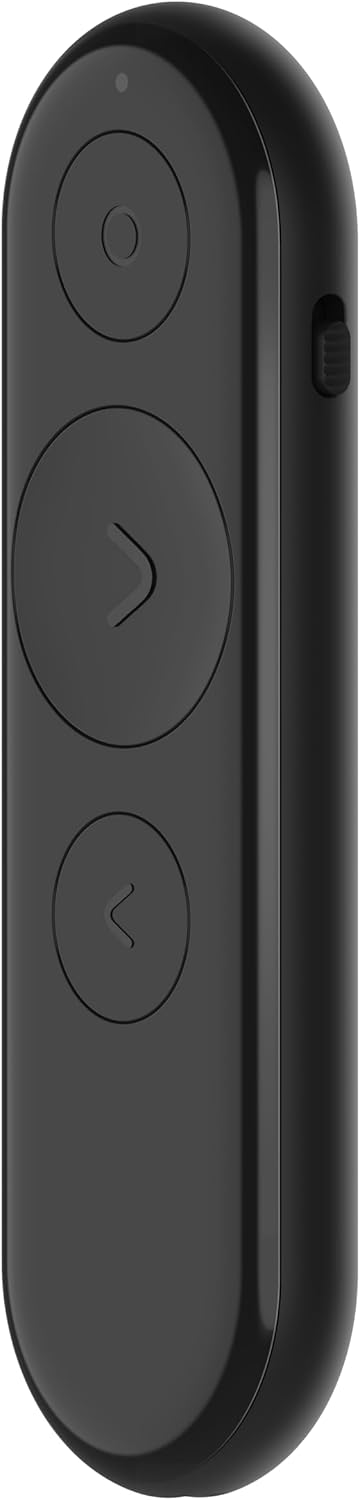
If you’re often on the move or like to keep things simple, this Lenovo Portable presentation clicker is made for you. At just 19 grams, it slips into your pocket effortlessly while still packing powerful features like a digital pointer and customizable buttons. Whether you’re in a meeting, a classroom, or a conference hall, its Bluetooth connection keeps things seamless without the hassle of dongles.
Plus, the rechargeable battery means you don’t have to worry about replacing batteries all the time.
What People Say
Many users love how lightweight and pocket-friendly this clicker is, making it perfect for busy presenters who are often on the go. People also highlight the solid Bluetooth connection and versatile pointer functions which help keep the audience focused.
The rechargeable battery is a big plus since it avoids frequent battery swaps, though some mention the Lenovo software could use a bit more polish. Overall, folks find it reliable and convenient for everyday presentations.
Ready to Go Anywhere
Thanks to its tiny size and light weight, you can easily toss this presentation clicker into your bag or even your pocket without thinking twice. Being rechargeable means fewer accessories to carry, which is a nice win when you’re traveling between gigs.
Why You’ll Like It
- Ultra-lightweight design (19 grams) that’s easy to carry anywhere
- Bluetooth 5.3 connection for reliable wireless control up to 30 meters
- Digital pointer plus on-screen cursor, magnify, and highlight features
- Customizable buttons with Lenovo’s LADM app for smooth presentation flow
- Rechargeable battery that can last about a month on a single charge
Current Price: $23.99
Rating: 4.2 (total: 43+)
FAQ
What Should You Look For When Buying a Wireless Presentation Clicker?
When choosing a presentation clicker, you want to make sure it matches your device’s USB port type, whether USB-A or USB-C, so it connects easily without extra adapters. Also, consider the wireless range—most reliable clickers offer around 30 to 100 feet, letting you move freely during your presentation.
Check if it has a built-in laser pointer for highlighting key points, and useful features like volume control or a blank screen button if you need extra control. Comfort matters too; you’ll want a clicker that feels good in your hand and has intuitive button placement to avoid fumbling.
Battery life and whether it’s rechargeable or requires replacements is important if you present often. Lastly, look for models with good compatibility for your operating system, like Mac or Windows, so setup is hassle-free.
How Do You Use a Presentation Clicker Effectively During Presentations?
To get the most out of your presentation clicker, first make sure it’s fully charged or has fresh batteries before starting. Plug in the USB receiver and let your computer recognize it—most clickers are plug-and-play and very easy to set up. Practice using the buttons to advance and reverse slides so your movements feel natural and confident. Use the built-in laser pointer to draw attention to key parts of your slides, but avoid overusing it so your audience stays focused on your message.
Try to move around your presentation space to engage your audience, knowing your clicker’s wireless range lets you roam without interrupting flow. Also, if available, use features like volume control or blank screen for better presentation control. Remember to turn it off and store the receiver inside or in a case to avoid losing parts.
Can You Use One Wireless Clicker With Multiple Devices or Operating Systems?
Many wireless presentation clickers support multiple operating systems like Windows, Mac, and sometimes even Linux, so you can switch between devices without much trouble. Some models come with adapters for both USB-A and USB-C ports, making them versatile across laptops and desktops.
However, most clickers connect to only one device at a time via their USB receiver, so you can’t control multiple computers simultaneously with a single clicker. If you regularly present on different machines, look for a clicker known for easy re-pairing or universal compatibility.
Always check reviews about compatibility, especially if you use the latest MacBooks or have non-standard USB ports. This way, you’ll avoid connectivity headaches and ensure a smooth presentation every time.
Wrapping Up
Picking the right presentation clicker can dramatically improve the way you interact with your audience. You’ll benefit from greater freedom to move, smoother slide control, and features that fit your workflow and devices. Whether you prioritize affordability, range, or rechargeability, this list offers dependable wireless USB-A and USB-C options that cover all the bases.
Investing in a quality presentation remote helps you focus on delivering your message confidently and professionally. With these tools in hand, you’re ready to make your next presentation your best one yet.
| Product | Image | Rating | Connectivity | Battery Life | Compatible Devices | Special Highlights | Price |
|---|---|---|---|---|---|---|---|
| Wireless Presenter, Hyperlink Volume Control Presentation Clicker |
 |
4.4/5 (12,826 reviews) | RF 2.4GHz | 1 AAA battery required | Laptop |
|
$9.99 |
| Logitech Wireless Presenter R400 |
|
4.6/5 (12,195 reviews) | 2.4 GHz Radio Frequency | 2 AA batteries included | Windows PC |
|
$29.99 |
| Presentation Clicker Wireless Presenter Remote |
 |
4.4/5 (3,056 reviews) | USB Type-A and Type-C | Rechargeable battery | Mac, Computer, Laptop |
|
$15.99 |
| QUI Presentation Clicker for PowerPoint |
 |
4.4/5 (1,896 reviews) | RF 2.4GHz USB | 1 AAA battery required | Windows, Mac |
|
$9.99 |
| Logitech Wireless Presenter R800 |
 |
4.6/5 (12,195 reviews) | 2.4 GHz wireless | 2 AAA batteries included | Computer, Projector |
|
$49.99 |
| Presentation Clicker Wireless Presenter |
 |
4.4/5 (4,433 reviews) | RF 2.4 GHz | 1 A battery required | Laptop, Personal Computer |
|
$12.99 |
| Presentation Clicker with Case Storage |
 |
4.9/5 (80 reviews) | Radio Frequency | Rechargeable battery | Computer, Laptop |
|
$24.99 |
| Wireless Presenter Remote |
 |
4.6/5 (2,502 reviews) | USB receiver | 1 AAA battery required | Computer |
|
$6.99 |
| Lenovo Portable Rechargeable Presentation Remote |
 |
4.2/5 (43 reviews) | Bluetooth | Rechargeable lithium-ion | Laptop, Personal Computer |
|
$23.99 |
Some links in this post help support our work at no extra cost to you, and we only recommend software, tools, and gear we truly love ourselves.

